1. Product introduction
KS0083 keyestudio New sensor kit with Uno
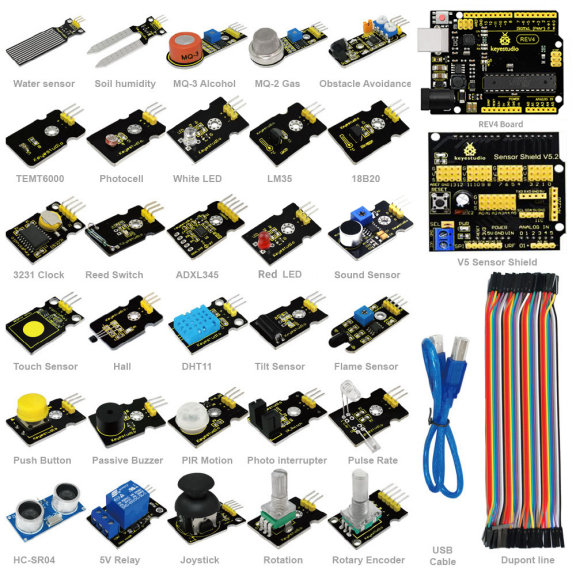
Sensor kit for Arduino,Based on open-source hardware,30 various sensors in one box,for you to make interesting projects.
1.1 Introduction
This is an Arduino sensor learning kit developed by Keyes. We bring together 30 basic sensors and modules, aiming for the convenience of its learning for starters. Inside this box, there are digital and analog sensors and also some special modules such as buzzer, ultrasonic, acceleration modules etc. For each module, there is clear connection diagram and sample code. So even if you are totally new at this, you can get started easily.
The sample codes for this sensor kit are based on ARDUINO because it’s open source and easy. And if you are good at this, you can also apply this kit to other MCU development platform, such as 51, STM32, Raspberries Pi. The working principle is pretty much the same.
Now, let us embrace this fascinating world of ARDUINO and learn together!
1.2 Kit list
No. |
Name |
QTY |
Picture |
|---|---|---|---|
1 |
Keyestudio REV4 controller board |
1 |
|
2 |
V5 sensor shield |
1 |
|
3 |
Female to female Dupont line |
40 |
|
4 |
usb cable |
1 |
|
5 |
White LED module |
1 |
|
6 |
Red LED module |
1 |
|
7 |
Passive Buzzer module |
1 |
|
8 |
Hall Magnetic Sensor |
1 |
|
9 |
LM35 Temperature Sensor |
1 |
|
10 |
18B20 Temperature Sensor |
1 |
|
11 |
Digital Tilt Sensor |
1 |
|
12 |
Photocell sensor |
1 |
|
13 |
Digital Push Button |
1 |
|
14 |
Capacitive Touch Sensor |
1 |
|
15 |
DHT11 Temperature and Humidity Sensor |
1 |
|
16 |
Analog Sound Sensor |
1 |
|
17 |
Flame Sensor |
1 |
|
18 |
DS3231 Clock Module |
1 |
|
19 |
MQ-2 Analog Gas Sensor |
1 |
|
20 |
MQ-3 Analog Alcohol Sensor |
1 |
|
21 |
Water sensor |
1 |
|
22 |
Soil humidity sensor |
1 |
|
23 |
Infrared Obstacle Avoidance Sensor |
1 |
|
24 |
PIR Motion Sensor |
1 |
|
25 |
Joystick Module |
1 |
|
26 |
photo interrupter module |
1 |
|
27 |
5V Relay Module |
1 |
|
28 |
ADXL345 Three Axis Acceleration Module |
1 |
|
29 |
Rotary Encoder module |
1 |
|
30 |
Analog Rotation Sensor |
1 |
|
31 |
HC-SR04 Ultrasonic Sensor |
1 |
|
32 |
Pulse Rate Monitor |
1 |
|
33 |
Reed Switch Module |
1 |
|
34 |
TEMT6000 ambient light sensor |
1 |
|




1.3 The Keyestudio REV4 (Black) Main Control Board
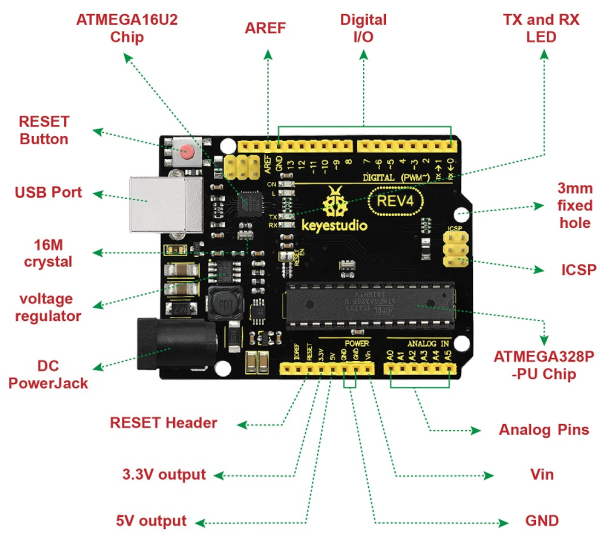
The Keyestudio REV4 (Black) Main Control Board is the best board to get started with electronics and coding. If this is your first experience tinkering with the platform, the Keyestudio REV4 (Black) Main Control Board is the most robust board you can start playing with.
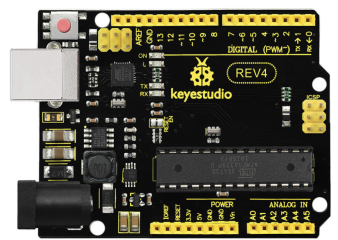
Here is an explanation of what every element and interface of the board does:
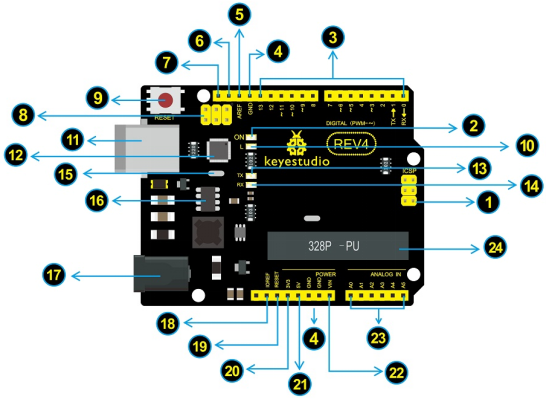
No. |
Explain |
|---|---|
|
ICSP(In-Circuit Serial Programming) Header |
|
Power LED Indicator |
|
Digital I/O |
|
GND(Ground pin headers) |
|
AREF |
|
SDA |
|
SCL |
|
ICSP(In-Circuit Serial Programming) Header |
|
RESET Button |
|
D13 LED |
|
USB Connection |
|
ATMEGA 16U2-MU |
|
TX LED |
|
RX LED |
|
Crystal Oscillator |
|
Voltage Regulator |
|
DC Power Jack |
|
IOREF |
|
RESET Header |
|
Power Pin 3V3 |
|
Power Pin 5V |
|
Vin |
|
Analog Pins |
|
Microcontroller |


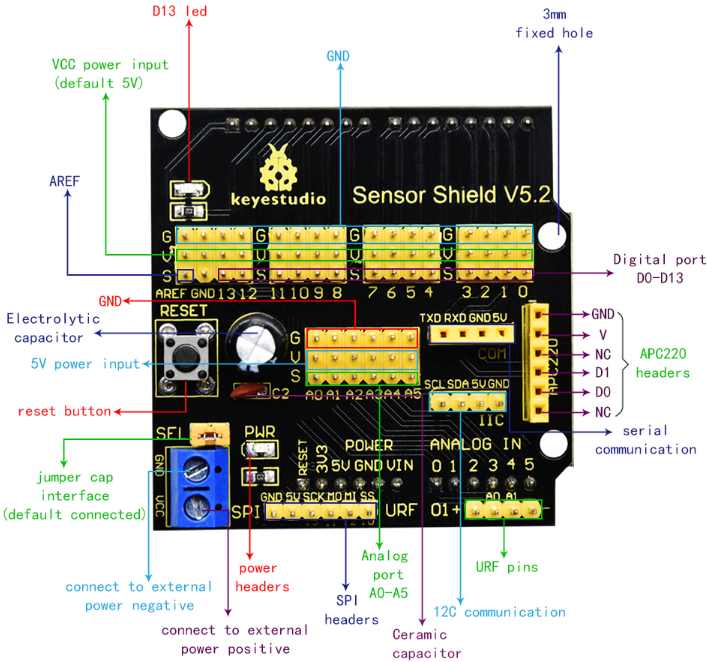
1.4 Keyestudio Sensor Shield V5
1.Introduction
In the experiments, you might often use REV4 control board and several sensor modules. If the interfaces of power output is not enough, you may need to add a breadboard and use many connection wires. Is it really troublesome?
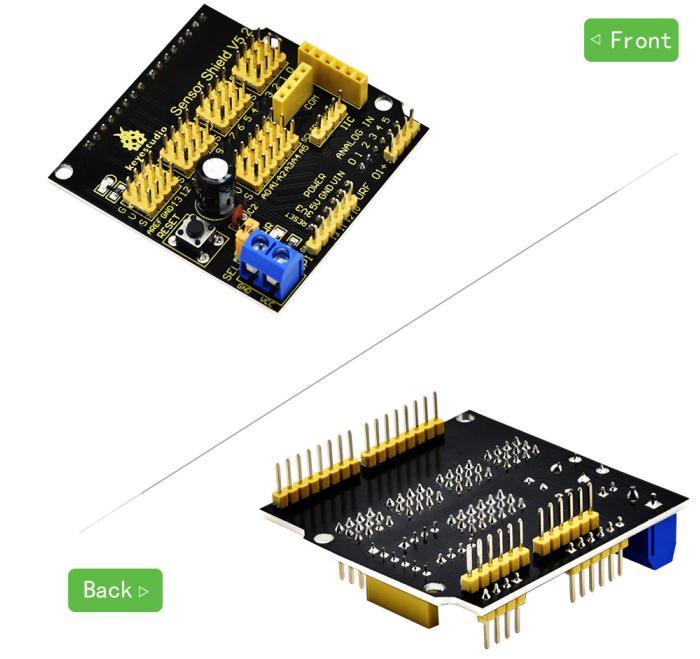
But now, with this keyestudio sensor shield, you can easily solve that problem. This shield is fully compatible with REV4 control board, so you can easily stack it onto REV4 for use.
This keyestudio sensor shield has extended the digital and analog ports out as 3PIN interface (G,V, S), which can directly connect 3PIN sensor modules.
It also breaks out some communication pins of 2.54mm pitch, like serial, IIC, and SPI communication.
The shield comes with a reset button and 2 signal indicators as well.
Additionally, you can supply the voltage needed to the sensor modules through blue terminal blocks on the shield. Because some sensor modules is not used with 5V or 3.3V but with special voltage.
2.Check out these awesome specifications
Extends an Arduino Reset button
Comes with a built-in power indicator and a D13 indicator
Breakout all the digital and analog ports of REV4 as 3PIN headers
A serial communication interface
A I2C communication interface
A SPI communication interface
Comes with a URF interface
Comes with an APC220 interface
You can supply the voltage needed for sensor modules via terminal blocks.
3.Details
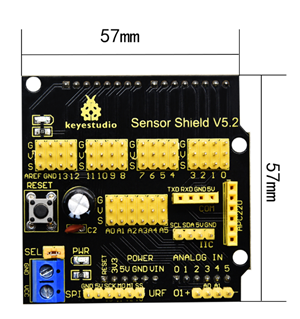
Dimensions: 57mm x 57mm x 20mm
Weight: 20.5g
4.Controllers Compatible
keyestudio REV4 BOARD /Arduino UNO R3
keyestudio EASY plug Control Board
keyestudio Leonardo R3 Development Board
51duino
5.PCB Dimensions
6.Pinout Instructions