KS0118 keyestudio EASY plug Reed Switch Module
1. Introduction
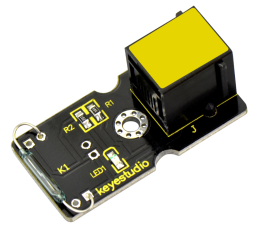
This is a small device called a reed switch on the module.
When the device is exposed to a magnetic field, the two ferrous materials inside the switch pull together and the switch closes.
When the magnetic field is removed, the reeds separate and the switch opens. This makes for a great non-contact switch.
You can mount reed switch on the door for alarming purpose or as switches. This sensor needs to be used together with EASY plug control board.
Special Note:
The sensor/module is equipped with the RJ11 6P6C interface, compatible with our keyestudio EASY plug Control Board with RJ11 6P6C interface.
If you have the control board of other brands, it is also equipped with the RJ11 6P6C interface but has different internal line sequence, can’t be used compatibly with our sensor/module.
2. Features
Connector: Easy plug
Working voltage: DC 3.3V-5V
Working current: ≥20mA
Working temperature: -10℃ to+50℃
Detection distance: ≤10mm
3. Technical Details
Dimensions: 39mm * 20mm * 18mm
Weight: 4.6g
4. Connect It Up
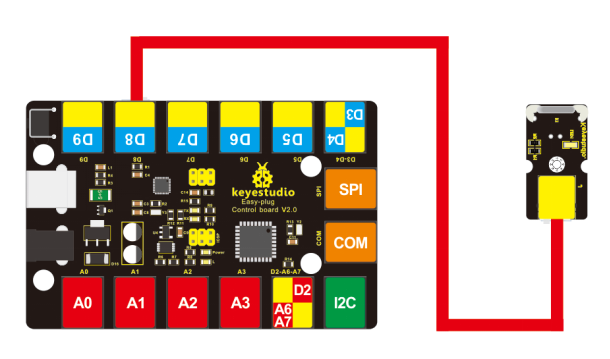
Connect the EASY Plug Reed switch module and LED module to control board using RJ11 cables. Then connect the control board to your PC with a USB cable.
5. Upload the Code
Download code : Code
int Led=13;//define LED interface
int buttonpin=8; //define reed switch sensor interface
int val;//define digital variable val

void setup()
{
    pinMode(Led,OUTPUT);//define LED as output interface
    pinMode(buttonpin,INPUT);//define reed switch sensor as output interface
}

void loop()
{
    val=digitalRead(buttonpin);// read and assign the value of digital interface 3 to val
    if(val==HIGH)//When a signal is detected by reed switch sensor, LED will flash
    {
    	digitalWrite(Led,HIGH);
    }
    else
    {
    	digitalWrite(Led,LOW);
    }
}
6. Result
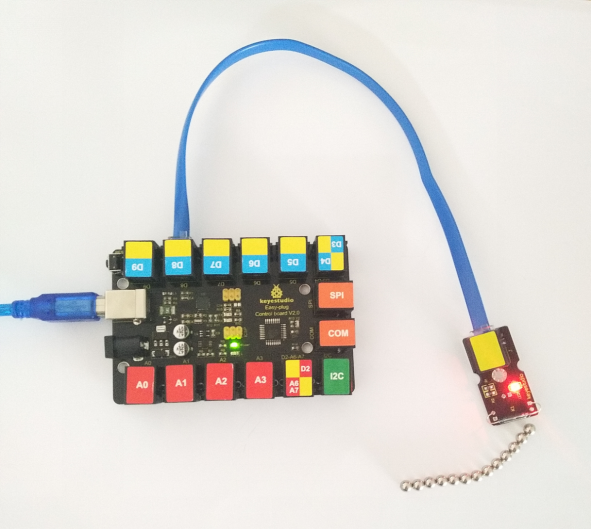
If you put some magnetic beads around the reed module, once the reed module detects the magnetic field, LED will turn on.