KS0268 keyestudio SHT10 Digital Temperature Sensor
1. Introduction
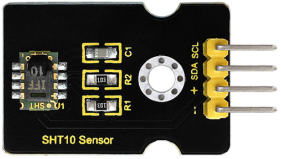
Keyestudio SHT10 digital temperature sensor is a temperature and humidity composite sensor containing digital signal outputs calibration.
It uses patented micromachining technology (CMOSens®) in the process of industrial COMS, which ensure that the product has high reliability and excellent long-term stability.
Sensor has full scale calibration and two digital interface, which can be directly connected with the microcontroller.
It has the features of high reliability, strong stability, rapid response, low power consumption, strong anti-interference and accurate dew point measurement and so on.
2. Specification
Working Voltage:5V(DC)
Interface:4PIN
Humidity Measurement Range:0—100%RH
Humidity Measurement Accuracy:±4.5%RH(20%—80%RH)
Humidity Measurement Resolution:0.03%RH
Temperature Measurement Range:-40—123.8℃
Temperature Measurement Accuracy:±0.5℃ error(in 25℃),±0.9℃ error(among 0—40℃)
Temperature Measurement Resolution:0.01℃
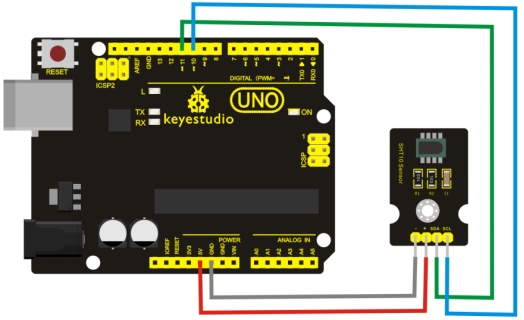
3. Connection Diagram
4. Sample Code
Download Resources: Resources
#include <SHT1x.h>

// define SHT1x connection pin
#define dataPin  11
#define clockPin 10

// Initialize sht1x object
SHT1x sht1x(dataPin, clockPin);

void setup()
{
   Serial.begin(9600);
}

void loop()
{
  // declare three variables, representing temperature (Celsius), temperature (Fahrenheit) and humidity
  float temp_c, temp_f, humidity;

  // read SHT1x temperature and humidity value
  temp_c = sht1x.readTemperatureC();
  temp_f = sht1x.readTemperatureF();
  humidity = sht1x.readHumidity();

  // Output the temperature and humidity value to Serial Port
  Serial.print("Temperature: ");
  Serial.print(temp_c, 1);  // Show one after the decimal point
  Serial.print("C / ");
  Serial.print(temp_f, 1);  // Show one after the decimal point
  Serial.print("F. Humidity: ");
  Serial.print(humidity);
  Serial.println("%");

  delay(1000);
}
5. Result
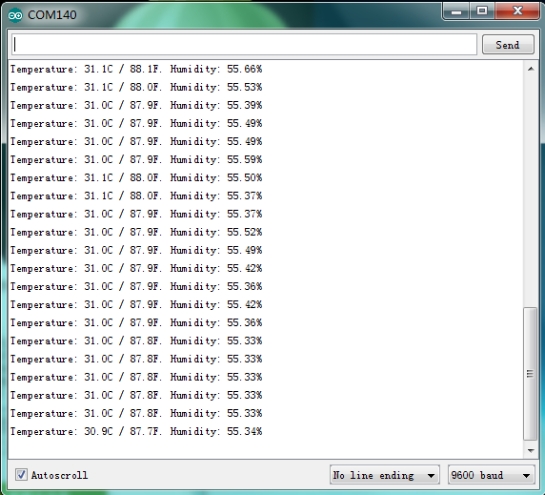
Wiring as the above diagram and burning the code,after powered-on, open the serial monitor, it will display the current test temperature and humidity, as the graph shown below.