KS0405 Keyestudio BMP280 Module (Black and Eco-friendly)
1. Overview
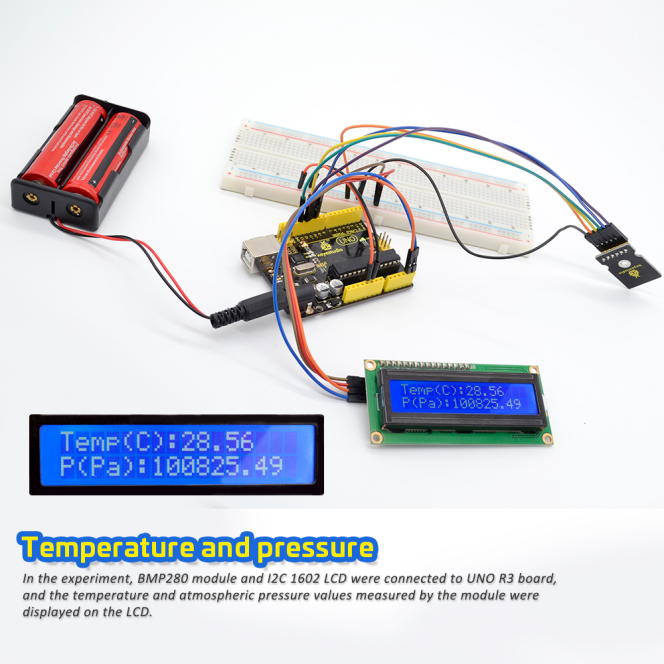
The keyestudio BMP280 module mainly uses the BMP280 sensor, a temperature and air pressure sensor, which is an absolute air pressure sensor designed for mobile applications.
The sensor module is available in an extremely compact package with small size and low power consumption. It features proven piezoresistive pressure sensor technology with high accuracy and linearity, as well as long-term stability and high EMC robustness. The multiple device working options provide the ultimate flexibility; we can optimize the device in terms of power consumption, resolution and filtering performance.
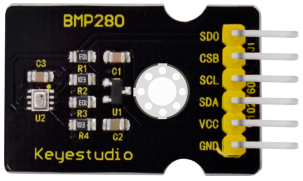
The module has two modes: I2C communication and SPI communication mode. When using the BMP280 module, users can choose the communication method according to their own needs.
2. Technical Parameters
Operating voltage: DC 5V
Air pressure measurement range: 300hPa~1100hPa (elevation +9000~-500m)
Air pressure measurement error: ±1hPa (±1m)
Air pressure measurement accuracy: 0.18Pa
Temperature measurement range: 0℃~ 65℃
Temperature measurement error: ±0.5℃, maximum ±1℃
Temperature measurement accuracy: 0.1℃
3. Application field
temperature check
Atmospheric pressure detection
Altitude detection
Indoor navigation (floor inspection, elevator inspection)
Outdoor navigation, leisure and sports apps
Healthcare applications (i.e. spirometry)
Vertical speed indication (i.e. ascending/sinking speed)
4. Hookup Guide
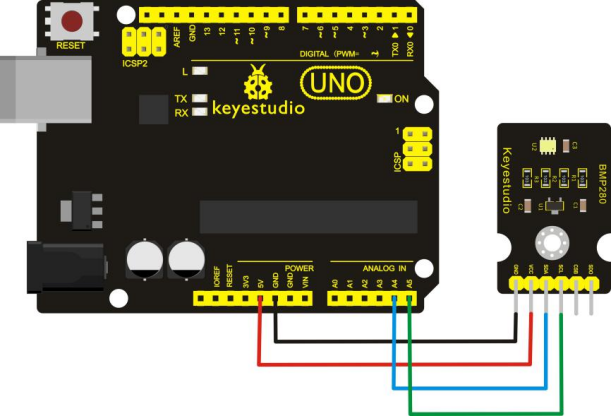
For I2C communication:
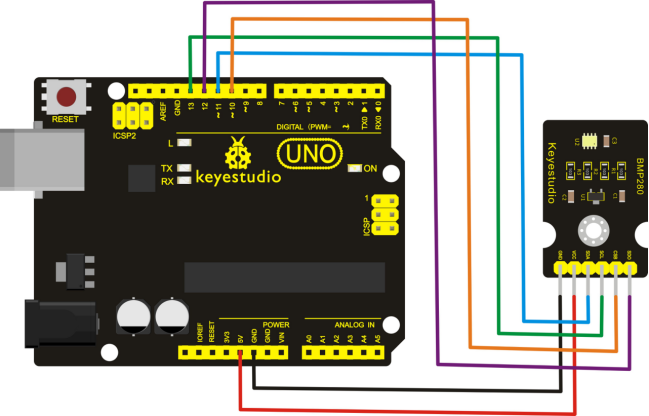
For SPI communication:
5. Test Program
Download Resources : Resources
Note: before uploading the code, you need to import the library files; otherwise, the code upload will fail.
For I2C communication:
#include <Wire.h>
#include <SPI.h>
#include <Adafruit_Sensor.h>
#include <Adafruit_BMP280.h>

#define BMP_SCK 13    //SCL
#define BMP_MISO 12   //SDO
#define BMP_MOSI 11   //SDA
#define BMP_CS 10     //CSB

Adafruit_BMP280 bme; // I2C
//Adafruit_BMP280 bme(BMP_CS, BMP_MOSI, BMP_MISO,  BMP_SCK);

void setup()
{
  Serial.begin(9600);
  Serial.println(F("BMP280 test"));
  if (!bme.begin())
  {
    Serial.println("Could not find a valid BMP280 sensor, check wiring!");
    while (1);
  }
}

void loop()
{
    Serial.print("Temperature = ");
    Serial.print(bme.readTemperature());
    Serial.println(" *C");

    Serial.print("Pressure = ");
    Serial.print(bme.readPressure());
    Serial.println(" Pa");

   // Serial.print("Approx altitude = ");
   // Serial.print(bme.readAltitude(1013.25));
   // Serial.println(" m");

    Serial.println();
    delay(2000);
}
For SPI communication:
#include <Wire.h>
#include <SPI.h>
#include <Adafruit_Sensor.h>
#include <Adafruit_BMP280.h>

#define BMP_SCK 13    //SCL
#define BMP_MISO 12   //SDO
#define BMP_MOSI 11   //SDA
#define BMP_CS 10     //CSB

//Adafruit_BMP280 bme; // I2C
Adafruit_BMP280 bme(BMP_CS, BMP_MOSI, BMP_MISO,  BMP_SCK);

void setup()
{
  Serial.begin(9600);
  Serial.println(F("BMP280 test"));

  if (!bme.begin())
  {
    Serial.println("Could not find a valid BMP280 sensor, check wiring!");
    while (1);
  }
}

void loop()
{
    Serial.print("Temperature = ");
    Serial.print(bme.readTemperature());
    Serial.println(" *C");

    Serial.print("Pressure = ");
    Serial.print(bme.readPressure());
    Serial.println(" Pa");

   // Serial.print("Approx altitude = ");
   // Serial.print(bme.readAltitude(1013.25));
   // Serial.println(" m");

    Serial.println();
    delay(2000);
}
6. Upload the program
1. Software Download
Open the browser and search: https://www.arduino.cc/en/software, we will take WINDOWS system as an example to show you how to download and install.
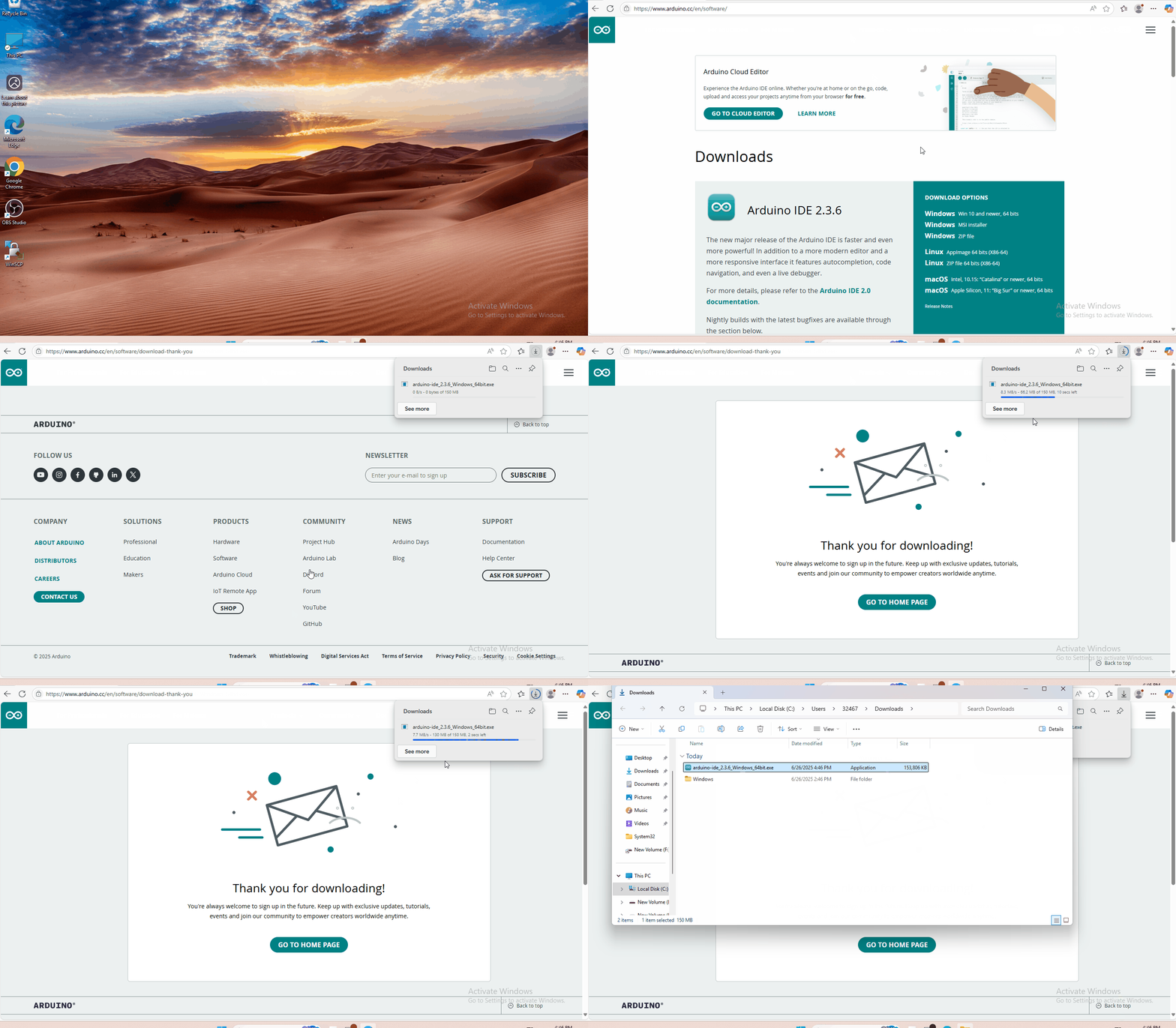
You just need to click JUSTDOWNLOAD,then click the downloaded file to install it.And when the ZIP file is downloaded,you can directly unzip and start it.
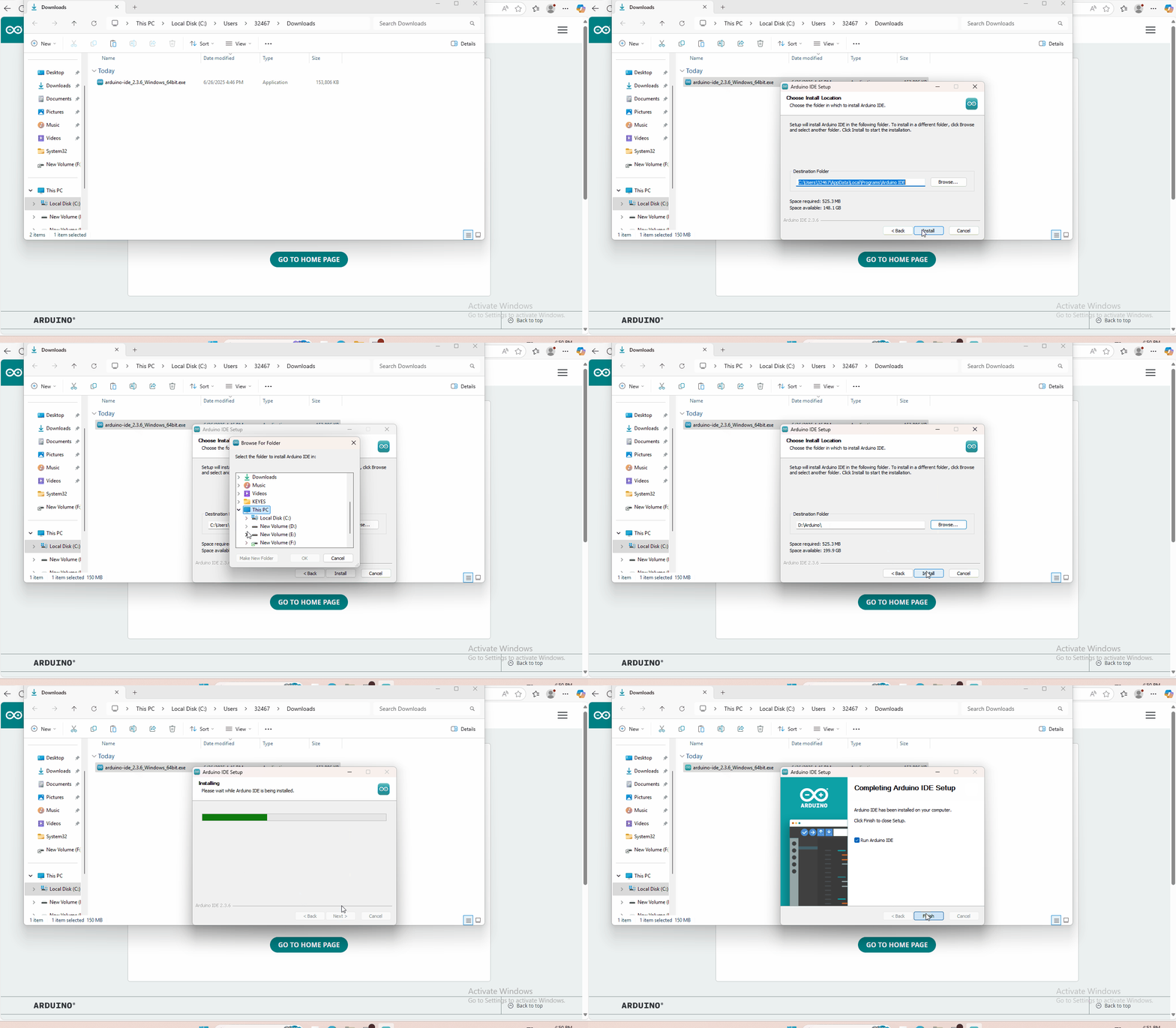
2. Set Arduino IDE
Connecting the board to the computer,and select the development board and port.

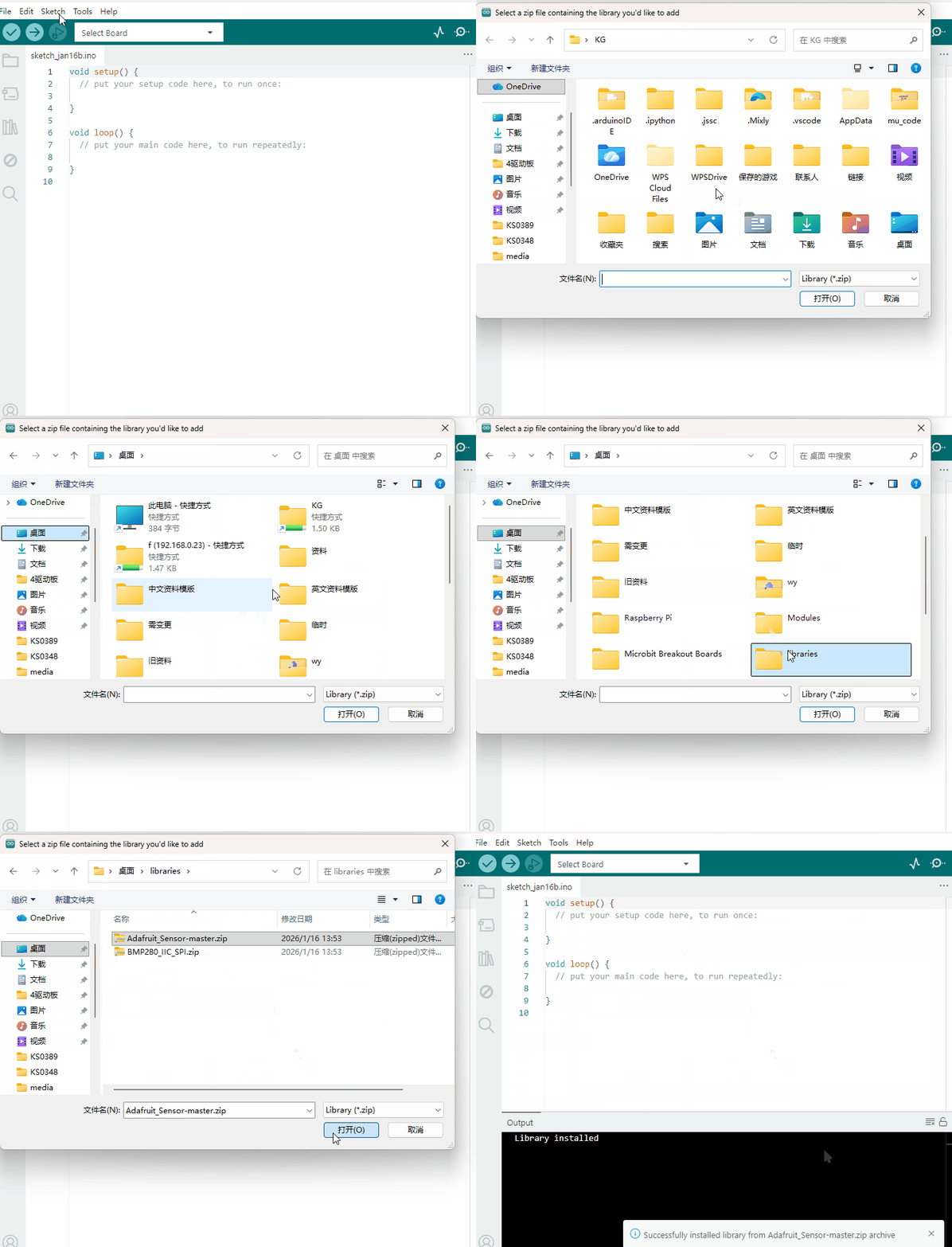
3. Add Library
Open the Arduino IDE, follow [Sketch] → [Include Library] → [Add .zip Library]. This method can only import one library file at a time. If the product has multiple libraries, please import them one by one following this process!
4. Result
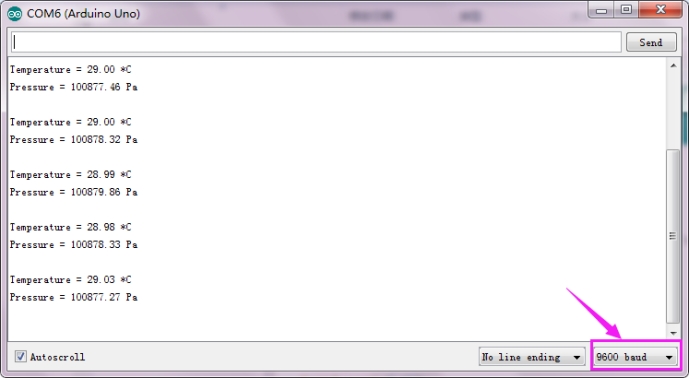
Done uploading the test code, click to open the monitor and set the baud rate to 9600.
The monitor will show the current temperature and air pressure.
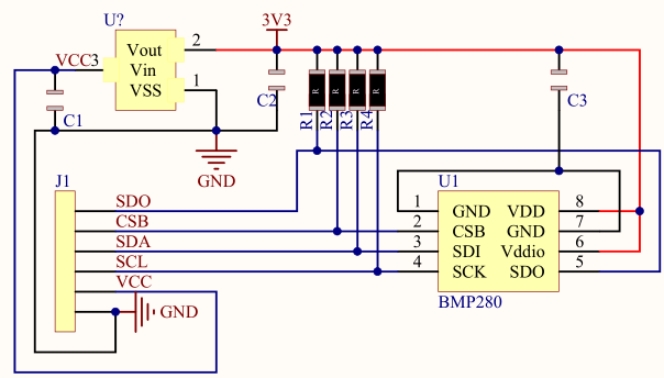
7. Schematics Diagram
8. Extension