KS0532 Keyestudio 1.3 128x64 OLED Display with IIC Ports
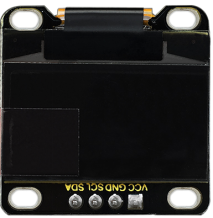
1. Description
OLED is an organic light-emitting diode, also known as organic dot laser display. Composed of a very thin coating of organic materials that emit light and a glass substrate, it has self-luminous properties, a large viewing angle and low power consumption.
It doesn’t need a backlight ( it will light up when the driver and wiring up are correct). It has high contrast and fast response speed, applied for flexible surface. In addition, it is easy to build. The module comes with 4 positioning holes, which is convenient for you to fix it on other devices.
2. Specification
Working voltage: DC 3.3V-5V
Working current: 30mA
Interface: pin header interface with a pitch of 2.54mm
Communication method: I2C communication
Internal driver chip: SSD1306
Resolution: 128*64
Viewing angle: more than 150°
Size: 33* 35 * 3mm
Hole spacing: 30.5mm (length) 29mm (width)
Weight: 7.1g
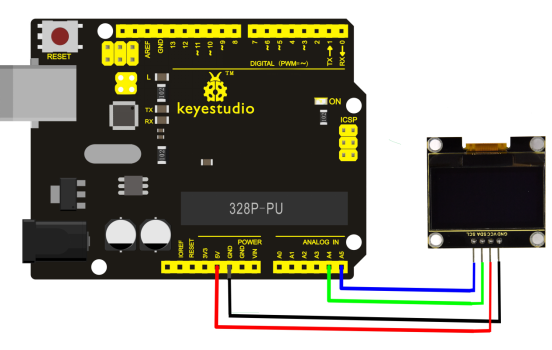
3. Wiring Up
4. Test Code
Download Resource: Resource
#include <SPI.h>
#include <Wire.h>
#include <Adafruit_GFX.h>
#include <Adafruit_SSD1306.h>

#define SCREEN_WIDTH 128 // OLED display width, in pixels
#define SCREEN_HEIGHT 64 // OLED display height, in pixels

#define OLED_RESET 4
Adafruit_SSD1306 display(SCREEN_WIDTH, SCREEN_HEIGHT, &Wire, OLED_RESET);

void setup()
{
    // by default, we'll generate the high voltage from the 3.3v line internally! (neat!)
    display.begin(SSD1306_SWITCHCAPVCC, 0x3C); // initialize with the I2C addr 0x3D (for the 128x64)
    // init done
    // Show image buffer on the display hardware.
    // Since the buffer is intialized with an Adafruit splashscreen
    // internally, this will display the splashscreen.
    // Clear the buffer.
    display.clearDisplay();
}

void loop()
{
    display.clearDisplay();
    display.setTextSize(1);
    display.setTextColor(WHITE);
    display.setCursor(0,0);
    display.println(F("Hello,world!"));
    display.println(F("Hello,keyestudio!"));
    display.setTextSize(2);
    display.println(F("Hello!"));
    //display.println(F("keyes!"));
    display.println(F("keyestudio"));
    display.display();
    delay(250);
}
5. Test Result
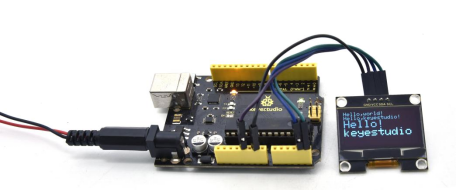
Wire up, upload test code and power up. The OLED display shows as follows: