BBC Micro:bit
(1) What is Micro:bit?
Micro:bit is an open source hardware platform based on the ARM architecture launched by British Broadcasting Corporation (BBC) together with ARM, Barclays, element14, Microsoft as well as other institutions. The core device is a 32-bit Arm Cortex-M4 with FPU micro-processing.
It is just the size of a credit card but it’s very powerful. The Micro:bit main board is equipped with a host of components such as a 5*5 LED dot matrix, 2 programmable buttons, an accelerometer, a compass, a thermometer, a touch-sensitive logo and a MEMS microphone, a Bluetooth module of low energy as well as a buzzer and so on, making it empower to play a variety of sounds without external devices.
Moreover, this board supports a sleeping mode to lower power consumption of batteries and it can be entered if users long press the Reset & Power button on the back of it.
Micro: Bit development board is easy to use and expand, the bottom gear design of the gold finger can be used to interact with various electronic components via fixed alligator clip. It is capable of reading the data of sensors, controlling servos and RGB lights and inserting an expansion board so as to connect various sensors.
Furthermore, it also supports a variety of codes and graphical programming platforms, and is compatible with almost all PCs and mobile devices and a free-installation driver. It has high integration electronic modules and a serial port monitoring function for easy debugging.
The board is widely used in programming video games, interactions between light and sound, robots controls, scientific experiments, wearable devices as well as some cool inventions like robots and musical instruments.
(2) Layout
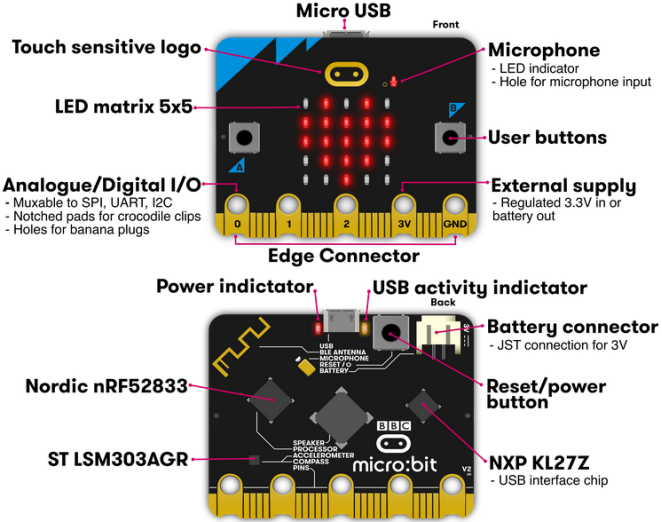
For more information,please resort to following links:
https://tech.microbit.org/hardware/
https://microbit.org/new-microbit/
https://www.microbit.org/get-started/user-guide/overview/
https://microbit.org/get-started/user-guide/features-in-depth/
(3) Pin out
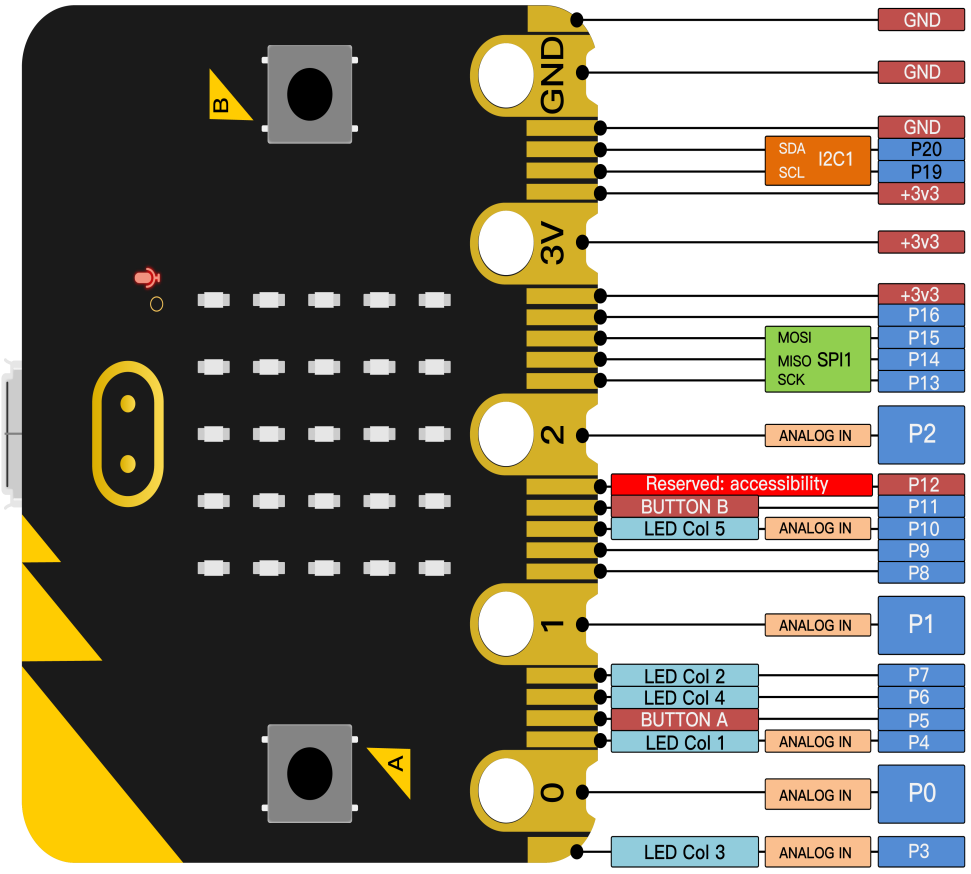
Functions:
GPIO |
P0,P1,P2,P3,P4,P5,P6,P7,P8,P9,P10,P11,P12,P13,P14,P15,P16,P19,P20 |
ADC/DAC |
P0,P1,P2,P3,P4,P10 |
IIC |
P19(SCL),P20(SDA) |
SPI |
P13(SCK),P14(MISO),P15(MOSI) |
PWM(used frequently) |
P0,P1,P2,P3,P4,P10 |
PWM(not frequently used) |
P5、P6、P7、P8、P9、P11、P12、P13、P14、P15、P16、P19、P20 |
Occupied |
P3(LED Col3),P4(LED Col1),P5(Button A),P6(LED Col4),P7(LED Col2),P10(LED Col5),P11(Button B) |
Please browse the official website for more details:https://tech.microbit.org/hardware/edgeconnector/
(4) Precautions for using Micro:bit motherboard:
a. It is recommended to cover with a silicone protector to prevent short circuit for its sophisticated electronic components.
b. Its IO port is very weak in driving since it can merely handle current less than 300mA. Therefore, do not connect it with devices operating in a large current, such as MG995 servo and DC motor or it will get burnt. Furthermore, you must figure out the current requirements of the devices before you use them and it is generally recommended to use the board together with a Micro:bit expansion board.
c. It is recommended to power the main board via the USB interface or the battery of 3V. The IO port of this board is 3V, so it does not support sensors of 5V. If you need to connect sensors of 5 V, a Micro: Bit expansion board is required.
d. When using pins(P3, P4, P6, P7 and P10)shared with the LED dot matrix, blocking them from the matrix or the LEDs may display randomly and the data about sensors connected maybe wrong.
e. Pin 19 and 20 can not be used as IO ports though the Makecode shows they can. They can only be used as I2C communication.
f. The battery port of 3V cannot be connected with battery more than 3.3V or the main board will be damaged.
g. Forbid to operate it on metal products to avoid short circuit.
To put it simple, Micro:bit V2 main board is like a microcomputer, which has made programming at our fingertips and enhanced digital innovation. And as for programming environment, BBC provides a website: https://microbit.org/code/, which has a graphical MakeCode program easy for use.