Keyestudio ESP32 Development Board

1.Description
This is a development board based on ESP32, integrated with ESP32-WROOM-32 module, is a universal WIFI plus Bluetooth development board, and the pins are compatible with Arduino.
It has a host of peripherals such as hall sensor, high-speed SDIO/SPI, UART, I2S as well as I2C. Furthermore,it can be equipped with freeRTOS operating system, which is quite suitable for the Internet of things and smart home solutions.
2.Specifications
Voltage |
3.3V-5V |
|---|---|
Current |
Output 1.2A(MAX) |
Maximum power |
Output 10W |
Working temperature |
-10℃~50℃ |
Dimension |
69*54*14.5mm |
Weight |
25.5g |
Environmental protection attributes |
ROHS |
3.Pin out

4.Arduino IDE Development Environment
⚠️ Note: Click the link to start learning how to download software, install drivers, upload code, and install library files.
5.Test Code
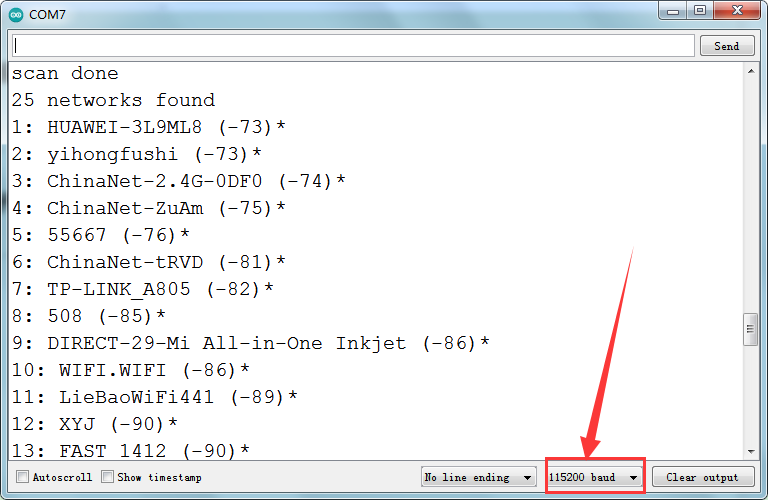
After uploading the code, ESP32 will find nearby WIFI and print the name and signal strength via the serial port every 5s.
#include "WiFi.h"

void setup()
{
    Serial.begin(115200);

    // Set WiFi to station mode and disconnect from an AP if it was previously connected
    WiFi.mode(WIFI_STA);
    WiFi.disconnect();
    delay(100);

    Serial.println("Setup done");
}

void loop()
{
    Serial.println("scan start");

    // WiFi.scanNetworks will return the number of networks found
    int n = WiFi.scanNetworks();
    Serial.println("scan done");
    if (n == 0) {
        Serial.println("no networks found");
    } else {
        Serial.print(n);
        Serial.println(" networks found");
        for (int i = 0; i < n; ++i) {
            // Print SSID and RSSI for each network found
            Serial.print(i + 1);
            Serial.print(": ");
            Serial.print(WiFi.SSID(i));
            Serial.print(" (");
            Serial.print(WiFi.RSSI(i));
            Serial.print(")");
            Serial.println((WiFi.encryptionType(i) == WIFI_AUTH_OPEN)?" ":"*");
            delay(10);
        }
    }
    Serial.println("");

    // Wait a bit before scanning again
    delay(5000);
}
6.Test Result
After uploading the code, open the serial port and we empower to see the wifi found by ESP32.