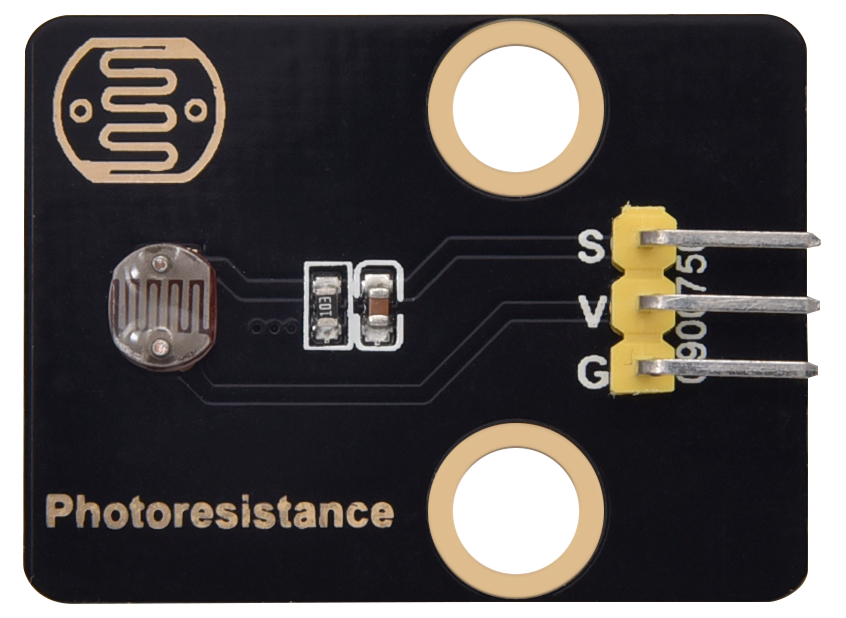
keyestudio Light Sensor (LDR) Module
1. Introduction
This tutorial explains how to use an Arduino Light Sensor Module (LDR – Light Dependent Resistor). You will learn how to read ambient light levels, brightness detection.
2.Specifications
Parameter |
Description |
|---|---|
Operating Voltage |
DC3.3–5V |
Control Method |
Arduino Analogue pin(A0-A5) |
Output Range |
0–1023 (analog reading) |
Dimensions |
Length:31.5 mm Width:23.5 mm |
3.Required Materials
Arduino Uno (Compatible with ESP32, STM32, Raspberry Pi, and others)
keyestudio Light Sensor (LDR) Module
Jumper wires
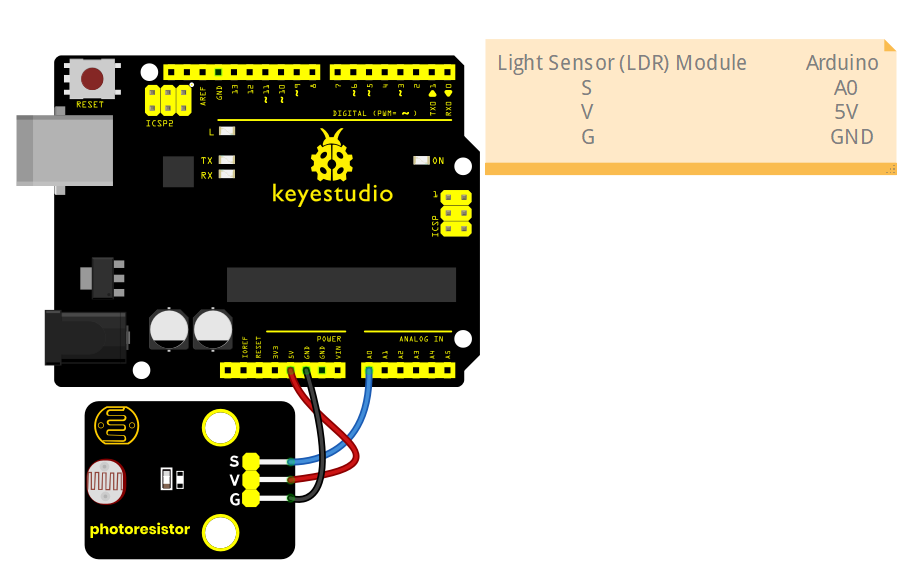
4.Wiring Instructions(Arduino UNO R3)
LDR Module Pin |
Arduino Pin |
|---|---|
VCC |
5V |
GND |
GND |
S |
A0 (or any analog pin) |
5.Sample Code
Read Light Intensity (Basic)
Prints raw analog values to the serial monitor.
int sensorPin = A0;  // LDR analog output pin
int sensorValue = 0;

void setup() {
  Serial.begin(9600);
}

void loop() {
  sensorValue = analogRead(sensorPin);
  Serial.println(sensorValue);  // 0–1023
  delay(300);
}
Experimental phenomena:
After uploading the code using the Arduino IDE, open the Serial Monitor. You will observe the values displayed in the Serial Monitor fluctuate in response to changes in light intensity. (You may cover the sensor area with your finger to simulate variations in light intensity.)