Project 2 Playing Typical 90 Tank Game with Coins
1.Introduction
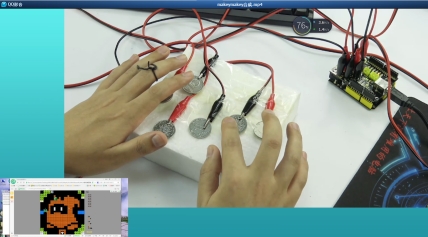
In Project 1, we have simulated the six number keys, No.1, 2, 3, 4, 5, 6. So in this project, we will actually simulate A, S, D, W, J and P key, to control the Tank. Replace A0 port with S key, to turn round the Tank in direction of 180 degree; A1 port with A key, controlling the Tank to turn left; A2 port with D key, controlling the Tank to turn right; A3 port with W key, controlling the Tank to go forward; A4 port with J key, controlling the Tank to shoot; A5 port with P key, controlling the game to pause and start.
2.Sample Code
#include "UsbKeyboard.h"
int InData1 = 0, InData2 = 0, InData3 = 0, InData4 = 0, InData5 = 0, InData0 = 0; //touch input value
//temporary storage
int TouchSensitivity = 30; //touch sensitivity. 0~1023,the larger the value, the lower the sensitivity

void setup()
{
    for(int i = A0; i <= A5; i++)
    {
    	pinMode(i, INPUT); //A0~A5 port as input port
    }
    for(int i = 6; i <= 12; i++)
    {
    	pinMode(i, OUTPUT); //A0~A5 port as input port
    }
    TIMSK0 &= !(1 << TOIE0);
}

void loop()
{
    UsbKeyboard.update();
    //read out the voltage value of all pins, and because of pull-up resistor,
    //the default of all pins of maximum level is 1023,decrease the level of pins though touch.
    //so the value is by 1024-analogRead(A0);
    InData0 = 1024 - analogRead(A0);
    InData1 = 1024 - analogRead(A1);
    InData2 = 1024 - analogRead(A2);
    InData3 = 1024 - analogRead(A3);
    InData4 = 1024 - analogRead(A4);
    InData5 = 1024 - analogRead(A5);
    //trigger keyboard events with various possibility
    if(InData0 >= TouchSensitivity)
    {
        digitalWrite (11, HIGH);
        UsbKeyboard.sendKeyStroke(22); //S
    }
    else
    	digitalWrite(11, LOW);
    if(InData1 >= TouchSensitivity)
    {
        digitalWrite(10, HIGH);
        UsbKeyboard.sendKeyStroke(4); //A
    }
    else
    	digitalWrite(10, LOW);
    if(InData2 >= TouchSensitivity)
    {
        digitalWrite(9, HIGH);
        UsbKeyboard.sendKeyStroke(7); //D
    }
    else
    	digitalWrite(9, LOW);
    if(InData3 >= TouchSensitivity)
    {
        digitalWrite(8, HIGH);
        UsbKeyboard.sendKeyStroke(26); //W
    }
    else
    	digitalWrite(8, LOW);
    if(InData4 >= TouchSensitivity)
    {
        digitalWrite(7, HIGH);
        UsbKeyboard.sendKeyStroke(13); //J
    }
    else
    	digitalWrite(7, LOW);
    if(InData5 >= TouchSensitivity)
    {
        digitalWrite(6, HIGH);
        UsbKeyboard.sendKeyStroke(19); //P
    }
    else
    	digitalWrite(6, LOW);
    delay(100);
}
3.Result After uploading program, take down one end of the Arduino cable on the control board; plug the end of the Arduino cable into Touch key USB Shield, and the other end still into PC USB port, now appearing new hardware “USB input device” on your PC. It is no need to install device driver, because generally XP and Win7 system support it. when one end connected to GND, hold the metal part of the other end of the alligator clip between your fingers with one hand; the other hand touches coins the other end of which have been connected to A1-A5 port to control the Tank.