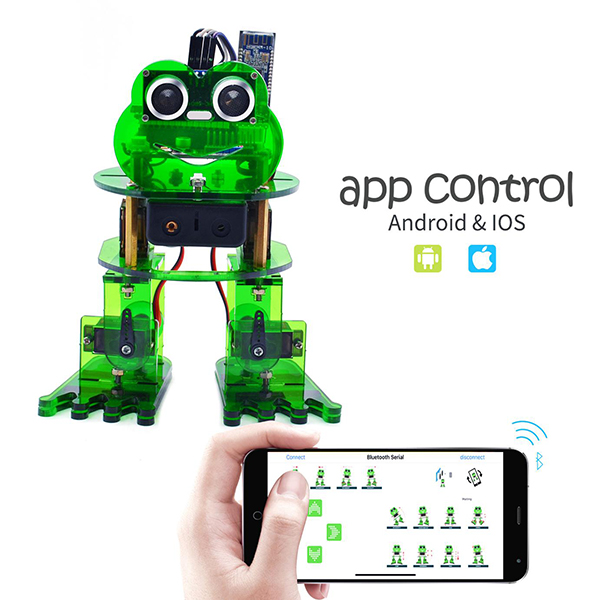
Project 9: Bluetooth Multiple Function
Circuit Design
How to combine multiple functions for the frog robot we’ve learned? In this circuit, we use a complete code to program the smart car to switch different functions with Bluetooth APP, pretty simple and easy.
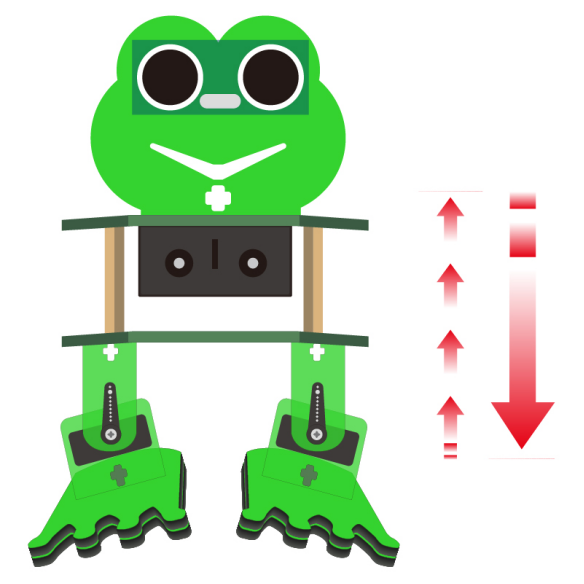
Wiring
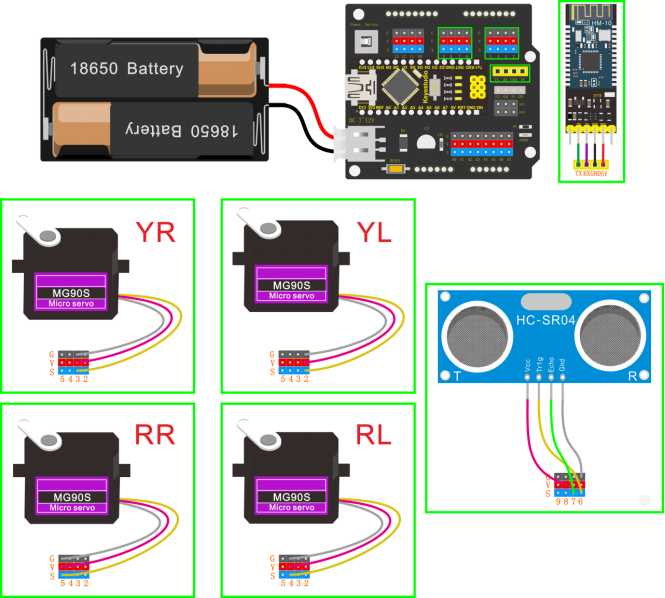
Stack the Nano ch340 onto the Nano shield; Connect ultrasonic sensor to Nano shield, VCC pin to 5V(V), Trig pin to digital 6 (S), Echo pin to digital 7 (S), GND pin to GND(G). Connect 4 servo motors to digital pin5,4,3,2 separately.
Plug in the Bluetooth module to pin TX, RX, GND, 5V. (RXD to TX, TXD to RX, GND to GND, VCC to 5V)
Code
#include <Servo.h>
#include <Oscillator.h>
#include <EEPROM.h>
#define N_SERVOS 4
//-- First step: Configure the pins where the servos are attached
/*
         ---------------
        |     O   O     |
        |---------------|
YR 3==> |               | <== YL 2
         ---------------
            ||     ||
            ||     ||
RR 5==>   -----   ------  <== RL 4
         |-----   ------|
*/
#define EEPROM_TRIM false

//adjust the initial angles of servos
#define TRIM_RR (-5)  //right02
#define TRIM_RL 5  //left02
#define TRIM_YR (-5)  //right01
#define TRIM_YL 0  //left01

//pins of the servo
#define PIN_RR 5
#define PIN_RL 4
#define PIN_YR 3
#define PIN_YL 2
#define INTERVALTIME 10.0
Oscillator servo[N_SERVOS];

#include "SR04.h"
#define TRIG_PIN 6    //sending pins of the ultrasonic sensor
#define ECHO_PIN 7    //receiving pins of the ultrasonic sensor
SR04 sr04 = SR04(ECHO_PIN,TRIG_PIN);
long a;
int i = 0;
int val = 0;

//each function declaration
void goingUp(int tempo);
void drunk (int tempo);
void noGravity(int tempo);
void kickLeft(int tempo);
void kickRight(int tempo);
void run(int steps, int T=500);
void walk(int steps, int T=1000);
void backyard(int steps, int T=3000);
void backyardSlow(int steps, int T=5000);
void turnLeft(int steps, int T=3000);
void turnRight(int steps, int T=3000);
void moonWalkLeft(int steps, int T=1000);
void moonWalkRight(int steps, int T=1000);
void crusaito(int steps, int T=1000);
void swing(int steps, int T=1000);
void upDown(int steps, int T=1000);
void flapping(int steps, int T=1000);
int t=495;
double pause=0;

volatile int distance;  //Integer variable used to store the distance value received by the ultrasonic sensor
volatile int flag;      //Set the integer variable flag

//stop
void Stop()
{
  for(int i=0;i<4;i++) servo[i].SetPosition(90);
}

//go back
 void backyard(int steps, int T)
{
  int A[4]= {15, 15, 30, 30};
  int O[4] = {0, 0, 0, 0};
  double phase_diff[4] = {DEG2RAD(0), DEG2RAD(0), DEG2RAD(-90), DEG2RAD(-90)};
  for(int i=0;i<steps;i++)oscillate(A,O, T, phase_diff);
}

char bluetooth_val;   //Character variable, used to store the value received by Bluetooth

//turn left
 void turnLeft(int steps, int T)
{
  int A[4]= {20, 20, 10, 30};
  int O[4] = {0, 0, 0, 0};
  double phase_diff[4] = {DEG2RAD(0), DEG2RAD(0), DEG2RAD(90), DEG2RAD(90)};
  for(int i=0;i<steps;i++)oscillate(A,O, T, phase_diff);
}

//turn right
 void turnRight(int steps, int T)
{
  int A[4]= {20, 20, 30, 10};
  int O[4] = {0, 0, 0, 0};
  double phase_diff[4] = {DEG2RAD(0), DEG2RAD(0), DEG2RAD(90), DEG2RAD(90)};
  for(int i=0;i<steps;i++)oscillate(A,O, T, phase_diff);
}

//go forward
 void walk(int steps, int T)
{
  int A[4]= {15, 15, 30, 30};
  int O[4] = {0, 0, 0, 0};
  double phase_diff[4] = {DEG2RAD(0), DEG2RAD(0), DEG2RAD(90), DEG2RAD(90)};
  for(int i=0;i<steps;i++)oscillate(A,O, T, phase_diff);
}

void oscillate(int A[N_SERVOS], int O[N_SERVOS], int T, double phase_diff[N_SERVOS]){
  for (int i=0; i<4; i++) {
    servo[i].SetO(O[i]);
    servo[i].SetA(A[i]);
    servo[i].SetT(T);
    servo[i].SetPh(phase_diff[i]);
  }
  double ref=millis();
   for (double x=ref; x<T+ref; x=millis()){
     for (int i=0; i<4; i++){
        servo[i].refresh();
     }
  }
}

unsigned long final_time;
unsigned long interval_time;
int oneTime;
int iteration;
float increment[N_SERVOS];
int oldPosition[]={90,90,90,90};

void moveNServos(int time, int  newPosition[]){
  for(int i=0;i<N_SERVOS;i++) increment[i] = ((newPosition[i])-oldPosition[i])/(time/INTERVALTIME);
  final_time =  millis() + time;
  iteration = 1;
  while(millis() < final_time){ //Javi del futuro cambia esto
      interval_time = millis()+INTERVALTIME;
      oneTime=0;
      while(millis()<interval_time){
          if(oneTime<1){
              for(int i=0;i<N_SERVOS;i++){
                  servo[i].SetPosition(oldPosition[i] + (iteration * increment[i]));
              }
              iteration++;
              oneTime++;
          }
      }
  }

  for(int i=0;i<N_SERVOS;i++){
    oldPosition[i] = newPosition[i];
  }
}

float checkdistance() {    //distance measuring function
  //Generate a 10us high pulse to trigger TrigPin
  digitalWrite(6, LOW);    //Set pin 6 output voltage low
  delayMicroseconds(2);    //delay in 20ms
  digitalWrite(6, HIGH);   //Set pin 6 output voltage high
  delayMicroseconds(10);   //delay in 10ms
  digitalWrite(6, LOW);    //Set pin 6 output voltage low
  // Detect pulse width and calculate distance
  float distance = pulseIn(7, HIGH) / 58.00;  // Read the high-level pulse on pin 7, divide the maximum pulse time by 58.00, and assign the result to the distance variable as a floating value  delay(10);  // delay in 10ms
  return distance;  //return the distance value
}

//slide
void crusaito(int steps, int T){
    int A[4]= {25, 25, 30, 30};
    int O[4] = {- 15, 15, 0, 0};
    double phase_diff[4] = {DEG2RAD(0), DEG2RAD(180 + 120), DEG2RAD(90), DEG2RAD(90)};
    for(int i=0;i<steps;i++)oscillate(A,O, T, phase_diff);
}

//dance
void dance() {
  flag = 1;              //variable flag=1
  while (flag == 1) {    //当variable flag=1时
    goingUp(2*t);        //tiptoe in 2*t
    for (int i = 0; i <= 2; i = i + (1)) { //set the variable i to save times of friction, from 0 to 2, the step is 1
      segunda1();  // robots rub on the floor
    }
    for (int i = 0; i <= 2; i = i + (1)) {  //set the variable i to save times of jumping, step is 1
      jump();  // robots jump
    }
    walk(3,2*t);      //go forward for 3 steps in 2*t
    backyard(3,2*t);  //go forward for 3 steps in 2*t
    crusaito(1,5*t);  //slide for 1 step in 5*t
    crusaito(1,1*t);  //slide for 1 step in 1*t
    crusaito(1,3*t);  //slide for 1 step in 3*t
    for (int i = 0; i <= 2; i = i + (1)) {  //set the variable i to save times of swinging, from 0 to 2, step is 1
      drunk(4*t);  //move in 4*t
    }
    moonLEFT(5,2*t);   //left moon walking for 5 steps in 2*t
    noGravity(2*t);    //in no gravity in 2*t
    swing(5,2*t);      //swing for 5 steps in 2*t
    moonRight(5,2*t);  //Right moonwalking for five steps in 2*t
    Stop();            //stop
    kickLeft(t);       //kick left
    for (int i = 0; i <= 2; i = i + (1)) {  //set the variable i to save times of jumping, step is 1
      jump();      //jump
    }
    Stop();        //stop
    kickRight(t);  //kick right
    for (int i = 0; i <= 2; i = i + (1)) {  //set the variable i to save times of jumping, step is 1
      jump();  //jump
    }
    Stop();   //stop
    flag = 0;  //the variable flag=0
    bluetooth_val = 'S';  //the value of the bluetooth_val is‘S’
  }
}

//drunk
void drunk (int tempo){
  pause=millis();
  int move1[] = {60,70,90,90};
  int move2[] = {110,120,90,90};
  int move3[] = {60,70,90,90};
  int move4[] = {110,120,90,90};
  moveNServos(tempo*0.235,move1);
  moveNServos(tempo*0.235,move2);
  moveNServos(tempo*0.235,move3);
  moveNServos(tempo*0.235,move4);
  while(millis()<(pause+tempo));
}

//follow
void follow() {
  flag = 1;              //variable flag=1
  while (flag == 1) {    //当variable flag=1
    distance = checkdistance();  //Assign the value of checkdistance() to the variable distance()
    if (distance > 20 && distance < 60) {  //if distance > 20 and distance < 60
      walk(1,2*t);  //move forward for 1 step in 2*t

    } else if (distance > 10 && distance < 20) {  //or else distance > 10 and distance <= 20
      Stop();     //stop
    } else if (distance <= 10) {  //or else distance <= 10
      backyard(1,2*t);  //go back for 1 step in 2*t
    } else {    //or above conditions are not met
      Stop();   //stop

    }
    if (Serial.available())  //Determine whether there is data in the serial port buffer
    {
      bluetooth_val = Serial.read();  //Read data from serial port buffer
      if (bluetooth_val == 'S') {  //if the value of the bluetooth_val is‘S’
        flag = 0;  //variable flag = 0

      }
    }
  }
}

//tiptoe
void goingUp(int tempo){
      pause=millis();
      for(int i=0;i<4;i++) servo[i].SetPosition(90);
      delay(tempo);
      servo[0].SetPosition(80);
      servo[1].SetPosition(100);
      delay(tempo);
      servo[0].SetPosition(70);
      servo[1].SetPosition(110);
      delay(tempo);
      servo[0].SetPosition(60);
      servo[1].SetPosition(120);
      delay(tempo);
      servo[0].SetPosition(50);
      servo[1].SetPosition(130);
      delay(tempo);
      while(millis()<pause+8*t);
}

//robots jump
void jump()
{
int move5[4] = {70,110,80,100};
  int move6[4] = {70,110,100,80};
  int move7[4] = {90,90,80,100};
  int move8[4] = {90,90,100,80};
pause=millis();
    moveNServos(t*0.15,move5);
    moveNServos(t*0.15,move6);
    moveNServos(t*0.15,move7);
    moveNServos(t*0.15,move8);
    while(millis()<(pause+t));
  }

//kick left
void kickLeft(int tempo){
  for(int i=0;i<4;i++) servo[i].SetPosition(90);
  delay(tempo);
  servo[0].SetPosition(50); //pie derecho
  servo[1].SetPosition(70); //pie izquiero
  delay(tempo);
  servo[0].SetPosition(80); //pie derecho
  servo[1].SetPosition(70); //pie izquiero
  delay(tempo/4);
  servo[0].SetPosition(30); //pie derecho
  servo[1].SetPosition(70); //pie izquiero
  delay(tempo/4);
  servo[0].SetPosition(80); //pie derecho
  servo[1].SetPosition(70); //pie izquiero
  delay(tempo/4);
  servo[0].SetPosition(30); //pie derecho
  servo[1].SetPosition(70); //pie izquiero
  delay(tempo/4);
  servo[0].SetPosition(80); //pie derecho
  servo[1].SetPosition(70); //pie izquiero
  delay(tempo);
}

//kick right
void kickRight(int tempo){
for(int i=0;i<4;i++) servo[i].SetPosition(90);
  delay(tempo);
  servo[0].SetPosition(110); //pie derecho
  servo[1].SetPosition(130); //pie izquiero
  delay(tempo);
  servo[0].SetPosition(110); //pie derecho
  servo[1].SetPosition(100); //pie izquiero
  delay(tempo/4);
  servo[0].SetPosition(110); //pie derecho
  servo[1].SetPosition(150); //pie izquiero
  delay(tempo/4);
  servo[0].SetPosition(110); //pie derecho
  servo[1].SetPosition(80); //pie izquiero
  delay(tempo/4);
  servo[0].SetPosition(110); //pie derecho
  servo[1].SetPosition(150); //pie izquiero
  delay(tempo/4);
  servo[0].SetPosition(110); //pie derecho
  servo[1].SetPosition(100); //pie izquiero
  delay(tempo);
}

//left moon walking
 void moonLEFT(int steps, int T)
{
  int A[4]= {25, 25, 0, 0};
  int O[4] = {-15, 15, 0, 0};
  double phase_diff[4] = {DEG2RAD(0), DEG2RAD(180 - 120), DEG2RAD(90), DEG2RAD(90)};
  for(int i=0;i<steps;i++)oscillate(A,O, T, phase_diff);
}

//right moon walking
 void moonRight(int steps, int T)
{
  int A[4]= {25, 25, 0, 0};
  int O[4] = {-15, 15, 0, 0};
  double phase_diff[4] = {DEG2RAD(0), DEG2RAD(180 + 120), DEG2RAD(90), DEG2RAD(90)};
  for(int i=0;i<steps;i++)oscillate(A,O, T, phase_diff);
}

//no gravity
void noGravity(int tempo){
  int move1[4] = {120,140,90,90};
  int move2[4] = {140,140,90,90};
  int move3[4] = {120,140,90,90};
  int move4[4] = {90,90,90,90};
  for(int i=0;i<4;i++) servo[i].SetPosition(90);
  for(int i=0;i<N_SERVOS;i++) oldPosition[i]=90;
  moveNServos(tempo*2,move1);
  moveNServos(tempo*2,move2);
  delay(tempo*2);
  moveNServos(tempo*2,move3);
  moveNServos(tempo*2,move4);
}

//friction
void segunda1()
{
int move1[4] = {90,90,80,100};
  int move2[4] = {90,90,100,80};
  int move3[4] = {90,90,80,100};
  int move4[4] = {90,90,100,80};
     pause=millis();
      moveNServos(t*0.15,move1);
      moveNServos(t*0.15,move2);
      moveNServos(t*0.15,move3);
      moveNServos(t*0.15,move4);
      while(millis()<(pause+t));
    }

//swing
void swing(int steps, int T){
    int A[4]= {15, 15, 8, 8};
    int O[4] = {-A[0], A[1], 0, 0};
    double phase_diff[4] = {DEG2RAD(0), DEG2RAD(180), DEG2RAD(90), DEG2RAD(-90)};
    for(int i=0;i<steps;i++)oscillate(A,O, T, phase_diff);
}

void setup(){
  distance = 0;
  flag = 0;
  Serial.begin(9600);
  servo[0].attach(PIN_RR);
  servo[1].attach(PIN_RL);
  servo[2].attach(PIN_YR);
  servo[3].attach(PIN_YL);
  int trim;
  if(EEPROM_TRIM){
    for(int x=0;x<4;x++){
      trim=EEPROM.read(x);
      if(trim>128)trim=trim-256;
      Serial.print("TRIM ");
      Serial.print(x);
      Serial.print(" en ");
      Serial.println(trim);
      servo[x].SetTrim(trim);
    }
  }
  else{
    servo[0].SetTrim(TRIM_RR);
    servo[1].SetTrim(TRIM_RL);
    servo[2].SetTrim(TRIM_YR);
    servo[3].SetTrim(TRIM_YL);
  }
  for(int i=0;i<4;i++) servo[i].SetPosition(90);
  Serial.begin(9600);
  Serial.begin(9600);
  pinMode(6, OUTPUT);
  pinMode(7, INPUT);
}

void loop(){
  if (Serial.available())  //Determine whether there is data in the serial port buffer
  {
    bluetooth_val = Serial.read();  //Read data from serial port buffer
    Serial.println(bluetooth_val);  //print out
  }
  switch (bluetooth_val) {  //The value of the variable bluetooth_val is compared with each case one by one
   case 'F':    //when the variable bluetooth_val is 'F'
    walk(1,2*t);  //move forward for 1 step in 2*t
    break;       //exit the switch-case statement
   case 'B':  //when the variable bluetooth_val is 'B'
    backyard(1,2*t);  //go back for 1 step in 2*t
    break;
   case 'L':  //when the variable bluetooth_val is 'L'
    turnLeft(1,2*t);  //turn left for 1 step in 2*t
    break;
   case 'R':  //When the value of the variable bluetooth_val is 'R'
    turnRight(1,2*t);  //move to right for 1 step in 2*t
    break;
   case 'S':  //When the value of the variable bluetooth_val is 'S'
    Stop();  //stop
    break;
   case '1':  //when the value of the variable bluetooth_val is '1'
    moonLEFT(1,2*t);  // left moon walking for 1 step in 2*t
    break;
   case '2':  //when the value of the variable bluetooth_val is '2”
    moonRight(1,2*t);  //right moon walking for 1 step in 2*t
    break;
   case '3':   //when the value of the variable bluetooth_val is '3'
    kickRight(t);  //kick right
    break;
   case '4':  //when the value of the variable bluetooth_val is '4'
    kickLeft(t);  //kick left
    break;
   case '6':  //when the value of the variable bluetooth_val is '6”'
    noGravity(2*t);  //no gravity in 2*t
    break;
   case '7':    //when the value of the variable bluetooth_val is '7'
    crusaito(1,5*t);  //slide for 1 step in 5*t
    crusaito(1,1*t);  //slide for 1 step in 1*t
    crusaito(1,3*t);  //slide for 1 step in 3*t
    break;
   case '8':  //when the value of the variable bluetooth_val is '8'
    segunda1();  // robots rub on the floor
    break;
   case 'G':  //when the value of the variable bluetooth_val is 'G'
    drunk(4*t);  //move in 4*t
    break;
   case '9':  //when the value of the variable bluetooth_val is '9'
    jump();  //jump
    break;
   case 'H':  //when the value of the variable bluetooth_val is 'H'
    swing(1,2*t);  //swing for 1 step in 2*t
    break;
   case 'J':  //when the value of the variable bluetooth_val is 'J'
    goingUp(2*t);  //tiptoe in 2*t
    break;
   case 'P':  //when the value of the variable bluetooth_val is 'P'
    dance();  //dance
    break;
   case 'U':  //when the value of the variable bluetooth_val is 'U'
    follow();  //follow
    break;
  }
}
Note: should upload the code success first, then plug in Bluetooth module. Otherwise, code upload fails.
Result
Upload the code to keyestudio nano ch340 success;
Stack keyestudio nano ch340 onto Nano Shield;
Connect Keyestudio nano ch340 to computer with a mini USB cable.
Install well the Bluetooth APP;
Powered on, press down the Power_Switch on Nano Shield. The indicator on Bluetooth module flashes. So you can open mobile Bluetooth APP to connect the Bluetooth module;
Bluetooth connected, aim at the Bluetooth module, tap the key on the Bluetooth APP. We can make the robot do any motions.