Project 3 SOS light

1.Project instruction
SOS is a Morse code distress signal, used internationally, that was originally established for maritime use. In formal notation SOS is written with an overscore line, to indicate that the Morse code equivalents for the individual letters of “SOS” are transmitted as an unbroken sequence of three dots / three dashes / three dots, with no spaces between the letters.[1] In International Morse Code three dots form the letter “S” and three dashes make the letter “O”, so “S O S” became a common way to remember the order of the dots and dashes. (IWB, VZE, 3B, and V7 form equivalent sequences, but traditionally SOS is the easiest to remember.)
2.Project Principle
We could produce a letter through LED on and off state, long and short flash respectively represent dot and dash. Through Morse code table,“S”is represented by three dots, therefore, we replace three dots with short flash, dash symbolizes letter“O”, replace threw dashes with long flash.
3.Project circuit
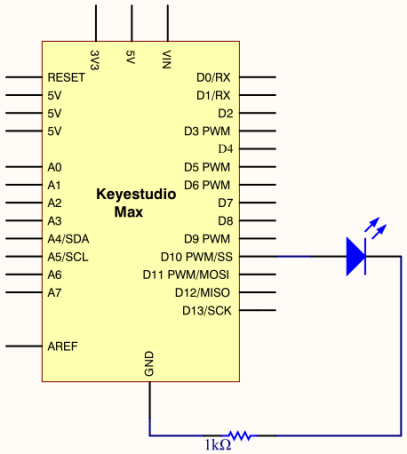
4.Project code
int ledPin = 10;

void setup()
{
  pinMode(ledPin, OUTPUT);
}

void loop()
{
    //  stand for“ S”with three quick flash
    for(int x=0;x<3;x++)
    {
         digitalWrite(ledPin,HIGH);            //set LED on
         delay(150);                           //delay in 150ms
         digitalWrite(ledPin,LOW);             //set LED off
         delay(100);                           //delay 100ms
    }
    // time gap to produce next letter
    delay(100);
    //stand for“ O”with three short flash
    for(int x=0;x<3;x++)
    {
         digitalWrite(ledPin,HIGH);            //set LED on
         delay(400);                           //delay in 400ms
         digitalWrite(ledPin,LOW);             //set LED off
         delay(100);                           //delay in 100ms
    }
    // time gap to produce next letter
    delay(100);
    // stand for“ S”with three quick flash
    for(int x=0;x<3;x++)
    {
         digitalWrite(ledPin,HIGH);            //set LED on
         delay(150);                           //delay in 150ms
         digitalWrite(ledPin,LOW);             //set LED off
         delay(100);                           //delay in 100ms
    }
    // wait 5s before repeating S.0.S signal
    delay(5000);
}
5.Project results
Upload code to Arduino, we will view LED flash S.O.S signal and wait for 5s and flash again. Plug external power in Arduino, and place them in a waterproof box, then S.O.S signal can be sent.
S.O.S signal is usually applied in maritime use and mountain-climbing.