5.1 Face Unlock
5.1.1 Overview
For face unlock, the module determines whether the face is a stored one. If it is, a correct prompt tone will be played with the green LED on; if not, an error prompt tone will be played with a red LED on. We can train and store faces by long-pressing the function button of the module, and then it will recognize the face by code.
5.1.2 Code Flow
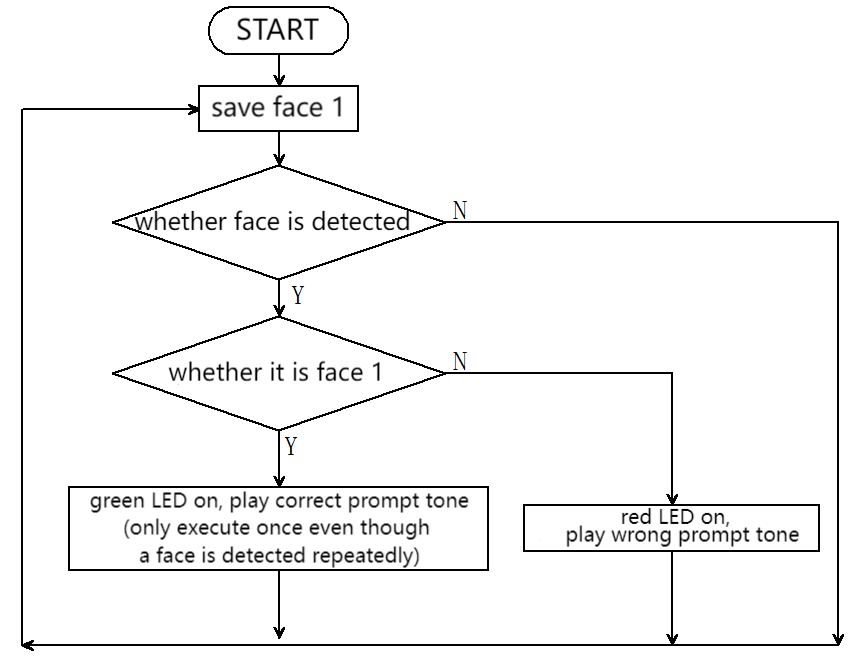
5.1.3 Test Code
from machine import I2C,UART,Pin,PWM
from  Sengo1  import *
import time
from neopixel import myNeopixel

# Wait for Sengo1 to initialize the operating system. This waiting time cannot be removed to prevent the situation where the controller has already developed and sent instructions before Sengo1 has been fully initialized
time.sleep(3)

# Select UART or I2C communication mode. Sengo1 is I2C mode by default. You can change it by just pressing the mode button.
# 4 UART communication modes: UART9600(Standard Protocol Instruction); UART57600(Standard Protocol Instruction), UART115200(Standard Protocol Instruction); Simple9600(Simple Protocol Instruction)
#########################################################################################################
# port = UART(2,rx=Pin(16),tx=Pin(17),baudrate=9600)
port = I2C(0,scl=Pin(21),sda=Pin(20),freq=400000)

# Sengo1 communication address: 0x60. If multiple devices are connected to the I2C bus, please avoid address conflicts.
sengo1 = Sengo1(0x60)

err = sengo1.begin(port)
print("sengo1.begin: 0x%x"% err)

# 1. Sengo1 can recognize 10 faces
# 2. It can remember or delete facial data by the joystick or through code instructions.
# 3. During normal use, the main controller sends commands to control the on and off of Sengo1 algorithm, rather than manual operation by joystick.
err = sengo1.VisionBegin(sengo1_vision_e.kVisionFace)
print("sengo1.VisionBegin(sengo1_vision_e.kVisionFace):0x%x"% err)

#Initialize the passive buzzer
buzzer = PWM(Pin(12))

#Define the number of pin and LEDs connected to neopixel.
NUM_LEDS = 4
np = myNeopixel(NUM_LEDS, 13)
np.brightness(150) #brightness: 0 ~ 255

previousMillis = 0
lastDetectionTime = 0
disappearDelay = 5000  # 1000ms = 1s
currentFaceDetected = False


def play_success_sound():
    """Correct prompt tone: two crisp short tones"""
    for i in range(2):
        buzzer.freq(1500)    # 1500Hz high frequency
        buzzer.duty_u16(32768)  # 50% duty cycle(65536/2)
        time.sleep_ms(100)    # last 100ms
        buzzer.duty_u16(0)   # no tone
        time.sleep_ms(50)     # tone interval 50ms

def play_error_sound():
    """Wrong prompt tone: single deep long note"""
    buzzer.freq(300)        # 300Hz low frequency
    buzzer.duty_u16(32768)  # 50% duty cycle
    time.sleep_ms(500)       # last 500ms
    buzzer.duty_u16(0)      # no tone


while True:
    # Sengo1 does not actively return the detection and recognition results; it requires the main control board to send instructions for reading.
    # The reading process: 1.read the number of recognition results. 2.After receiving the instruction, Sengo1 will refresh the result data. 3.If the number of results is not zero, the board will then send instructions to read the relevant information. (Please be sure to build the program according to this process.)
    obj_num = sengo1.GetValue(sengo1_vision_e.kVisionFace, sentry_obj_info_e.kStatus)
    # Get the running time
    currentMillis = time.ticks_ms()
    if obj_num:
        # Read the label value of the human face. 1 to 10 represent stored facial data, and 0 represents an unfamiliar face that has not been stored.
        l = sengo1.GetValue(sengo1_vision_e.kVisionFace, sentry_obj_info_e.kLabel)
        # Determine whether face 1 is recognized and whether currentFaceDetected is Fasle
        if l == 1 and not currentFaceDetected:
            # Set the start time to the current time and then perform a 5-second calculation
            lastDetectionTime = currentMillis
            #if currentFaceDetected is set to True, it will not enter the current IF
            currentFaceDetected = True
            # The green light for WS2812 is on
            np.fill(0, 255, 0)
            np.show()
            # Correct prompt tone
            play_success_sound()
            time.sleep(0.2)
            # The WS2812 is off
            np.fill(0, 0, 0)
            np.show()
        # If it's a new face
        elif l == 0:
            # The red light for WS2812 is on
            np.fill(255, 0, 0)
            np.show()
            # Wrong prompt tone
            play_error_sound()
            time.sleep(0.2)
            # The WS2812 is off
            np.fill(0, 0, 0)
            np.show()
    # Delay of 0.3 seconds
    time.sleep(0.3)
    # 5-second delay code. The correct face will not be recognized again within 5 seconds after a successful recognition
    if currentFaceDetected and (currentMillis - lastDetectionTime >= disappearDelay):
        # Set currentFaceDetected to False to enter the correct face code
        currentFaceDetected = False
5.1.4 Test Result
After uploading the code, the AI vision module will detect the image captured by the camera to determine if there is a face. If there is, it will judge whether it is the one we set. If yes, the car will emit a correct prompt tone with green LED on. If not, the car will emit a wrong prompt sound with red LED on.