5.2.5 Evitar Ladrillos
5.2.5.1 Resumen

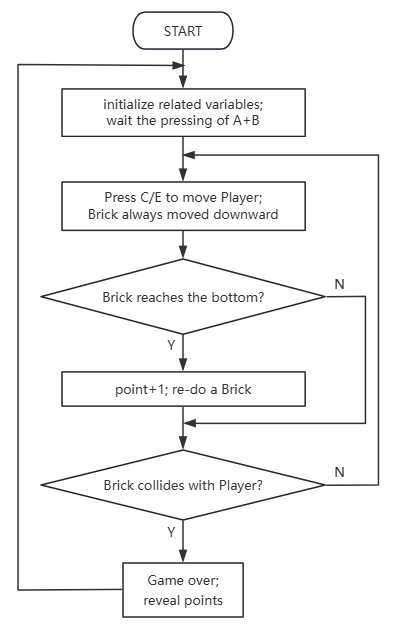
En este proyecto, jugamos un juego de evitar ladrillos donde los jugadores usan un gamepad Micro:bit para mover su indicador LED a izquierda y derecha mientras evaden ladrillos que caen desde arriba. Hay tres estados: a) un icono dinámico al inicio, b) acciones de evasión en tiempo real durante el juego, y c) una puntuación final después de las colisiones.
Los jugadores ganan 1 punto después de cada evasión (cuando el ladrillo llega al fondo), y el juego termina cuando colisionan con un ladrillo; la puntuación final se muestra con un efecto de desplazamiento.
El juego se puede iniciar o reiniciar presionando A+B. Este mecanismo de juego sencillo combina la capacidad de respuesta en tiempo real con la anticipación estratégica.

5.2.5.2 Piezas Requeridas
|
|
|
|---|---|---|
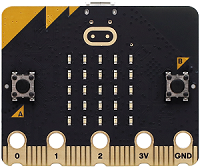
Placa micro:bit V2 (suministrada por el usuario) ×1 |
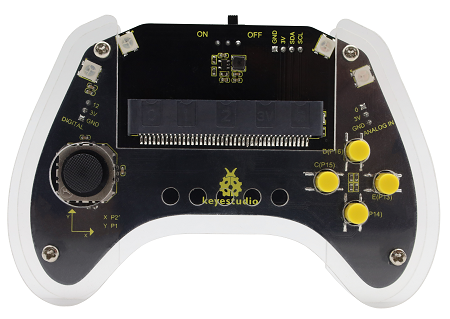
Smart Gamepad micro:bit (ensamblado) ×1 |
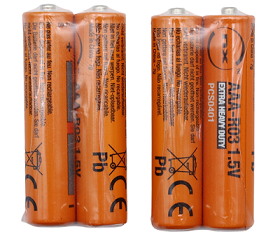
Pila AAA (suministrada por el usuario) ×4 |
5.2.5.3 Flujo del Código
5.2.5.4 Código de Prueba
⚠️ Tenga en cuenta que el umbral inicial brick_move_speed=300 se puede modificar según sus necesidades. Cuanto mayor sea el valor, más lento caerá el ladrillo.
Código completo:
import utime
import random
from microbit import *

# ===================== Global Configuration & Variables =====================
# Player initial configuration (micro:bit pixel coordinates: col=column(0-4, left-right), row=row(0-4, top-bottom))
player_fixed_row = 4    # Player's fixed row (bottom row)
player_init_col = 4     # Player's initial column (rightmost)
brick_move_speed = 300  # Brick falling interval (ms)

# Game state: 0=not started 1=running 2=game over
game_state = 0
brick_x = 0             # Brick current column (left-right)
brick_y = 0             # Brick current row (top-bottom)
score = 0               # Score counter
a_pressed_flag = False  # Left move button debounce flag
b_pressed_flag = False  # Right move button debounce flag
collision_x = False     # Collision detection - same column
collision_y = False     # Collision detection - same row
flash_count = 0         # End screen flash counter
time_passed = 0         # Time difference (for brick falling)
current_time = 0        # Current timestamp
last_brick_time = 0     # Last brick falling timestamp
start_flag = 0          # Start button debounce flag
can_start = False       # Game start flag
ab_pressed = False      # A+B pressed simultaneously flag
player_col = player_init_col  # Player's current column

# Initialize pins with pull-up (PULL_UP: pressed=low level 0, released=high level 1)
pin13.set_pull(pin13.PULL_UP)  # Right move button
pin15.set_pull(pin15.PULL_UP)  # Left move button

# ===================== Core Functions =====================
def on_start():
    """Initialization on power-up: randomly generate initial brick column"""
    global brick_x
    brick_x = random.randint(0, 4)

def draw_game():
    """Draw game screen: player (bright) + brick (dim)"""
    global game_state, player_col, brick_x, brick_y
    display.clear()
    # Draw player (fixed at bottom row, brightness 9 = brightest)
    display.set_pixel(player_col, player_fixed_row, 9)
    # Draw brick during gameplay (brightness 3 = dim)
    if game_state == 1:
        display.set_pixel(brick_x, brick_y, 7)

def reset_game():
    """Reset all game states"""
    global game_state, player_col, brick_x, brick_y, score
    global a_pressed_flag, b_pressed_flag
    game_state = 1
    player_col = player_init_col
    brick_x = random.randint(0, 4)
    brick_y = 0
    score = 0
    a_pressed_flag = False
    b_pressed_flag = False
    display.clear()

def check_collision():
    """Collision detection: game over if brick is in same column and row as player"""
    global collision_x, collision_y, game_state, flash_count
    collision_x = (brick_x == player_col)
    collision_y = (brick_y == player_fixed_row)
    if collision_x and collision_y:
        game_state = 2
        display.clear()
        flash_count = 0

# ===================== Main Loop =====================
def on_forever():
    """Main game logic loop"""
    global ab_pressed, can_start, start_flag, last_brick_time
    global flash_count, player_col, a_pressed_flag, b_pressed_flag
    global current_time, time_passed, brick_x, brick_y, score

    # 1. A+B pressed simultaneously: start/reset game (debounced)
    ab_pressed = button_a.is_pressed() and button_b.is_pressed()
    can_start = ab_pressed and (game_state != 1)
    if can_start:
        if start_flag == 0:
            start_flag = 1
            utime.sleep_ms(20)
            if button_a.is_pressed() and button_b.is_pressed():
                reset_game()
                last_brick_time = running_time()
    else:
        start_flag = 0

    # 2. Game not started state
    if game_state == 0:
        display.show(Image.DIAMOND_SMALL)
        utime.sleep_ms(500)
        display.show(Image.DIAMOND)
        utime.sleep_ms(500)

    # 3. Game over state
    if game_state == 2:
        if flash_count < 3:
            display.scroll(score)
            utime.sleep_ms(300)
            display.clear()
            utime.sleep_ms(200)
            flash_count += 1
        else:
            display.scroll(score)
            utime.sleep_ms(500)

    # 4. Game running logic
    if game_state == 1:
        # Left move button (pin15): fix level detection + set flag only on successful move
        if not pin15.read_digital():  # Pressed = low level 0, trigger left move
            if not a_pressed_flag:
                if player_col > 0:
                    player_col -= 1
                    a_pressed_flag = True  # Only set flag on successful move
                    utime.sleep_ms(50)
        else:
            a_pressed_flag = False  # Reset flag immediately when button is released

        # Right move button (pin13): fix level detection + set flag only on successful move
        if not pin13.read_digital():  # Pressed = low level 0, trigger right move
            if not b_pressed_flag:
                if player_col < 4:
                    player_col += 1
                    b_pressed_flag = True  # Only set flag on successful move
                    utime.sleep_ms(50)
        else:
            b_pressed_flag = False  # Reset flag immediately when button is released

        # Brick falling logic
        current_time = running_time()
        time_passed = current_time - last_brick_time
        if time_passed > brick_move_speed:
            last_brick_time = current_time
            brick_y += 1
            if brick_y > 4:
                brick_x = random.randint(0, 4)
                brick_y = 0
                score += 1

        # Collision detection + screen refresh
        check_collision()
        draw_game()

# ===================== Program Entry Point =====================
if __name__ == "__main__":
    on_start()
    while True:
        on_forever()
        utime.sleep_ms(10)

Breve explicación:
① Importe librerías, configure constantes e inicialización.
Primero importa utime para operaciones relacionadas con el tiempo (por ejemplo, retrasos), random para generar números aleatorios, microbit para acceder al hardware de Micro:bit.
Luego define variables globales y constantes para configurar el juego:
player_fixed_rowyplayer_init_coldefinen la posición inicial del jugador (en la columna más a la derecha de la fila inferior).brick_move_speedestablece el intervalo de tiempo (en milisegundos) de la caída del ladrillo.game_staterastrea el estado del juego (0=no iniciado, 1=jugando, 2=fin del juego).brick_x,brick_yalmacenan las coordenadas actuales del ladrillo.scoreregistra la puntuación.a_pressed_flag,b_pressed_flageliminan el rebote del botón.collision_x,collision_ydetectan colisiones.flash_countcrea un efecto de parpadeo al final del juego.time_passed,current_time,last_brick_timeson para cronometrar la caída de los ladrillos.start_flag,can_start,ab_pressedse utilizan para iniciar el juego y restablecer el anti-rebote y el estado del botón.player_colalmacena la posición de la columna actual del jugador.
Finalmente, configura pin13 y pin15 (utilizados para los movimientos de los botones izquierdo y derecho) como resistencias pull-up internas (pinX.PULL_UP), lo que significa que los pines mantienen un nivel alto (1) cuando los botones no están presionados y un nivel bajo (0) cuando están presionados.
import utime
import random
from microbit import *

# ===================== Global Configuration & Variables =====================
# Player initial configuration (micro:bit pixel coordinates: col=column(0-4, left-right), row=row(0-4, top-bottom))
player_fixed_row = 4    # Player's fixed row (bottom row)
player_init_col = 4     # Player's initial column (rightmost)
brick_move_speed = 300  # Brick falling interval (ms)

# Game state: 0=not started 1=running 2=game over
game_state = 0
brick_x = 0             # Brick current column (left-right)
brick_y = 0             # Brick current row (top-bottom)
score = 0               # Score counter
a_pressed_flag = False  # Left move button debounce flag
b_pressed_flag = False  # Right move button debounce flag
collision_x = False     # Collision detection - same column
collision_y = False     # Collision detection - same row
flash_count = 0         # End screen flash counter
time_passed = 0         # Time difference (for brick falling)
current_time = 0        # Current timestamp
last_brick_time = 0     # Last brick falling timestamp
start_flag = 0          # Start button debounce flag
can_start = False       # Game start flag
ab_pressed = False      # A+B pressed simultaneously flag
player_col = player_init_col  # Player's current column

# Initialize pins with pull-up (PULL_UP: pressed=low level 0, released=high level 1)
pin13.set_pull(pin13.PULL_UP)  # Right move button
pin15.set_pull(pin15.PULL_UP)  # Left move button
② Definiciones de funciones funcionales principales.
Hay tres funciones principales que el juego necesita:
on_start(): Se llama al inicio del programa. Principalmente inicializa la posición de la columna inicial de los ladrillos, asegurando que aparezca uno aleatoriamente entre 0 y 4.draw_game(): Responsable de renderizar los elementos del juego en la matriz LED 5x5 de Micro:bit. Borra la pantalla y muestra al jugador con el brillo máximo (9) en la fila inferiorplayer_fixed_rowcon columnas determinadas porplayer_col. Cuando el juego está en ejecución (game_state == 1), renderiza ladrillos con un brillo medio (7).reset_game(): Reinicia el juego a su estado inicial. Establecegame_stateen 1, reinicia al jugador y al ladrillo y las puntuaciones, borra el indicador anti-rebote del botón y la pantalla.check_collision(): Detecta si ocurre una colisión entre el ladrillo y el jugador. Esto se determina comparando el ejex(brick_x == player_col) y ely(brick_y == player_fixed_row). Si ambos coinciden, se detecta una colisión ygame_state= 2 (fin del juego), borra la pantalla y reiniciaflash_count.
# ===================== Core Functions =====================
def on_start():
    """Initialization on power-up: randomly generate initial brick column"""
    global brick_x
    brick_x = random.randint(0, 4)

def draw_game():
    """Draw game screen: player (bright) + brick (dim)"""
    global game_state, player_col, brick_x, brick_y
    display.clear()
    # Draw player (fixed at bottom row, brightness 9 = brightest)
    display.set_pixel(player_col, player_fixed_row, 9)
    # Draw brick during gameplay (brightness 3 = dim)
    if game_state == 1:
        display.set_pixel(brick_x, brick_y, 7)

def reset_game():
    """Reset all game states"""
    global game_state, player_col, brick_x, brick_y, score
    global a_pressed_flag, b_pressed_flag
    game_state = 1
    player_col = player_init_col
    brick_x = random.randint(0, 4)
    brick_y = 0
    score = 0
    a_pressed_flag = False
    b_pressed_flag = False
    display.clear()

def check_collision():
    """Collision detection: game over if brick is in same column and row as player"""
    global collision_x, collision_y, game_state, flash_count
    collision_x = (brick_x == player_col)
    collision_y = (brick_y == player_fixed_row)
    if collision_x and collision_y:
        game_state = 2
        display.clear()
        flash_count = 0
③ Bucle principal: Lógica de inicio/reinicio del juego.
on_forever() primero verifica si ambos botones A y B de la placa Micro:bit están presionados (button_a.is_pressed() and button_b.is_pressed()). El indicador can_start es verdadero cuando ambos botones A y B se presionan simultáneamente y el juego no está en ejecución.
Si can_start es verdadero y start_flag = 0 (la primera pulsación simultánea detectada de A+B), establece start_flag en 1 con un breve retraso (utime.sleep_ms(20)).
Vuelve a verificar si los botones A+B permanecen presionados (para anti-rebote). Si es así, reset_game() reiniciará el juego y se registrará last_brick_time. Si A+B no se presionan al mismo tiempo, start_flag = 0.
# ===================== Main Loop =====================
def on_forever():
    """Main game logic loop"""
    global ab_pressed, can_start, start_flag, last_brick_time
    global flash_count, player_col, a_pressed_flag, b_pressed_flag
    global current_time, time_passed, brick_x, brick_y, score

    # 1. A+B pressed simultaneously: start/reset game (debounced)
    ab_pressed = button_a.is_pressed() and button_b.is_pressed()
    can_start = ab_pressed and (game_state != 1)
    if can_start:
        if start_flag == 0:
            start_flag = 1
            utime.sleep_ms(20)
            if button_a.is_pressed() and button_b.is_pressed():
                reset_game()
                last_brick_time = running_time()
    else:
        start_flag = 0
④ Bucle principal: Visualización del estado de juego no iniciado y de fin de juego.
Juego no iniciado (
game_state == 0): En este estado, la matriz muestra pequeños diamantes (Image.DIAMOND_SMALL) y grandes diamantes (Image.DIAMOND), cada uno con una duración de 500ms, como indicación para que los jugadores esperen antes de comenzar.Juego terminado (
game_state == 2): Cuando el juego termina, el programa entra en un bucle que parpadea la puntuación.flash_countlimita el número de parpadeos (3 aquí). Cada parpadeo desplaza la puntuación actual y la borra con un breve retraso. Después de eso, la puntuación final se muestra de nuevo durante 500 milisegundos.
    # 2. Game not started state
    if game_state == 0:
        display.show(Image.DIAMOND_SMALL)
        utime.sleep_ms(500)
        display.show(Image.DIAMOND)
        utime.sleep_ms(500)

    # 3. Game over state
    if game_state == 2:
        if flash_count < 3:
            display.scroll(score)
            utime.sleep_ms(300)
            display.clear()
            utime.sleep_ms(200)
            flash_count += 1
        else:
            display.scroll(score)
            utime.sleep_ms(500)
⑤ Lógica de juego en ejecución.
    # 4. Game running logic
    if game_state == 1:
        # Left move button (pin15): fix level detection + set flag only on successful move
        if not pin15.read_digital():  # Pressed = low level 0, trigger left move
            if not a_pressed_flag:
                if player_col > 0:
                    player_col -= 1
                    a_pressed_flag = True  # Only set flag on successful move
                    utime.sleep_ms(50)
        else:
            a_pressed_flag = False  # Reset flag immediately when button is released

        # Right move button (pin13): fix level detection + set flag only on successful move
        if not pin13.read_digital():  # Pressed = low level 0, trigger right move
            if not b_pressed_flag:
                if player_col < 4:
                    player_col += 1
                    b_pressed_flag = True  # Only set flag on successful move
                    utime.sleep_ms(50)
        else:
            b_pressed_flag = False  # Reset flag immediately when button is released

        # Brick falling logic
        current_time = running_time()
        time_passed = current_time - last_brick_time
        if time_passed > brick_move_speed:
            last_brick_time = current_time
            brick_y += 1
            if brick_y > 4:
                brick_x = random.randint(0, 4)
                brick_y = 0
                score += 1

        # Collision detection + screen refresh
        check_collision()
        draw_game()
⑥ Punto de entrada del programa.
# ===================== Program Entry Point =====================
if __name__ == "__main__":
    on_start()
    while True:
        on_forever()
        utime.sleep_ms(10)
5.2.5.5 Resultado de la Prueba

Después de grabar el código, inserte la placa micro:bit en la ranura del gamepad (pilas instaladas), y active el interruptor a “ON”.
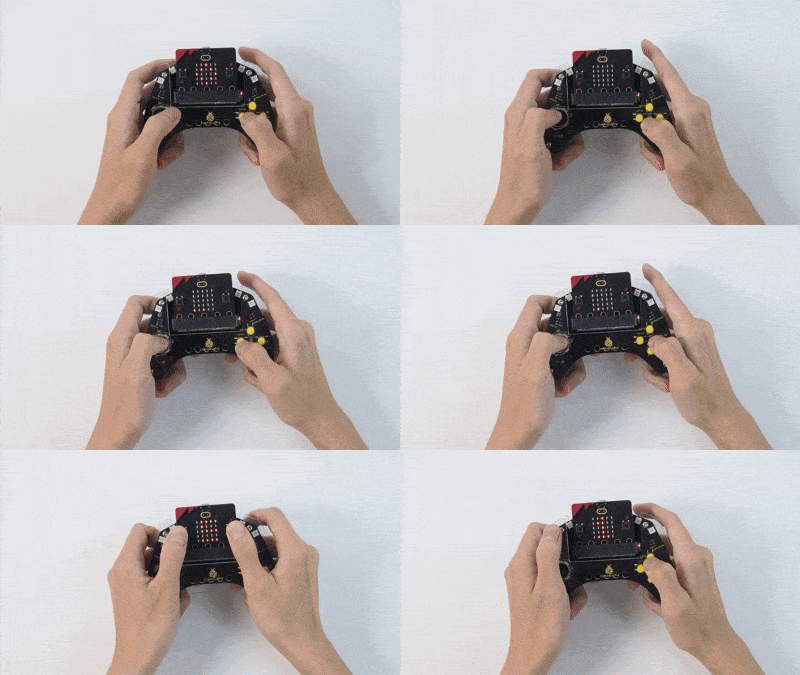
Está en 0-estado inicial después de encender y la matriz parpadea dos iconos cuadrados.
Presione A y B (durante al menos 1 segundo) para iniciar el juego (en estado 1-jugando), y un ladrillo caerá en una columna aleatoria. Ahora puede moverse a izquierda/derecha presionando C/E. Cada vez que evite un ladrillo, puntuación +1.
Fin del juego al colisionar (2-fin del juego), y la puntuación final se mostrará en la matriz. Si desea jugar una ronda más, presione A y B nuevamente. Apague para salir del juego (cambie el interruptor DIP a “OFF”).
Consejo: Si no hay respuesta en la placa, presione el botón de reinicio en la parte posterior de la placa micro:bit.
