3. Debugging Step
Download library file: library
3.1 Connection Method
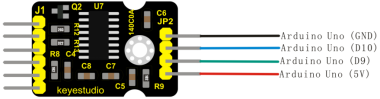
VCC can be any value among 2.6-5.5 . Because we use Arduino, just connect to 5V, and to GND.
Connect SCK to Pin 9, DT to Pin 10 on Arduino; you can change the pins in program.
Connect E+ to positive driving voltage, E- to negative, A+ to positive output voltage and A- to negative on bridge sensor.(E+ to red wire, E- to black wire, A+ to green or blue wire , A- to white wire )
Connect B+ and B- to sensor of channel B, or connect to power supply through partial pressure circuit, in order to detect supply voltage. If not, you had better connect to GND. But disconnect GND is OK.
3.2 Connection Diagram
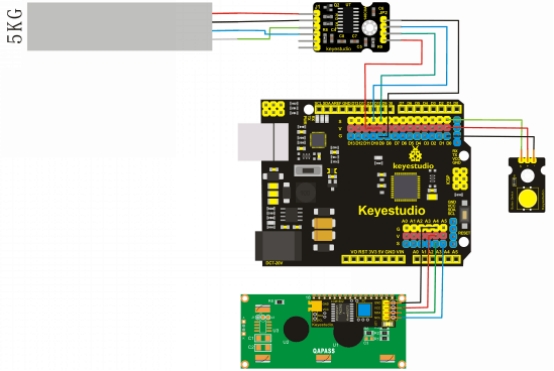
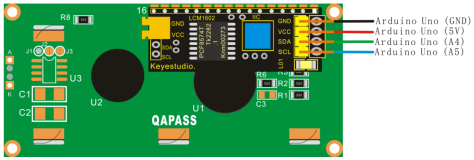
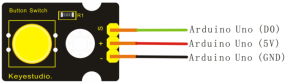
(Pay attention:“-” is equivalent to G, “+” is equivalent to “V”)

3.3 Debugging Step
The following is a specific applied sample:
Parameters of sensor shown as following:
Full-range Output Voltage=Excitation x Sensitivity 1.0mV/V
For example: 5V supply voltage multiplied by 1.0mV/V sensitivity equals to 5mV full-range.
In fact when supply voltage of the module is 5V, supply voltage of sensor is 4V, so full-range voltage of the sensor is 4mV. or you can choose 128 bit, the highest gain factor in channel A , to get highest precision.
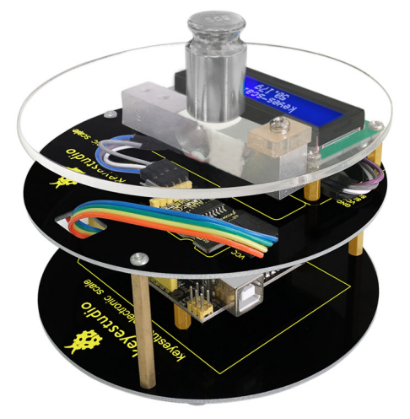
Figure of a Complete Electronic Scale
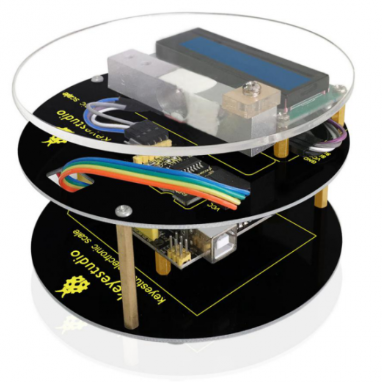
In the picture , the module connected to sensor is HX711, Arduino UNO is in the lower right corner, bridge sensor is hung on lazy arm(my connection mode is to use sling to measure tension value). It is better to choose the shorter wire between HX711 module and sensor. If it is too long, the module will get disturbed and it has better exceeding 30cm. If it is necessary to lengthen, you can use wire that can shield electromagnetism and signal amplifier.
1. Open sample codes in Arduino, and you can see that they are very easy:
#include <HX711.h> // Header files with library
HX711 hx(9, 10); // Data pin definition

void setup()
{
	Serial.begin(9600);
}

void loop()
{
    double sum = 0;    // In order to reduce the error, take out 10 values every time and calculate the average value.

    for (int i = 0; i < 10; i++) // The more loops, the higher the accuracy, and of course, the more time it takes
    sum += hx.read();  //Cumulative
    Serial.println(sum/10); //Calculate average value, average value is minus by another average value
}
These sample codes are very simple, but there are a lot of sample without function:
HX711(byte sck, byte dout, byte amp = 128, double co = 1); // define SCK and DOUT pin, gain factor(default 128) and correction factor(default 1)
void set_amp(byte amp); // changing gain factor and corresponding channel, and invoking read() at least one time to work
bool is_ready(); // whether turning beck hx711 is useful, and it is invoked in read()
long read(); // turning beck sensor voltage value, if hx711 not working, the program stops this function
double bias_read(); // turning beck:(read() - deviant) * correction factor
void tare(int t = 10); // adding tare to deviant and influencing the invoking of read()
void set_co(double co = 1); // modifying correction factor(default 1)
void set_offset(long offset = 0); // modifying deviant (default 1) , you can see hx711 also can use 4 parameters mode to define, and stipulate gain factor and correction factor. You can change gain and correction factor at any time during program running , and utilize deviant to remove tare.
The only one needed to explain is the first function HX711 hx(9, 10); // only defining SCK and DOUT pin, the default of gain of AMP in channel A is 128 bit, the default of correction factor is 1;
HX711 hx(9, 10, 64); // defining SCK and DOUT pin, the default of gain of AMP in channel A is 64 bit, the default of correction factor is 1;
HX711 hx(9, 10, 32, 1.4); // defining SCK and DOUT pin, the default of gain of AMP in channel A is 32 bit, the default of correction factor is 1.4;
As for choosing channel and gain factor mentioned in materials, The gain in channel A is 128 or 64 bit, and its corresponding full-load voltage is respectively ±20mV or ±40mV. The gain in channel B is fixed 32 and full-load voltage is 80mV. Input voltage of each channel can’t be more than their full-load voltage. Of course, you can change channel and gain factor at any time, as long as you use function of set_amp(amp) during programming, but the value of amp only can be 128, 64 or 32.
Stressing again, if you choose gain factor of 32 bit, the data read out is of channel B.
Firstly, use samples coming with library to test, and you can see the value after hanging on 100g weight on a tray:
186184.00
186176.59
186177.40
186170.09
186169.70
186162.70
186175.00
186163.40
186160.20
186163.00
186170.79
186174.20
186174.90
186177.70
186179.00
186178.50
186173.59
186168.09
186170.59
186151.20
186184.59
186165.70
186188.09
186176.09
186173.00
186170.79
186163.40
186160.90
186184.20
186163.40
186173.09
186166.50
186155.79
186183.00
186173.59
186173.70
186163.79
186158.40
186170.50
186172.40

After a 50g weight is taken out, the value are:

163012.09
163010.70
163043.00
163042.20
163021.90
163012.90
163015.09
163027.79
163019.79
163043.00
163024.90
163006.50
163016.70
163001.40
163028.00
163010.79
163026.79
163008.70
163004.70
163018.09
163020.50
163019.40
163028.70
163033.90
163014.90
163016.09
163008.50
163032.59
163030.79
163010.20
163036.50
163018.29
163015.00
163029.59
163006.50
163026.00
163028.09
162995.50
163014.59
163024.09
Calculating roughly:
186170-163020=23150 so the correction factor is about 50/23150=0.0021598272138229
2. Then the codes are (at the moment you can decrease properly reading rate, and add “delay” , like reading value at 30 seconds at one time):
#include <HX711.h>
HX711 hx(9, 10, 128, 0.0021598272138229);

void setup()
{
	Serial.begin(9600);
}

void loop()
{
    delay(500);
    double sum = 0;
    for (int i = 0; i < 10; i++)
    	sum += hx.read();
    Serial.println(sum/10);
}
After compiling codes into Arduino, take out all weights, and just keep the body, you can get:
139712.00
139695.29
139705.29
139713.09
139713.70
139706.50
139709.59
139705.90
139692.90
139715.79
139735.59
139703.90
139711.59
139708.59
139730.70
139716.40
139689.79
139705.59
139692.20
139701.50
139730.09
139728.09
139723.40
139715.20
139705.79
139711.29
139686.20
139701.29
139711.50
139684.70
139687.20
139712.70
139680.09
139699.09
139683.79
139697.29
139725.50
139723.90
139711.70
139702.40
139684.09
139704.70
139703.90
139696.90
3.That means the deviant approximates to 139700. So we can invoke the function of deviant in setup(using bias_read() to read value with correction factor and deviant, compared with read() as a reference)
#include <HX711.h>
HX711 hx(9, 10, 128, 0.0021598272138229);

void setup()
{
    Serial.begin(9600);
    hx.set_offset(139700);
}

void loop()
{
    delay(500);
    double sum0 = 0;
    double sum1 = 0;
    for (int i = 0; i < 10; i++)
    {
        sum0 += hx.read();
        sum1 += hx.bias_read();
    }
    Serial.print(sum0/10);
    Serial.print(" ");
    Serial.println(sum1/10);
}
The data read out is changed into:
139692.70 0.00
139695.00 -0.01
139702.00 -0.01
139685.29 -0.03
139715.59 0.03
139696.40 0.01
139687.59 -0.03
139690.50 -0.00
139694.00 -0.01
139685.70 -0.02
139693.59 -0.01
139692.50 -0.03
139695.50 -0.01
139702.90 0.02
139709.09 0.02
139716.50 0.03
139695.59 -0.00
139705.70 0.02
139698.29 -0.01
139699.79 -0.01
139711.59 0.02
139698.40 0.01
139710.90 0.02
139703.59 0.01
139709.29 0.02
139704.29 0.00
139715.90 0.02
139709.90 0.02
139702.40 0.00
139696.79 -0.00
139712.40 0.00
139682.09 -0.03
139693.59 -0.02
139690.70 -0.02
139676.09 -0.05
139699.00 0.00
139688.09 -0.04
139686.50 -0.02
139710.29 0.01
139708.29 0.02
139688.09 -0.02
139697.00 -0.01
139690.90 -0.01
139706.70 0.03
139705.50 0.01
139713.00 0.02
139702.70 -0.00
139708.00 0.01
139700.59 0.00
139701.40 0.01
139694.90 -0.01
Check again the data after putting on a 50g weight:
162869.29 50.03
162878.79 50.06
162885.00 50.07
162891.29 50.09
162894.79 50.09
162880.20 50.07
162863.70 50.05
162901.29 50.09
162874.79 50.05
162889.09 50.07
162885.70 50.09
162890.00 50.09
162880.09 50.06
162886.29 50.08
162886.00 50.06
162874.50 50.05
162882.00 50.08
162820.59 50.00
162818.79 49.99
162860.09 50.02
162875.09 50.05
162866.40 50.04
162848.79 49.99
162866.90 50.04
162864.70 50.03
162862.09 50.04
162884.00 50.06
162852.70 50.01
162863.20 50.02
162864.50 50.03
Putting on another 100g weight:
186051.20 100.01
186050.10 100.03
186049.99 100.03
186048.29 99.99
186049.50 100.02
186048.20 99.98
186054.79 100.05
186054.60 100.04
186047.40 99.98
186049.79 100.00
186049.99 100.03
186054.70 100.04
186052.50 100.03
186048.00 99.98
186049.29 100.00
186048.29 99.99
186053.90 100.03
186049.09 100.01
186048.80 99.97
186047.90 99.98
186050.60 100.01
186050.50 100.00
186050.20 100.02
186048.40 99.99
186054.09 100.05
186048.32 99.99
186048.69 100.02
186053.99 100.05
186049.65 100.00
186048.30 99.98
186050.09 100.02
186050.20 100.04
186049.59 100.02
186049.70 100.03
186049.59 100.02
186049.60 100.02
You can see the first decimal has changed for 0.1. That means reading correction factor is not precise enough, but it fits completely precision at 1g.
4. Next, it is to perfect program and increase removing tare function. Install a button on Arduino. In order to prevent electromagnetic interference and mistakes, we use a button usually inputting high level. When pressing down the button, it inputs low level. Connect this button to D0 port:
#include <HX711.h>
HX711 hx(9, 10, 128, 0.0021598272138229);

void setup()
{
    Serial.begin(9600);
    hx.set_offset(139700);
}

void loop()
{
    if(digitalRead(0) == LOW) hx.tare();
    double sum0 = 0;
    double sum1 = 0;
    for (int i = 0; i < 10; i++)
    {
        sum0 += hx.read();
        sum1 += hx.bias_read();
    }
    Serial.print(sum0/10);
    Serial.print(" ");
    Serial.println(sum1/10);
}
Every time you press the button, tare is removed.
5. One more code added 1602 liquid crystal:
#include <HX711.h>
#include <Wire.h>
#include <LiquidCrystal_I2C.h>
HX711 hx(9, 10, 128, 0.0021598272138229);
LiquidCrystal_I2C lcd(0x27,16,2);

void setup()
{
  Serial.begin(9600);
  hx.set_offset(139700);
  lcd.init();                      // initialize the lcd
  lcd.backlight();
  lcd.begin(16,2);
}

void loop()
{
  if(digitalRead(0) == LOW)
  hx.tare();
  double sum0 = 0;
  double sum1 = 0;
  for (int i = 0; i < 10; i++)
  {
    sum0 += hx.read();
    sum1 += hx.bias_read();
  }
  lcd.clear();
  lcd.setCursor(2,0);
  lcd.print("keyes-scale");
  lcd.setCursor(5, 1);
  lcd.print(sum1/10);
  lcd.print("g");
  delay(10);
}
Because of influences of different factor ,such as temperature, environment, wires and more, actual error is about 1%.
3.4 Result
Put a 50g weight on tray, and the result is shown as below.