Project 11 Infrared Control Turtle Robot
1.Overview
In the previous section, we have introduced how to use an IR remote control to control a 8 * 8 dot matrix. So think that how to control the smart robot with an IR remote control.
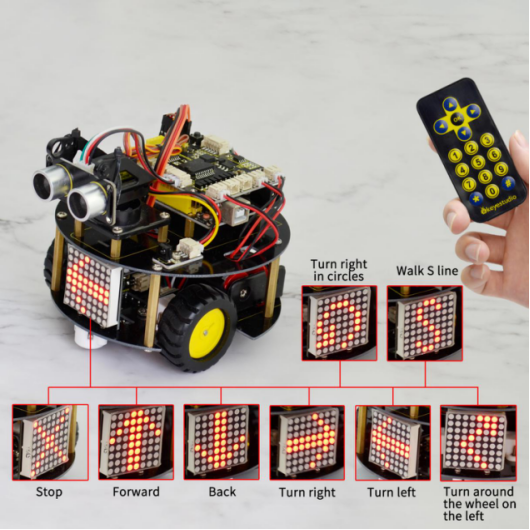
It is very simple. Use ARDUINO board to analyze and judge the collected infrared signal so as to drive the motor forward,backward and turn. You can apply the decoding value of remote control mentioned before to the code that used to control the robot with IR remote control. It also adds a 8 * 8 dot matrix to display the running state of turtle robot.
2.Wiring Diagram
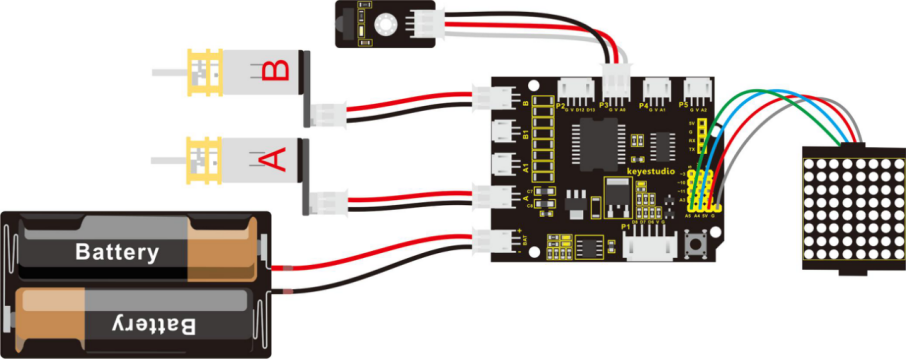
Next let’s look back to the decoding value of IR remote control.
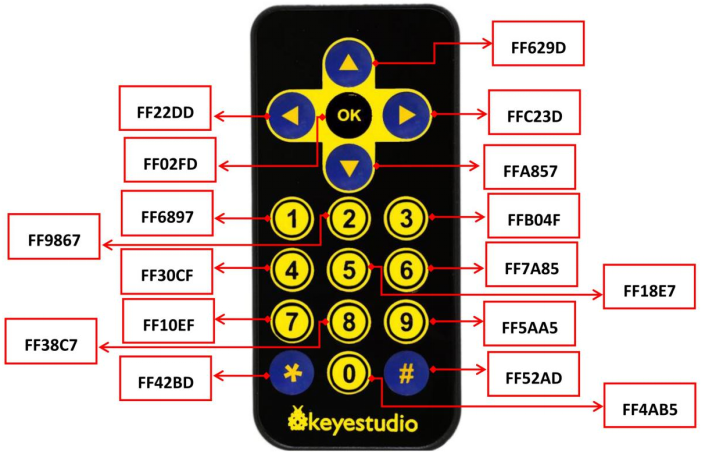
You can get the details:
Forward button: 0x00FF629D
Backward button: 0x00FFA857
Stop button: 0x00FF02FD
Left button: 0x00FF22DD
Right Button: 0x00FFC23D
You can apply those data to the code of infrared controlled robot.
3.Code 14
//DOT MATRIX
#include <Wire.h>   // add IIC libraries
#include "Adafruit_LEDBackpack.h"   // add the libraries of matrix display
#include "Adafruit_GFX.h"
Adafruit_LEDBackpack matrix = Adafruit_LEDBackpack();   // build an object to control a dot matrix

// IR receiver
#include <IRremote.h>    // add the libraries of IR receiver
int RECV_PIN = A0;        // define the ir receiver pin as A0
IRrecv irrecv(RECV_PIN);
decode_results results;
// decoding value of ir receiver
const long IR_front = 0x00FF629D;
const long IR_back = 0x00FFA857;
const long IR_left = 0x00FF22DD;
const long IR_right = 0x00FFC23D;
const long IR_stop = 0x00FF02FD;
const long IR_1 = 0x00FF6897;
const long IR_2 = 0x00FF9867;
const long IR_3 = 0x00FFB04F;
const long IR_4 = 0x00FF30CF;
const long IR_5 = 0x00FF18E7;
const long IR_6 = 0x00FF7A85;
const long IR_7 = 0x00FF10EF;
const long IR_8 = 0x00FF38C7;
const long IR_9 = 0x00FF5AA5;
const long IR_0 = 0x00FF52AD;

// control two motors
#define INT_A 2    // control the left motor direction pin D2
#define INT_B 4    // control the right motor direction pin D4
#define left_A 9    // define the left motor speed control pin as D9
#define right_B 5   // define the right motor speed control pin as D5
int i=0;
long val;       // define a variable to receive the signal sent by IR transmitter


void setup()
{
  Serial.begin(9600);           // set the serial baud rate to 9600
  irrecv.enableIRIn();            // Start the receiver
  delay(100);           // delay 100ms
  pinMode(INT_A,OUTPUT);           // set the motor control pin as OUTPUT
  pinMode(INT_B,OUTPUT);
  pinMode(left_A,OUTPUT);
  pinMode(right_B,OUTPUT);

  // DOT MATRIX
  matrix.begin(0x70);  // pass in the address
  chushi();         //initial matrix display
}

void loop()
{
  i = 1;
  if(irrecv.decode(&results))   // if receive the infrared signal
  {
    val = results.value;      // assign the result value to val
    Serial.println(val,HEX);    // print out hexadecimal val value on the serial monitor

    switch(val)   // perform the corresponding function for the received data
    {
      case  IR_front:  front(),qian();  break;  // if receive the(IR_front = 0x00FF629D),perform the front function(front())and matrix display function(qian())
      case  IR_back:  back(),hou();    break;  // backward
      case  IR_left:  left(),zuo();    break;  // turn left
      case  IR_right:  right(),you();   break;  // turn right
      case  IR_stop:  Stop(),ting();   break;   // stop
      case  IR_1:  front_s();   break;          // walk in S line
      case  IR_2:  left_l(),ZZ();   break;     // turn around the wheel on the left
      case  IR_3:  right_l(),YZ();   break;    // turn around the wheel on the right
      case  IR_4:  right_r(),ZX();  break;    // turn a circle to the right
      case  IR_5:  left_r(),YX();  break;     // turn a circle to the left

      default : printf("error");
    }
    irrecv.resume();    // Receive the next value
  }

}

// go forward
void front()
{
  digitalWrite(INT_A,LOW);    // control the left motor turn forward
  digitalWrite(INT_B,LOW);   // control the right motor turn forward
  analogWrite(left_A,200);   // set the two motors’ speed(PWM=200)
  analogWrite(right_B,200);
}
// backward
void back()
{
  digitalWrite(INT_A,HIGH);   // control the left motor turn backward
  digitalWrite(INT_B,HIGH);    // control the right motor turn backward
  analogWrite(left_A,200);   // set the two motors’ speed (PWM=200)
  analogWrite(right_B,200);
}
// turn left
void left()
{
  digitalWrite(INT_A,HIGH);    // control the left motor turn backward
  digitalWrite(INT_B,LOW);    // control the right motor turn forward
  analogWrite(left_A,100);    // set the two motors’ speed(PWM为100)
  analogWrite(right_B,100);
}
// turn right
void right()
{
  digitalWrite(INT_A,LOW);     // control the left motor turn forward
  digitalWrite(INT_B,HIGH);     // control the right motor turn backward
  analogWrite(left_A,100);    // two motors’ speed(PWM为100)
  analogWrite(right_B,100);
}
// stop
void Stop()
{
  digitalWrite(INT_A,LOW);
  digitalWrite(INT_B,LOW);
  analogWrite(left_A,0);    // both PWM are 0
  analogWrite(right_B,0);
}
//walk in S line
void front_s()
{
  S();
  while(i>0)
  {
    digitalWrite(INT_A,LOW);   // control the left motor turn forward
    digitalWrite(INT_B,LOW);   // control the right motor turn forward
    analogWrite(left_A,50);   // left motor PWM=100
    analogWrite(right_B,255);  // right motor PWM=255  (walk in S line to the left)
    delay(300);      // delay 1S
    analogWrite(left_A,255);   // left motor PWM=255
    analogWrite(right_B,50);  // right motor PWM=100  (walk in S line to the right)
    delay(300);      // delay 1S
    if(irrecv.decode(&results))   // if receive the infrared signal
    {
      irrecv.resume();    // Receive the next value
      val=results.value;    // assign the received data to val
      if(val==IR_stop)   // if receive the stop command
      {
        Stop();       // stop
        break;        // exit the current function
      }
    }
  }
}
//turn around the wheel on the left
void left_l()
{
    digitalWrite(INT_A,HIGH);   // control the left motor turn backward
    digitalWrite(INT_B,LOW);   // control the right motor turn forward
    analogWrite(left_A,0);     //left PWM=0,left wheel stops
    analogWrite(right_B,200);    //right PWM=200,right wheel goes front
}
// turn around the wheel on the right
void right_l()
{
    digitalWrite(INT_A,HIGH);   // control the left motor turn backward
    digitalWrite(INT_B,LOW);   // control the right motor turn forward
    analogWrite(left_A,200);   //left PWM=200, left wheel goes forward
    analogWrite(right_B,0);    //right PWM=0,right wheel stops
}
// turn a circle to the right
void right_r()
{
    digitalWrite(INT_A,LOW);    // control the left motor turn forward
    digitalWrite(INT_B,LOW);   // control the right motor turn forward
    analogWrite(left_A,100);   // left motor PWM=100
    analogWrite(right_B,200);   // right motor PWM=200 (car turns around to the left)
}

// turn around to the left
void left_r()
{
    digitalWrite(INT_A,LOW);    // control the left motor turn forward
    digitalWrite(INT_B,LOW);   // control the right motor turn forward
    analogWrite(left_A,200);   // left motor PWM=100
    analogWrite(right_B,100);   // right motor PWM=200 ( car turns around to the left)
}

////////////////////////matrix display image////////////////////////////
// front image
void qian()
{
    matrix.displaybuffer[3] = B11111111;
    matrix.displaybuffer[4] = B11111111;
    matrix.displaybuffer[2] = B00000001;
    matrix.displaybuffer[1] = B00000010;
    matrix.displaybuffer[0] = B00000100;
    matrix.displaybuffer[5] = B00000001;
    matrix.displaybuffer[6] = B00000010;
    matrix.displaybuffer[7] = B00000100;
    matrix.writeDisplay();
}
// back image
void hou()
{
    matrix.displaybuffer[3] = B11111111;
    matrix.displaybuffer[4] = B11111111;
    matrix.displaybuffer[2] = B00100000;
    matrix.displaybuffer[1] = B00010000;
    matrix.displaybuffer[0] = B00001000;
    matrix.displaybuffer[5] = B00100000;
    matrix.displaybuffer[6] = B00010000;
    matrix.displaybuffer[7] = B00001000;
    matrix.writeDisplay();
}
//right image
void you()
{
    for(int i=0;i<8;i++)
    {
      matrix.displaybuffer[i] = B00001100;
    }
    matrix.displaybuffer[6] = B00011110;
    matrix.displaybuffer[5] = B00101101;
    matrix.displaybuffer[4] = B11001100;
    matrix.writeDisplay();
}
// left image
void zuo()
{
    for(int i=0;i<8;i++)
    {
      matrix.displaybuffer[i] = B00001100;
    }
    matrix.displaybuffer[1] = B00011110;
    matrix.displaybuffer[2] = B00101101;
    matrix.displaybuffer[3] = B11001100;
    matrix.writeDisplay();
}
// stop image
void ting()
{
    matrix.displaybuffer[0] = B11000000;
    matrix.displaybuffer[1] = B00100001;
    matrix.displaybuffer[2] = B00010010;
    matrix.displaybuffer[3] = B00001100;
    matrix.displaybuffer[4] = B00001100;
    matrix.displaybuffer[5] = B00010010;
    matrix.displaybuffer[6] = B00100001;
    matrix.displaybuffer[7] = B11000000;
    matrix.writeDisplay();
}
// initial image
void chushi()
{
    matrix.displaybuffer[0] = B00000011;
    matrix.displaybuffer[1] = B10000000;
    matrix.displaybuffer[2] = B00010011;
    matrix.displaybuffer[3] = B00100000;
    matrix.displaybuffer[4] = B00100000;
    matrix.displaybuffer[5] = B00010011;
    matrix.displaybuffer[6] = B10000000;
    matrix.displaybuffer[7] = B00000011;
    matrix.writeDisplay();
}
//S line
void S()
{
    matrix.displaybuffer[0] = B00000000;
    matrix.displaybuffer[1] = B00000000;
    matrix.displaybuffer[2] = B00110001;
    matrix.displaybuffer[3] = B11001000;
    matrix.displaybuffer[4] = B11000100;
    matrix.displaybuffer[5] = B00100011;
    matrix.displaybuffer[6] = B00000000;
    matrix.displaybuffer[7] = B00000000;
    matrix.writeDisplay();
}
// turn around the wheel on the left
void ZZ()
{
    matrix.displaybuffer[0] = B00000000;
    matrix.displaybuffer[1] = B10000011;
    matrix.displaybuffer[2] = B11000001;
    matrix.displaybuffer[3] = B10100010;
    matrix.displaybuffer[4] = B00010100;
    matrix.displaybuffer[5] = B00001000;
    matrix.displaybuffer[6] = B00000000;
    matrix.displaybuffer[7] = B00000000;
    matrix.writeDisplay();
}
// turn around the wheel on the right
void YZ()
{
    matrix.displaybuffer[0] = B00000000;
    matrix.displaybuffer[1] = B00000000;
    matrix.displaybuffer[2] = B00001000;
    matrix.displaybuffer[3] = B00010100;
    matrix.displaybuffer[4] = B10100010;
    matrix.displaybuffer[5] = B11000001;
    matrix.displaybuffer[6] = B10000011;
    matrix.displaybuffer[7] = B00000000;
    matrix.writeDisplay();
}
// turn around to the left
void ZX()
{
    matrix.displaybuffer[0] = B00000000;
    matrix.displaybuffer[1] = B00011100;
    matrix.displaybuffer[2] = B00100010;
    matrix.displaybuffer[3] = B01000001;
    matrix.displaybuffer[4] = B00000001;
    matrix.displaybuffer[5] = B00111001;
    matrix.displaybuffer[6] = B00110010;
    matrix.displaybuffer[7] = B00101100;
    matrix.writeDisplay();
}
// turn around to the right
void YX()
{
    matrix.displaybuffer[0] = B00001100;
    matrix.displaybuffer[1] = B00110010;
    matrix.displaybuffer[2] = B00111001;
    matrix.displaybuffer[3] = B00000001;
    matrix.displaybuffer[4] = B00000001;
    matrix.displaybuffer[5] = B00100010;
    matrix.displaybuffer[6] = B00011100;
    matrix.displaybuffer[7] = B00000000;
    matrix.writeDisplay();
}
Upload the above code to the board, and turn on the POWER button on the shield. Aligned with the IR receiver, use remote control to control the turtle robot run, showing the running states on the dot matrix display.