Projekt 11: Morsecode
Morsecode, auch als Morsepasswort bekannt, ist ein Ein-/Aus-Signalcodesystem, das verschiedene Buchstaben, Zahlen und Satzzeichen durch unterschiedliche Folgen ausdrückt. Jetzt verwenden wir ihn als unsere Zugangskontrolle.
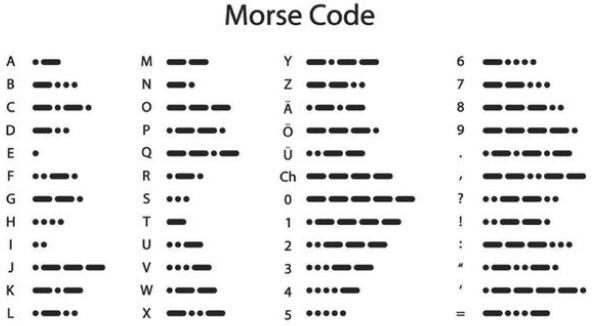
Die Morsezeichen entsprechen den folgenden Zeichen:
Projekt 11.1 Morsecode: Tür öffnen
Beschreibung
Wir verwenden 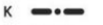 \ als korrektes Passwort. Außerdem gibt es die Button-Bibliothek OneButton, die sehr einfache Funktionen wie Klick, Doppelklick, langes Drücken usw. unterstützt. Beim Morse-Passwort steht ein Klick für „.“, langes Drücken und Loslassen für „-“.
Test Code
# Import machine, time and dht modules.
from machine import Pin, PWM
from time import sleep_ms, ticks_ms
from machine import SoftI2C, Pin
from i2c_lcd import I2cLcd

DEFAULT_I2C_ADDR = 0x27

# Initialize SCL/SDA pins and enable internal pull-up
scl_pin = Pin(22, Pin.OUT, pull=Pin.PULL_UP)  # GPIO22 with internal pull-up
sda_pin = Pin(21, Pin.OUT, pull=Pin.PULL_UP)  # GPIO21 with internal pull-up

i2c = SoftI2C(scl=Pin(22), sda=Pin(21), freq=100000)
lcd = I2cLcd(i2c, DEFAULT_I2C_ADDR, 2, 16)

button1 = Pin(16, Pin.IN, Pin.PULL_UP)
button2 = Pin(27, Pin.IN, Pin.PULL_UP)
count = 0
time_count = 0
password = ""   # Input password
correct_password = "-.-"  # Correct password
lcd.putstr("Enter password")
pwm = PWM(Pin(13))
pwm.freq(50)

while True:
    btnVal1 = button1.value()  # Reads the value of button 1
    if(btnVal1 == 0):
        sleep_ms(10)
        while(btnVal1 == 0):
            time_count = time_count + 1  # Start counting how long the button is pressed
            sleep_ms(200)                # Time accumulates in 200ms increments
            btnVal1 = button1.value()
            if(btnVal1 == 1):
                count = count + 1
                print(count)
                print(time_count)
                if(time_count > 3):      # If button pressed longer than 200*3ms, add "-" to password
                    lcd.clear()
                    #lcd.move_to(1, 1)
                    password = password + "-"
                else:
                    lcd.clear()
                    password = password + "."  # Otherwise add "."
                lcd.putstr('{}'.format(password))
                time_count = 0

    btnVal2 = button2.value()
    if(btnVal2 == 0):
        if(password == correct_password):  # If password is correct
            lcd.clear()
            lcd.putstr("open")
            pwm.duty(128)  # Open door
            password = ""  # Clear password
            sleep_ms(1000)
        else:              # If password is wrong
            lcd.clear()
            lcd.putstr("error")
            pwm.duty(25)  # Close door
            sleep_ms(2000)
            lcd.clear()
            lcd.putstr("enter again")
            password = ""  # Clear password
Test Result
Zuerst zeigt die LCD1602 “Passwort eingeben” an. Drücken Sie dann Taste 1 kurz oder lang, um das Passwort einzugeben. Wenn wir das korrekte Passwort “-.-” eingeben und anschließend Taste 2 drücken, öffnet sich die Tür und die LCD1602 zeigt “geöffnet” an.
Wenn ein anderes falsches Passwort eingegeben wird, bleibt die Tür geschlossen und die LCD1602 zeigt “Fehler” an, gefolgt von “erneut eingeben” 2 Sekunden später.