Project 9 Ultrasonic Obstacle Avoidance Smart Car
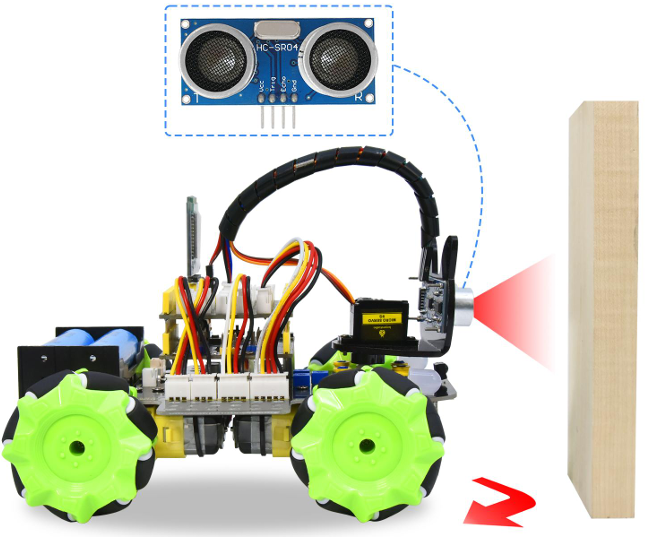
1.Description
Ultrasonic obstacle avoidance smart car is used to control the car motion state, so as to achieve obstacle avoidance by using the ultrasonic sensor detecting the obstacles distance.
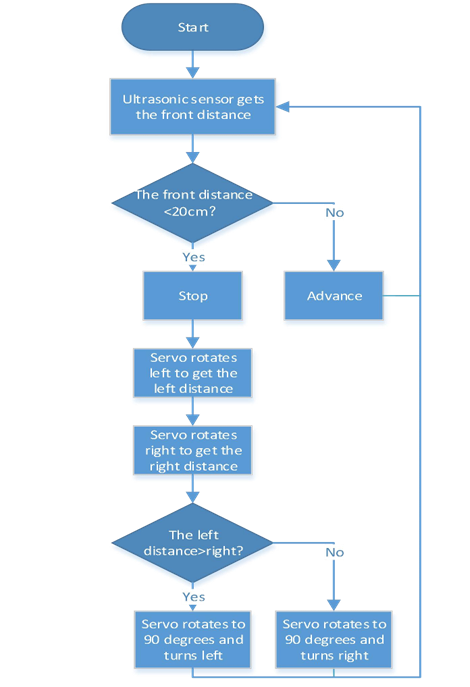
2.Flow Diagram
3.Test Code
#include "MecanumCar_v2.h"
#include "Servo.h"
mecanumCar mecanumCar(3, 2); //sda-->D3,scl-->D2
Servo myservo;//Define an instance of a servo
#define EchoPin 13 //ECHO to GPIO13
#define TrigPin 12 //TRIG to GPIO12
int distance_M, distance_L, distance_R;

void setup()
{
    myservo.attach(9);//The pins of the servo is connected to GP2
    pinMode(EchoPin, INPUT);//The ECHO pin is set to input mode
    pinMode(TrigPin, OUTPUT); //The TRIG pin is set to output mode
    myservo.write(90); //Rotate to 90 degrees
    delay(300);
}

void loop()
{
    distance_M = get_distance(); //Get the distance and save in the distance variable
    if (distance_M < 20) //When the distance in front is less than 20cm
    {
        mecanumCar.Stop(); //Robot stops
        delay(500); //Delay in 500ms
        myservo.write(180); //Ultrasonic cradle head turns left
        delay(500); //Delay in 500ms
        distance_L = get_distance(); //Assign the left ultrasonic distance to variable a1
        delay(100); //Read values when stable
        myservo.write(0); //Ultrasonic cradle head turns right
        delay(500); //Delay in 500ms
        distance_R = get_distance(); //Assign the right ultrasonic distance to variable a2
        delay(100); //Read values when stable
        myservo.write(90); //Return to the 90 degree position
        delay(500);
        if (distance_L > distance_R) //When the distance on the left is greater than right
        {
            mecanumCar.Turn_Left(); //Robot turns left
            delay(300); //Turn left 700ms
        }
        else
        {
            mecanumCar.Turn_Right(); //Robot turns right
         delay(300);
        }
    }
    else //If the distance in front>=20cm,the robot will advance
    {
     	mecanumCar.Advance();//Advance
    }
}

int get_distance(void)//Ultrasonicdetectsthedistance
{
    int dis;
    digitalWrite(TrigPin,LOW);
    delayMicroseconds(2);
    digitalWrite(TrigPin,HIGH);//Give the TRIG a high level of at least 10 µs to trigger
    delayMicroseconds(10);
    digitalWrite(TrigPin,LOW);
    dis= pulseIn(EchoPin,HIGH)/58.2;   //Work out the distance
    delay(30);
    return dis;
}
4.Test Result
After uploading the code successfully, turn the DIP switch to the ON end and power up, then the car can automatically avoid obstacles. Note that the speed can’t be too large.
The car will stop when encountering obstacles in front of it and the servo cradle head will rotate left to detect the left distance, then rotate right to detect the right distance.Then judge the distance between the obstacles on the left and the right, the car will turn along the farther side, and then continue to drive.
5.Code Explanation
myservo.write(90); // Make the servo rotate to 90 degrees.
intdistance=get_distance(); // Define an integer variable to store the measured distance,and then control the car driving according to it.
myservo.write(180);
distance_L=get_distance();  // Ultrasonic turns left to detect and save the .
myservo.write(0);
distance_R=get_distance();  //Ultrasonic turns right to detect and save the distance.
myservo.write(90); //The servo return to the 90 degrees position.
if(distance_L>distance_R) // Judge the left and right distance.
else
{
	mecanumCar.Advance();
}
//If the front distance is bigger than 20cm,the car will advance.