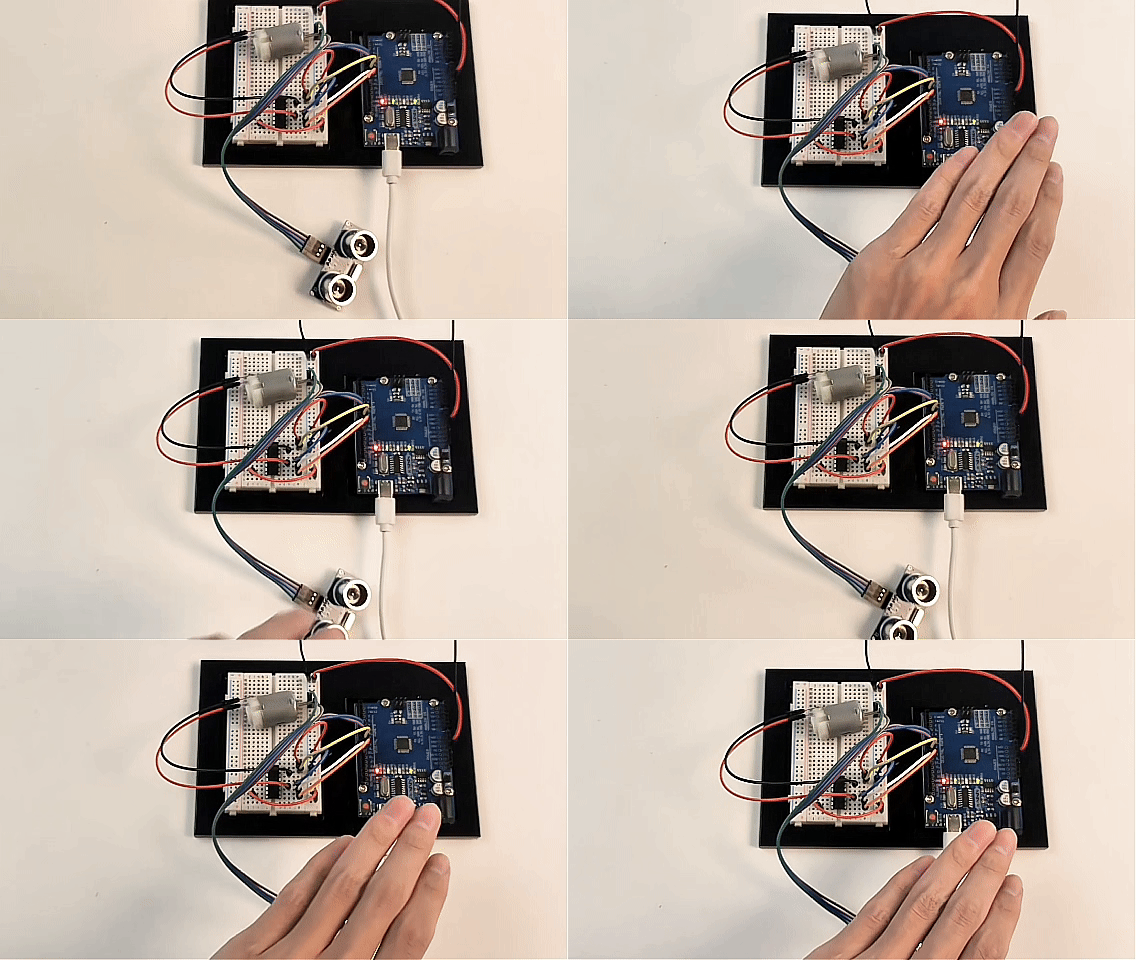
Project 24: Smart Obstacle Avoidance Fan
Description
In this project, we will build a “smart fan” that responds to its surrounding environment. We will combine the HC-SR04 ultrasonic sensor with a DC motor driven by an L293D chip. The ultrasonic sensor acts as a proximity detector: when an object (such as your hand) gets too close to the fan blades, the motor will automatically stop to prevent injury; when the obstacle is removed, the fan will automatically resume spinning.
Hardware
UNO R3 development board (CH340) × 1
HC-SR04 Ultrasonic Sensor × 1
L293D Motor Driver Chip × 1
130 DC Motor × 1
9V Battery and Battery Clip × 1 (for independent motor power supply)
Breadboard × 1
Jumper wires × several
Working Principle
Ultrasonic Distance Measurement: The HC-SR04 sensor emits high-frequency sound waves and measures the time it takes for the echo to return. Arduino calculates the physical distance ahead based on the round-trip time of the sound wave.
Logic Control: We set a “safe distance” threshold in the code (e.g., 15 cm). Arduino continuously checks the distance measured by the ultrasonic sensor:
If the distance is greater than 15 cm: Arduino sends commands to the L293D via a custom
setMotorfunction to run the DC motor at full speed.If the distance is less than or equal to 15 cm: Arduino immediately sends a stop command to the L293D, and the motor brakes instantly.
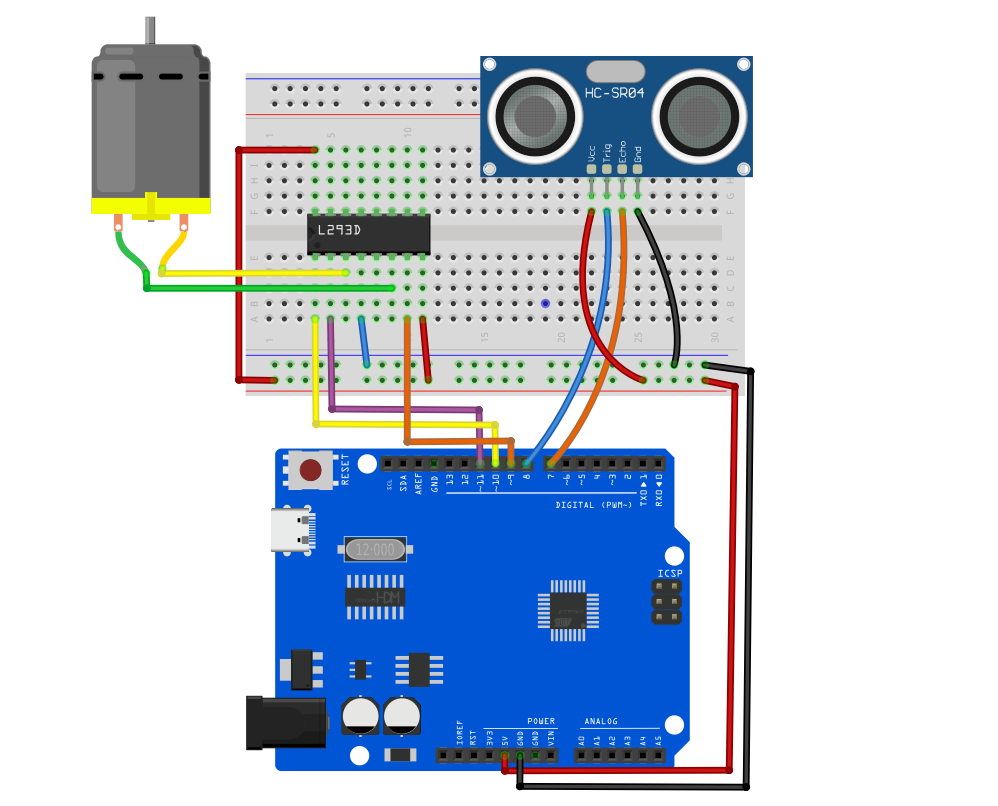
Wiring Diagram
1. HC-SR04 Ultrasonic Sensor Pins
VCC➔ Connect to Arduino 5VGND➔ Connect to Arduino GNDTrig (Trigger)➔ Connect to Arduino D8Echo (Echo)➔ Connect to Arduino D7
2. L293D Motor Driver Pins (following previous safe wiring method)
Pin 1 (Enable 1)➔ Connect to Arduino D10 (for speed control / start-stop)Pin 2 (Input 1)➔ Connect to Arduino D11 (direction control 1)Pin 7 (Input 2)➔ Connect to Arduino D9 (direction control 2)Pin 3 (Output 1)➔ Connect to one terminal of the motorPin 6 (Output 2)➔ Connect to the other terminal of the motorPin 16 (VCC1)➔ Connect to Arduino 5V (logic power)Pin 8 (VCC2)➔ Connect to 9V battery positive terminal (motor independent power)Pin 4, 5 (GND)➔ Connect to breadboard common GND (including Arduino GND and battery negative terminal)
Sample Code
/*

Electronics Learning Starter Kit for Arduino

Project 24

Smart Obstacle Avoidance Fan

Edit By Keyes

*/

// --- 1. Ultrasonic sensor pin definitions ---
const int trigPin = 8;  // Trigger pin
const int echoPin = 7;  // Echo pin

// --- 2. L293D motor driver pin definitions ---
const int enablePin = 10; // D10: motor speed control (PWM)
const int in1Pin = 11;    // D11: motor direction control 1
const int in2Pin = 9;     // D9:  motor direction control 2

// --- 3. Parameter settings ---
const int safeDistance = 15; // Safe distance threshold set to 15 cm

void setup() {
  // Initialize ultrasonic sensor pins
  pinMode(trigPin, OUTPUT);
  pinMode(echoPin, INPUT);

  // Initialize motor control pins
  pinMode(enablePin, OUTPUT);
  pinMode(in1Pin, OUTPUT);
  pinMode(in2Pin, OUTPUT);

  // Start serial communication to monitor distance data on PC
  Serial.begin(9600);
}

void loop() {
  // ================= Step 1: Emit sound wave and measure distance =================
  digitalWrite(trigPin, LOW);
  delayMicroseconds(2);
  digitalWrite(trigPin, HIGH); // Emit 10 microseconds high-frequency sound pulse
  delayMicroseconds(10);
  digitalWrite(trigPin, LOW);

  // Measure the duration of echo pin being HIGH (microseconds)
  long duration = pulseIn(echoPin, HIGH);
  // Calculate distance (speed of sound approx. 0.034 cm/us, divide by 2 for round trip)
  int distance = duration * 0.034 / 2;

  // Print current distance to serial monitor
  Serial.print("Current distance: ");
  Serial.print(distance);
  Serial.println(" cm");

  // ================= Step 2: Control motor start/stop based on distance =================
  // Add distance > 0 to avoid misjudgment when sensor occasionally returns 0
  if (distance > 0 && distance <= safeDistance) {
    // Obstacle too close! Set speed to 0 and stop motor.
    setMotor(0, false);
    Serial.println(">>> Status: Danger! Braking <<<");
  } else {
    // Safe ahead! Set speed to 255, full speed forward.
    setMotor(255, false);
    Serial.println("Status: Running normally...");
  }

  // Short delay to avoid interference from too frequent measurements
  delay(100);
}

// ================= Custom motor control function =================
void setMotor(int speed, boolean reverse) {
  analogWrite(enablePin, speed);
  digitalWrite(in1Pin, !reverse);
  digitalWrite(in2Pin, reverse);
}
Code Explanation
1. Distance Measurement (pulseIn function):
long duration = pulseIn(echoPin, HIGH);
int distance = duration * 0.034 / 2;
The pulseIn() function measures how long the Echo pin stays HIGH. We multiply this time by the speed of sound (0.034 cm per microsecond), then divide by 2 because the sound travels to the object and back, to get the accurate one-way distance in centimeters.
2. Safe Obstacle Avoidance Logic:
if (distance > 0 && distance <= safeDistance)
We check if the distance is less than or equal to the safeDistance (15 cm). The distance > 0 condition is added because the ultrasonic sensor sometimes returns 0 when out of range or no echo is received. Without this check, the fan might mistakenly stop when the sensor outputs 0.
3. Using Safe Motor Control:
The code continues to use the previously written setMotor() function. This ensures that no matter how the main program changes, the underlying mutually exclusive logic controlling direction (!reverse) protects the chip from short circuits.
Project Result
After uploading the code to Arduino and connecting the 9V battery:
The DC motor will start spinning immediately.
Place your hand or a book about 10–15 cm in front of the ultrasonic sensor, and the motor will stop spinning immediately.
Move your hand away, and the motor will automatically resume spinning.
If you open the Arduino IDE Serial Monitor (baud rate set to 9600), you can see the real-time measured distance and the fan’s running status.