5.2.5 Avoid Bricks
5.2.5.1 Overview

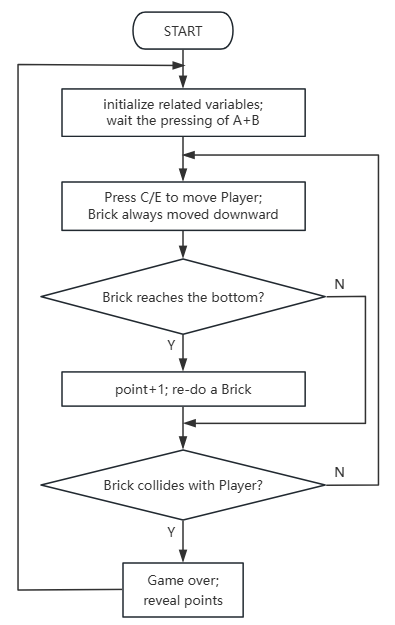
In this project, we play a brick-avoidance game where players use a Micro:bit gamepad to move their LED indicator left and right while evading bricks falling from above. There are three states: a) a dynamic icon at startup, b) real-time avoidance actions during gameplay, and c) a final score after collisions.
Players earn 1 point after each avoidance (when the brick reaches the bottom), and the game is over when they collides with a brick; the final score is displayed with a scrolling effect.
The game can be started or reset by pressing both A+B. This straightforward gameplay mechanism combines real-time responsiveness with strategic anticipation.

5.2.5.2 Required Parts
|
|
|
|---|---|---|
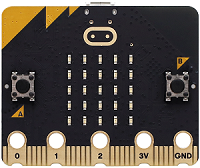
micro:bit V2 board (self-provided) ×1 |
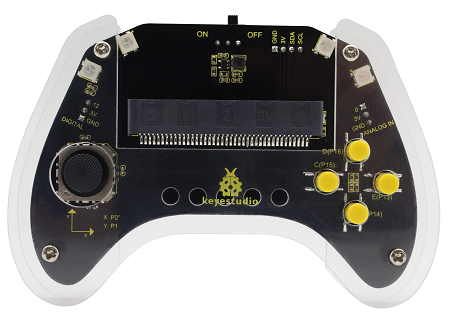
micro:bit Smart Gamepad (assembled) ×1 |
AAA battery (self-provided) ×4 |
5.2.5.3 Code Flow
5.2.5.4 Test Code
⚠️ Note that the initial threshold ‘‘brick_move_speed=300’’ can be modified according to your needs. The higher the value is, the slower the brick will fall.
Complete code:
import utime
import random
from microbit import *

# ===================== Global Configuration & Variables =====================
# Player initial configuration (micro:bit pixel coordinates: col=column(0-4, left-right), row=row(0-4, top-bottom))
player_fixed_row = 4    # Player's fixed row (bottom row)
player_init_col = 4     # Player's initial column (center)
brick_move_speed = 300  # Brick falling interval (ms)

# Game state: 0=not started 1=running 2=game over
game_state = 0
brick_x = 0             # Brick current column (left-right)
brick_y = 0             # Brick current row (top-bottom)
score = 0               # Score counter
a_pressed_flag = False  # Left move button debounce flag
b_pressed_flag = False  # Right move button debounce flag
collision_x = False     # Collision detection - same column
collision_y = False     # Collision detection - same row
flash_count = 0         # End screen flash counter
time_passed = 0         # Time difference (for brick falling)
current_time = 0        # Current timestamp
last_brick_time = 0     # Last brick falling timestamp
start_flag = 0          # Start button debounce flag
can_start = False       # Game start flag
ab_pressed = False      # A+B pressed simultaneously flag
player_col = player_init_col  # Player's current column

# Initialize pins with pull-up (PULL_UP: pressed=low level 0, released=high level 1)
pin13.set_pull(pin13.PULL_UP)  # Right move button
pin15.set_pull(pin15.PULL_UP)  # Left move button

# ===================== Core Functions =====================
def on_start():
    """Initialization on power-up: randomly generate initial brick column"""
    global brick_x
    brick_x = random.randint(0, 4)

def draw_game():
    """Draw game screen: player (bright) + brick (dim)"""
    global game_state, player_col, brick_x, brick_y
    display.clear()
    # Draw player (fixed at bottom row, brightness 9 = brightest)
    display.set_pixel(player_col, player_fixed_row, 9)
    # Draw brick during gameplay (brightness 3 = dim)
    if game_state == 1:
        display.set_pixel(brick_x, brick_y, 7)

def reset_game():
    """Reset all game states"""
    global game_state, player_col, brick_x, brick_y, score
    global a_pressed_flag, b_pressed_flag
    game_state = 1
    player_col = player_init_col
    brick_x = random.randint(0, 4)
    brick_y = 0
    score = 0
    a_pressed_flag = False
    b_pressed_flag = False
    display.clear()

def check_collision():
    """Collision detection: game over if brick is in same column and row as player"""
    global collision_x, collision_y, game_state, flash_count
    collision_x = (brick_x == player_col)
    collision_y = (brick_y == player_fixed_row)
    if collision_x and collision_y:
        game_state = 2
        display.clear()
        flash_count = 0

# ===================== Main Loop =====================
def on_forever():
    """Main game logic loop"""
    global ab_pressed, can_start, start_flag, last_brick_time
    global flash_count, player_col, a_pressed_flag, b_pressed_flag
    global current_time, time_passed, brick_x, brick_y, score

    # 1. A+B pressed simultaneously: start/reset game (debounced)
    ab_pressed = button_a.is_pressed() and button_b.is_pressed()
    can_start = ab_pressed and (game_state != 1)
    if can_start:
        if start_flag == 0:
            start_flag = 1
            utime.sleep_ms(20)
            if button_a.is_pressed() and button_b.is_pressed():
                reset_game()
                last_brick_time = running_time()
    else:
        start_flag = 0

    # 2. Game not started state
    if game_state == 0:
        display.show(Image.DIAMOND_SMALL)
        utime.sleep_ms(500)
        display.show(Image.DIAMOND)
        utime.sleep_ms(500)

    # 3. Game over state
    if game_state == 2:
        if flash_count < 3:
            display.scroll(score)
            utime.sleep_ms(300)
            display.clear()
            utime.sleep_ms(200)
            flash_count += 1
        else:
            display.scroll(score)
            utime.sleep_ms(500)

    # 4. Game running logic
    if game_state == 1:
        # Left move button (pin15): fix level detection + set flag only on successful move
        if not pin15.read_digital():  # Pressed = low level 0, trigger left move
            if not a_pressed_flag:
                if player_col > 0:
                    player_col -= 1
                    a_pressed_flag = True  # Only set flag on successful move
                    utime.sleep_ms(50)
        else:
            a_pressed_flag = False  # Reset flag immediately when button is released

        # Right move button (pin13): fix level detection + set flag only on successful move
        if not pin13.read_digital():  # Pressed = low level 0, trigger right move
            if not b_pressed_flag:
                if player_col < 4:
                    player_col += 1
                    b_pressed_flag = True  # Only set flag on successful move
                    utime.sleep_ms(50)
        else:
            b_pressed_flag = False  # Reset flag immediately when button is released

        # Brick falling logic
        current_time = running_time()
        time_passed = current_time - last_brick_time
        if time_passed > brick_move_speed:
            last_brick_time = current_time
            brick_y += 1
            if brick_y > 4:
                brick_x = random.randint(0, 4)
                brick_y = 0
                score += 1

        # Collision detection + screen refresh
        check_collision()
        draw_game()

# ===================== Program Entry Point =====================
if __name__ == "__main__":
    on_start()
    while True:
        on_forever()
        utime.sleep_ms(10)

Brief explanation:
① Import libraries, configure constants and initialization.
It first imports utime for time-related operations (e.g., delays), random for generating random numbers, microbit for accessing Micro:bit’s hardware.
It then defines global variables and constants to configure the game:
player_fixed_rowandplayer_init_coldefine the player’s initial position (on the middle of the bottom row).brick_move_speedsets the time interval (in milliseconds) of the brick’ fall.game_statetracks game status (0=initial, 1=gaming, 2=game over).brick_x,brick_ystore the current coordinates of the brick.scorerecords the score.a_pressed_flag,b_pressed_flageliminate button jitter.collision_x,collision_ydetects collision.flash_countcreates a flickering effect at the end of the game.time_passed,current_time,last_brick_timeis for timing the fall of bricks.start_flag,can_start,ab_pressedis used for game start and to reset anti-jitter and button status.player_colstores the player’s current column position.
Finally, it configures pin13 and pin15 (used for left and right button movements) as internal pull-up resistors (pinX.PULL_UP), meaning pins maintain a high level (1) when the buttons are not pressed and a low level (0) when pressed.
import utime
import random
from microbit import *

# ===================== Global Configuration & Variables =====================
# Player initial configuration (micro:bit pixel coordinates: col=column(0-4, left-right), row=row(0-4, top-bottom))
player_fixed_row = 4    # Player's fixed row (bottom row)
player_init_col = 4     # Player's initial column (center)
brick_move_speed = 300  # Brick falling interval (ms)

# Game state: 0=not started 1=running 2=game over
game_state = 0
brick_x = 0             # Brick current column (left-right)
brick_y = 0             # Brick current row (top-bottom)
score = 0               # Score counter
a_pressed_flag = False  # Left move button debounce flag
b_pressed_flag = False  # Right move button debounce flag
collision_x = False     # Collision detection - same column
collision_y = False     # Collision detection - same row
flash_count = 0         # End screen flash counter
time_passed = 0         # Time difference (for brick falling)
current_time = 0        # Current timestamp
last_brick_time = 0     # Last brick falling timestamp
start_flag = 0          # Start button debounce flag
can_start = False       # Game start flag
ab_pressed = False      # A+B pressed simultaneously flag
player_col = player_init_col  # Player's current column

# Initialize pins with pull-up (PULL_UP: pressed=low level 0, released=high level 1)
pin13.set_pull(pin13.PULL_UP)  # Right move button
pin15.set_pull(pin15.PULL_UP)  # Left move button
② Core functional function definitions.
There are three core functions that the game needs:
on_start(): Called at program startup. It primarily initializes the starting column position of bricks, ensuring one appear randomly among 0 to 4.draw_game(): Responsible for rendering game elements on the Micro:bit 5x5 LED matrix. It clears the display and show the player at maximum brightness(9) in the bottom rowplayer_fixed_rowwith columns determined byplayer_col. When the game is running (game_state == 1), it renders bricks at medium brightness (7).reset_game(): Reset the game to its initial state. It setsgame_stateto 1, resets player and brick and scores, clears the button anti-jitter flag and display.check_collision(): Detect whether a collision occurs between the brick and the player. This is determined by comparing axisx(brick_x == player_col) andy(brick_y == player_fixed_row). If both match, a collision is detected andgame_state= 2(game over), clear display and resetflash_count.
# ===================== Core Functions =====================
def on_start():
    """Initialization on power-up: randomly generate initial brick column"""
    global brick_x
    brick_x = random.randint(0, 4)

def draw_game():
    """Draw game screen: player (bright) + brick (dim)"""
    global game_state, player_col, brick_x, brick_y
    display.clear()
    # Draw player (fixed at bottom row, brightness 9 = brightest)
    display.set_pixel(player_col, player_fixed_row, 9)
    # Draw brick during gameplay (brightness 3 = dim)
    if game_state == 1:
        display.set_pixel(brick_x, brick_y, 7)

def reset_game():
    """Reset all game states"""
    global game_state, player_col, brick_x, brick_y, score
    global a_pressed_flag, b_pressed_flag
    game_state = 1
    player_col = player_init_col
    brick_x = random.randint(0, 4)
    brick_y = 0
    score = 0
    a_pressed_flag = False
    b_pressed_flag = False
    display.clear()

def check_collision():
    """Collision detection: game over if brick is in same column and row as player"""
    global collision_x, collision_y, game_state, flash_count
    collision_x = (brick_x == player_col)
    collision_y = (brick_y == player_fixed_row)
    if collision_x and collision_y:
        game_state = 2
        display.clear()
        flash_count = 0
③ Main loop: Game Start/Reset Logic.
on_forever() first checks whether both the A and B buttons on the Micro:bit board are pressed (button_a.is_pressed() and button_b.is_pressed()). can_start flag is true when both A and B buttons are pressed simultaneously and the game is not running.
If can_start is true and start_flag = 0 (the first detected simultaneous press of the A+B), set start_flag to 1 with a short delay (utime.sleep_ms(20)).
Recheck whether the A+B buttons remain pressed (for anti-jitter). If yes, reset_game() will restart the game, and last_brick_time is recorded. If the A+B are not pressed at the same time, start_flag = 0.
# ===================== Main Loop =====================
def on_forever():
    """Main game logic loop"""
    global ab_pressed, can_start, start_flag, last_brick_time
    global flash_count, player_col, a_pressed_flag, b_pressed_flag
    global current_time, time_passed, brick_x, brick_y, score

    # 1. A+B pressed simultaneously: start/reset game (debounced)
    ab_pressed = button_a.is_pressed() and button_b.is_pressed()
    can_start = ab_pressed and (game_state != 1)
    if can_start:
        if start_flag == 0:
            start_flag = 1
            utime.sleep_ms(20)
            if button_a.is_pressed() and button_b.is_pressed():
                reset_game()
                last_brick_time = running_time()
    else:
        start_flag = 0
④ Main loop: Display of the game-not-started and game-over status.
Game has not started yet. (
game_state == 0): In this state, the matrix displays small diamonds (Image.DIAMOND_SMALL) and large diamonds (Image.DIAMOND) with each lasting 500ms, as an indication for players to wait before starting.Game is over (
game_state == 2): When the game ends, the program enters a loop that flashes the score.flash_countlimits the number of flashes (3 here). Each flash scroll-display the current score, and clear it with a brief delay. After that, final score shows again for 500 milliseconds.
    # 2. Game not started state
    if game_state == 0:
        display.show(Image.DIAMOND_SMALL)
        utime.sleep_ms(500)
        display.show(Image.DIAMOND)
        utime.sleep_ms(500)

    # 3. Game over state
    if game_state == 2:
        if flash_count < 3:
            display.scroll(score)
            utime.sleep_ms(300)
            display.clear()
            utime.sleep_ms(200)
            flash_count += 1
        else:
            display.scroll(score)
            utime.sleep_ms(500)
⑤ Main loop: The logic in during gaming.
game_state == 1 (gaming), execute the following logic:
Player move left and right.:
pin15(left movement button): Ifpin15is pressed (reading 0),a_pressed_flagisFalse(avoid consecutive triggers), and Player is not at the most left (player_col > 0), Player will move one space to the left (player_col -= 1) anda_pressed_flagwill becomeTrue, with a delay of 50ms. Ifpin15is not pressed,a_pressed_flagwill be reset toFalse.pin13(right movement button): Ifpin13is pressed (reading 0),a_pressed_flagisFalse(avoid consecutive triggers), and Player is not at the most right (player_col < 4), Player will move one space to the right (player_col += 1) andb_pressed_flagwill becomeTrue, with a delay of 50ms. Ifpin13is not pressed,b_pressed_flagwill be reset toFalse.
Brick falls down:
current_timegets the current time,time_passedcalculates the time elapsed since the last brick fell.If
time_passed>brick_move_speed, updatelast_brick_timeand brick moves one space down (brick_y += 1).If a brick falls till the bottom (
brick_y > 4), reset it to a random column at the top (brick_x = random.randint(0, 4)), and zero outbrick_yandscore+1.
Detect collision and render image:
check_collision()detects if the player and the brick collide.draw_game()updates the display on the Micro:bit matrix.
    # 4. Game running logic
    if game_state == 1:
        # Left move button (pin15): fix level detection + set flag only on successful move
        if not pin15.read_digital():  # Pressed = low level 0, trigger left move
            if not a_pressed_flag:
                if player_col > 0:
                    player_col -= 1
                    a_pressed_flag = True  # Only set flag on successful move
                    utime.sleep_ms(50)
        else:
            a_pressed_flag = False  # Reset flag immediately when button is released

        # Right move button (pin13): fix level detection + set flag only on successful move
        if not pin13.read_digital():  # Pressed = low level 0, trigger right move
            if not b_pressed_flag:
                if player_col < 4:
                    player_col += 1
                    b_pressed_flag = True  # Only set flag on successful move
                    utime.sleep_ms(50)
        else:
            b_pressed_flag = False  # Reset flag immediately when button is released

        # Brick falling logic
        current_time = running_time()
        time_passed = current_time - last_brick_time
        if time_passed > brick_move_speed:
            last_brick_time = current_time
            brick_y += 1
            if brick_y > 4:
                brick_x = random.randint(0, 4)
                brick_y = 0
                score += 1

        # Collision detection + screen refresh
        check_collision()
        draw_game()
⑥ Program entry point.
This is the actual starting point for the execution of the program.
if __name__ == "__main__": ensures this code is only executed when the script is running as the main program.
Among it, on_start() performs a one-time initialization.
Then, enter an infinite loop (while True), where each iteration:
on_forever()executes all the core logic of the game.A delay of 10ms (
utime.sleep_ms(10)) controls the execution frequency, reduces CPU load, and ensures moderate game update speed.
# ===================== Program Entry Point =====================
if __name__ == "__main__":
    on_start()
    while True:
        on_forever()
        utime.sleep_ms(10)
5.2.5.5 Test Result

After burning the code, insert the micro:bit board into the slot of the gamepad (batteries installed), and toggle the switch on it to “ON”.
It is in 0-initial state after powering on and the matrix flashes two square icons.
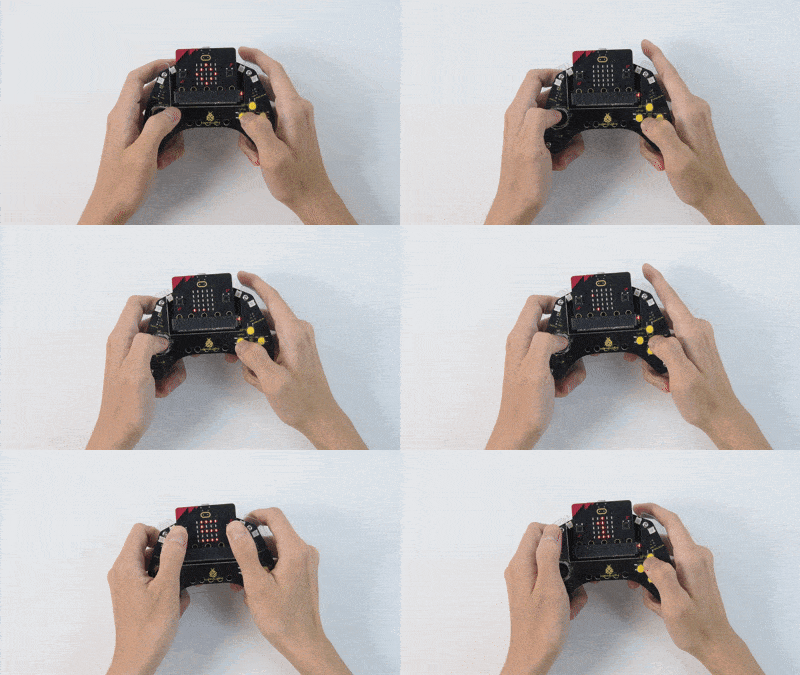
Press A and B (for at least 1 second) to start the game (in 1-gaming state), and a brick will fall in a random column. Now you can move left/right by pressing C/E. Each time you avoid a brick, score+1.
Game over upon collision (2-game over), and the final score will be displayed on the matrix. If you want to play one more round, press A and B again. Power off to exit the game (toggle the DIP switch to “OFF”).
Tip: If there is no response on the board, please press the reset button on the back of the micro:bit board.
