5.2.6 Rock-Paper-Scissors
5.2.6.1 Overview

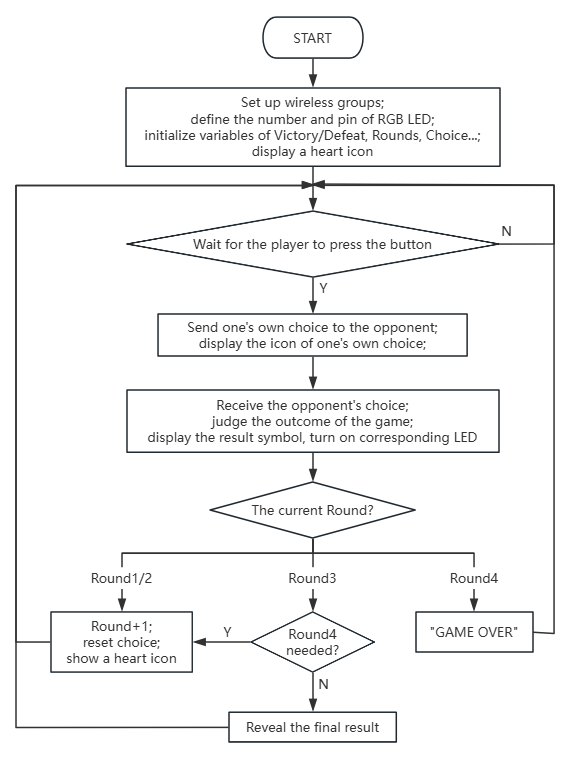
Herein, let’s play rock-paper-scissors by wireless communication of micro:bit. Players select their move (rock, paper, or scissors) via the buttons, with data exchange between devices. The game follows best-of-three; if all three rounds end in all tie or win-loss-tie, a fourth match is triggered.
Each outcome is displayed on the micro:bit matrix (W for win, L for Loss, = for tie) and revealed by the RGB lights (green for win, red for loss, yellow for tie) at pin P8. Upon completion of a round, the two device resets all data and lights, preparing for the next match.
The gameplay seamlessly integrates wireless interaction with the multi-round combat.

5.2.6.2 Component Knowledge

Microbit wireless communication
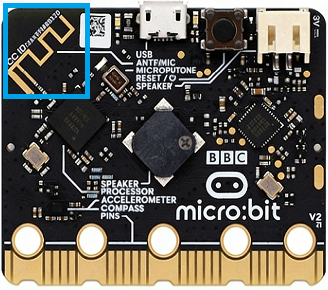
The micro:bit board integrates two convenient wireless communication capabilities: 2.4GHz radio and low-power Bluetooth (BLE). Yet they cannot be used simultaneously.
The former requires no pairing and supports up to 255 independent packets to minimize interference, with a communication range of 10–30 meters, enabling rapid transmission of digital data and strings. While the latter is primarily used for pairing with smartphones, tablets, and other smart devices for IoT applications such as sensor data upload and mobile app remote control.
They expands the creative development possibilities of the micro:bit.
5.2.6.3 Required Parts
|
|
|
|---|---|---|
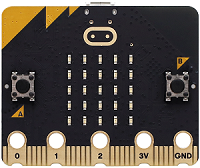
micro:bit V2 board (self-provided) ×2 |
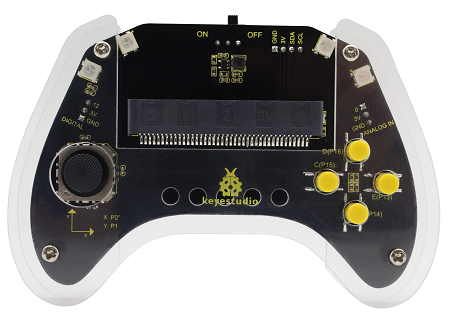
micro:bit Smart Gamepad (assembled) ×2 |
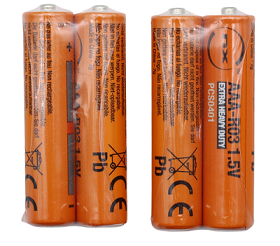
AAA battery (self-provided) ×8 |
5.2.6.4 Code Flow
5.2.6.5 Test Code
Complete code:
from microbit import *
import neopixel
import radio

# Global Variables
round2 = 1
check = 1
me = 0
you = 0
wins = 0
loses = 0
draws = 0
gameResults = []
strip = None

pin13.set_pull(pin13.PULL_UP)
pin15.set_pull(pin15.PULL_UP)
pin16.set_pull(pin16.PULL_UP)
# Initialize LED strip (4 LEDs, connected to pin P8)
strip = neopixel.NeoPixel(pin8, 4)

# Reset game state
def resetGame():
    global me, you, round2, wins, loses, draws, gameResults, check
    me = 0
    you = 0
    round2 = 1
    wins = 0
    loses = 0
    draws = 0
    gameResults = []
    check = 1
    resetLights()
    display.show(Image.HEART)

# Receive opponent's choice via radio
def on_received_message(receivedMsg):
    global you
    if you == 0:
        # Convert string to integer if needed
        if isinstance(receivedMsg, str) and receivedMsg in ['1', '2', '3']:
            you = int(receivedMsg)
        # Use directly if it's an integer
        elif isinstance(receivedMsg, int) and receivedMsg in [1, 2, 3]:
            you = receivedMsg

# Turn off all LEDs
def resetLights():
    for i in range(4):
        strip[i] = (0, 0, 0)  # Off
    strip.show()

# Check if a 4th round is needed
def needFourthRound():
    # Case 1: All 3 draws -> need 4th round, return 2
    if wins == 0 and loses == 0 and draws == 3:
        return 2
    # Case 2: 1 win, 1 loss, 1 draw -> need 4th round, return 1
    if wins == 1 and loses == 1 and draws == 1:
        return 1
    # No 4th round needed
    return 0

# Show round result on LED strip
def showRoundResult(roundNum, result):
    if roundNum <= 4:
        if result == 1:
            # Win: Green
            strip[roundNum - 1] = (0, 255, 0)
        elif result == 0:
            # Draw: Yellow
            strip[roundNum - 1] = (255, 255, 0)
        else:
            # Lose: Red
            strip[roundNum - 1] = (255, 0, 0)
        strip.show()

# Game initialization
radio.on()
radio.config(group=1)
check = 1
me = 0
you = 0
strip.clear()
strip.show()
display.show(Image.HEART)

# Main game loop
while True:

    # Process result when both players have chosen
    if me != 0 and you != 0:
        # Current round result: 1=win, 0=draw, -1=lose
        resultSymbol = "="
        # Determine round outcome
        if me == you:
            resultSymbol = "="
            # Draw
            result2 = 0
            draws += 1
        elif me == 2 and you == 1 or (me == 3 and you == 2 or me == 1 and you == 3):
            resultSymbol = "W"
            # Win
            result2 = 1
            wins += 1
        else:
            resultSymbol = "L"
            # Lose
            result2 = -1
            loses += 1

        # Save round result
        gameResults.append(result2)

        # Display result symbol
        display.show(resultSymbol)

        # Update LED strip
        showRoundResult(round2, result2)

        sleep(3000)

        # Check if game continues
        if round2 == 3:
            # After 3 rounds, check for 4th round
            fourth_round_needed = needFourthRound()
            if fourth_round_needed:
                # Go to 4th round
                round2 = 4
                if fourth_round_needed == 2:
                    display.scroll("FINAL")
                sleep(1000)
                display.show(Image.HEART)
                check = 1
                me = 0
                you = 0
            else:
                # End game
                if wins > loses:
                    display.scroll("WINNER")
                elif loses > wins:
                    display.scroll("LOSER")
                else:
                    display.scroll("TIE")
                sleep(3000)
                resetGame()
        elif round2 == 4:
            # 4th round finished, game over
            display.scroll("GAME OVER")
            sleep(3000)
            resetGame()
        else:
            # Next round (1st or 2nd)
            round2 += 1
            display.show(Image.HEART)
            check = 1
            me = 0
            you = 0

    # Check button input
    if check == 1:
        if pin13.read_digital() == 0:
            # Paper -> send '3'
            radio.send('3')
            display.show(Image.SQUARE)
            me = 3
            check = 0
            sleep(200)
        elif pin15.read_digital() == 0:
            # Scissors -> send '1'
            radio.send('1')
            display.show(Image('99009:'
                                '99090:'
                                '00900:'
                                '99090:'
                                '99009'))
            me = 1
            check = 0
            sleep(200)
        elif pin16.read_digital() == 0:
            # Rock -> send '2'
            radio.send('2')
            display.show(Image.SQUARE_SMALL)
            me = 2
            check = 0
            sleep(200)

    # Receive radio data
    try:
        received = radio.receive()
        if received is not None:
            on_received_message(received)
    except:
        pass

    sleep(100)


# Receive opponent's choice via radio
def on_received_message(receivedMsg):
    global you
    if you == 0:
        # Convert string to integer if needed
        if isinstance(receivedMsg, str) and receivedMsg in ['1', '2', '3']:
            you = int(receivedMsg)
        # Use directly if it's an integer
        elif isinstance(receivedMsg, int) and receivedMsg in [1, 2, 3]:
            you = receivedMsg

# Turn off all LEDs
def resetLights():
    for i in range(4):
        strip[i] = (0, 0, 0)  # Off
    strip.show()

# Check if a 4th round is needed
def needFourthRound():
    # Case 1: All 3 draws -> need 4th round, return 2
    if wins == 0 and loses == 0 and draws == 3:
        return 2
    # Case 2: 1 win, 1 loss, 1 draw -> need 4th round, return 1
    if wins == 1 and loses == 1 and draws == 1:
        return 1
    # No 4th round needed
    return 0

# Show round result on LED strip
def showRoundResult(roundNum, result):
    if roundNum <= 4:
        if result == 1:
            # Win: Green
            strip[roundNum - 1] = (0, 255, 0)
        elif result == 0:
            # Draw: Yellow
            strip[roundNum - 1] = (255, 255, 0)
        else:
            # Lose: Red
            strip[roundNum - 1] = (255, 0, 0)
        strip.show()

# Game initialization
radio.on()
radio.config(group=1)
check = 1
me = 0
you = 0
strip.clear()
strip.show()
display.show(Image.HEART)

# Main game loop
while True:

    # Process result when both players have chosen
    if me != 0 and you != 0:
        # Current round result: 1=win, 0=draw, -1=lose
        resultSymbol = "="
        # Determine round outcome
        if me == you:
            resultSymbol = "="
            # Draw
            result2 = 0
            draws += 1
        elif me == 2 and you == 1 or (me == 3 and you == 2 or me == 1 and you == 3):
            resultSymbol = "W"
            # Win
            result2 = 1
            wins += 1
        else:
            resultSymbol = "L"
            # Lose
            result2 = -1
            loses += 1

        # Save round result
        gameResults.append(result2)

        # Display result symbol
        display.show(resultSymbol)

        # Update LED strip
        showRoundResult(round2, result2)

        sleep(3000)

        # Check if game continues
        if round2 == 3:
            # After 3 rounds, check for 4th round
            fourth_round_needed = needFourthRound()
            if fourth_round_needed:
                # Go to 4th round
                round2 = 4
                if fourth_round_needed == 2:
                    display.scroll("FINAL")
                sleep(1000)
                display.show(Image.YES)
                check = 1
                me = 0
                you = 0
            else:
                # End game
                if wins > loses:
                    display.scroll("WINNER")
                elif loses > wins:
                    display.scroll("LOSER")
                else:
                    display.scroll("TIE")
                sleep(3000)
                resetGame()
        elif round2 == 4:
            # 4th round finished, game over
            display.scroll("GAME OVER")
            sleep(3000)
            resetGame()
        else:
            # Next round (1st or 2nd)
            round2 += 1
            display.show(Image.HEART)
            check = 1
            me = 0
            you = 0

    # Check button input
    if check == 1:
        if pin13.read_digital() == 0:
            # Paper -> send '3'
            radio.send('3')
            display.show(Image.SQUARE)
            me = 3
            check = 0
            sleep(200)
        elif pin15.read_digital() == 0:
            # Scissors -> send '1'
            radio.send('1')
            display.show(Image('99009:'
                                '99090:'
                                '00900:'
                                '99090:'
                                '99009'))
            me = 1
            check = 0
            sleep(200)
        elif pin16.read_digital() == 0:
            # Rock -> send '2'
            radio.send('2')
            display.show(Image.SQUARE_SMALL)
            me = 2
            check = 0
            sleep(200)

    # Receive radio data
    try:
        received = radio.receive()
        if received is not None:
            on_received_message(received)
    except:
        pass

    sleep(100)

Brief explanation:
① Import the relevant libraries, initialize global variables, and configure pins.
from microbit import *
import neopixel
import radio

# Global Variables
round2 = 1
check = 1
me = 0
you = 0
wins = 0
loses = 0
draws = 0
gameResults = []
strip = None

pin13.set_pull(pin13.PULL_UP)
pin15.set_pull(pin15.PULL_UP)
pin16.set_pull(pin16.PULL_UP)
# Initialize LED strip (4 LEDs, connected to pin P8)
strip = neopixel.NeoPixel(pin8, 4)
② resetGame resets all game states.
It usually be called at the start of a game or after a round concludes to reset all global variables related to the game progress—including player selections, turn counts, win/loss/tie counts, and historical results—to their initial values.
resetLights() turns off all NeoPixel LEDs and display a heart icon (Image.HEART), indicating the game is ready to begin.
# Reset game state
def resetGame():
    global me, you, round2, wins, loses, draws, gameResults, check
    me = 0
    you = 0
    round2 = 1
    wins = 0
    loses = 0
    draws = 0
    gameResults = []
    check = 1
    resetLights()
    display.show(Image.HEART)
③ on_received_message processes the opponent’s selection received via radio. It handles radio messages from another Micro:bit (scissors, rock, or paper).
To ensure accuracy, it verifies the message type: if the message is a string (‘1’, ‘2’, or ‘3’), convert it to an integer; if it is an integer (1, 2, or 3), directly use it .
The value of the you is updated only when you=0 (no opponent choice is received), preventing multiple reception.
# Receive opponent's choice via radio
def on_received_message(receivedMsg):
    global you
    if you == 0:
        # Convert string to integer if needed
        if isinstance(receivedMsg, str) and receivedMsg in ['1', '2', '3']:
            you = int(receivedMsg)
        # Use directly if it's an integer
        elif isinstance(receivedMsg, int) and receivedMsg in [1, 2, 3]:
            you = receivedMsg
④ resetLights turns off all NeoPixel LEDs. It iterates through all four LEDs to set their colors to black ((0, 0, 0)), i.e., off.
strip.show() sends these color updates to the light strip to ensure all LEDs off.
# Turn off all LEDs
def resetLights():
    for i in range(4):
        strip[i] = (0, 0, 0)  # Off
    strip.show()
⑤ needFourthRound determines whether a fourth round is required after the three rounds.
It handles two special cases: if all three rounds end in draws (wins == 0 and loses == 0 and draws == 3), return 2 for a fourth round — the final decisive game; If there is a win-loss-tie (wins == 1 and loses == 1 and draws == 1), return 1 for an additional round as well. In all other cases (where there is a clear winner/loser), return 0 (No 4th round needed).
# Check if a 4th round is needed
def needFourthRound():
    # Case 1: All 3 draws -> need 4th round, return 2
    if wins == 0 and loses == 0 and draws == 3:
        return 2
    # Case 2: 1 win, 1 loss, 1 draw -> need 4th round, return 1
    if wins == 1 and loses == 1 and draws == 1:
        return 1
    # No 4th round needed
    return 0
⑥ showRoundResult displays the result of each round on the LED strip.
It accepts the current round number (roundNum) and the result (result: 1 for win, 0 for draw, -1 for loss). Based on the result, it lights up different colors on the corresponding LED: green for win, yellow for draw, and red for loss.
roundNum-1 converts the round number into a zero-based index for the LEDs.
# Show round result on LED strip
def showRoundResult(roundNum, result):
    if roundNum <= 4:
        if result == 1:
            # Win: Green
            strip[roundNum - 1] = (0, 255, 0)
        elif result == 0:
            # Draw: Yellow
            strip[roundNum - 1] = (255, 255, 0)
        else:
            # Lose: Red
            strip[roundNum - 1] = (255, 0, 0)
        strip.show()
⑦ Initialization when the game starts.
It runs once when the program starts. It activates the Micro:bit radio function and set group=1. Next, it sets check to 1 (selective for Player), me and you to 0(waiting for Player and Opponent choices).
The NeoPixel light strip is cleared and updated to turn off all LEDs. And Micro:bit shows a heart icon (Image.HEART) as the initial prompt awaiting Player input.
# Game initialization
radio.on()
radio.config(group=1)
check = 1
me = 0
you = 0
strip.clear()
strip.show()
display.show(Image.HEART)
⑧ Process the turn results and control the game flow.
This code represents the core logic of the game, running in an infinite loop. It first checks whether both Player and Opponent have made their choices (me != 0 and you != 0).
If yes, it determines the outcome of the current round according to the rock-paper-scissors rules, updates wins, loses, draws counters, and displays the corresponding icon(“W”, “L”, “=”) on the matrix.
showRoundResult turns on LED on the NeoPixel in related colors for the previous round
After displaying the results for 3s, the game will proceed based on the current turn count:
If it is currently the 3rd round (
round2 == 3),needFourthRound()will determine whether the final decisive round is required. If so, the fourth round proceeds; otherwise, based on the overall outcome, show a WINNER/LOSER/TIE and reset the game.If it is currently the fourth round (
round2 == 4), declare “GAME OVER” and reset the game.If it is the first or second round, round +1 (
round2 += 1), display the heart icon, reset choices and prepare to enter the next round.
# Main game loop
while True:

    # Process result when both players have chosen
    if me != 0 and you != 0:
        # Current round result: 1=win, 0=draw, -1=lose
        resultSymbol = "="
        # Determine round outcome
        if me == you:
            resultSymbol = "="
            # Draw
            result2 = 0
            draws += 1
        elif me == 2 and you == 1 or (me == 3 and you == 2 or me == 1 and you == 3):
            resultSymbol = "W"
            # Win
            result2 = 1
            wins += 1
        else:
            resultSymbol = "L"
            # Lose
            result2 = -1
            loses += 1

        # Save round result
        gameResults.append(result2)

        # Display result symbol
        display.show(resultSymbol)

        # Update LED strip
        showRoundResult(round2, result2)

        sleep(3000)

        # Check if game continues
        if round2 == 3:
            # After 3 rounds, check for 4th round
            fourth_round_needed = needFourthRound()
            if fourth_round_needed:
                # Go to 4th round
                round2 = 4
                if fourth_round_needed == 2:
                    display.scroll("FINAL")
                sleep(1000)
                display.show(Image.HEART)
                check = 1
                me = 0
                you = 0
            else:
                # End game
                if wins > loses:
                    display.scroll("WINNER")
                elif loses > wins:
                    display.scroll("LOSER")
                else:
                    display.scroll("TIE")
                sleep(3000)
                resetGame()
        elif round2 == 4:
            # 4th round finished, game over
            display.scroll("GAME OVER")
            sleep(3000)
            resetGame()
        else:
            # Next round (1st or 2nd)
            round2 += 1
            display.show(Image.HEART)
            check = 1
            me = 0
            you = 0
⑨ Process player button input.
It detects players’ choices via external buttons (connected to pin13, pin15, pin16). It detects button press only when check = 1 (Choices are allowed).
If
pin13is pressed(low), a Paper is chosen(3), and Micro:bit sends'3'and shows a big square.If
pin15is pressed, a Scissors is chosen(1), send'1'and show a scissors icon.If
pin16is pressed, a Rock is chosen(2), send'2'and show a small square.
After choosing, update me, check = 0(avoid repeat choice) and delay 200ms for anti-jitter.
    # Check button input
    if check == 1:
        if pin13.read_digital() == 0:
            # Paper -> send '3'
            radio.send('3')
            display.show(Image.SQUARE)
            me = 3
            check = 0
            sleep(200)
        elif pin15.read_digital() == 0:
            # Scissors -> send '1'
            radio.send('1')
            display.show(Image('99009:'
                                '99090:'
                                '00900:'
                                '99090:'
                                '99009'))
            me = 1
            check = 0
            sleep(200)
        elif pin16.read_digital() == 0:
            # Rock -> send '2'
            radio.send('2')
            display.show(Image.SQUARE_SMALL)
            me = 2
            check = 0
            sleep(200)
⑩ Handle radio data reception and loop delay.
It attempts to receive radio data during each main loop. radio.receive() capture any incoming messages. If a message is received (received is not None), call on_received_message() to handle the Opponent’s choise.
To prevent the program blocked due to missing messages, try-except catches possible anomalies (although radio.receive() usually does not throw exceptions directly in MicroPython, it’s a good programming habit)
sleep(100) pauses the program for 100s, regulating the main loop execution frequency to avoid excessive processor consumption and allowing time for button detection and display refreshing.
    # Receive radio data
    try:
        received = radio.receive()
        if received is not None:
            on_received_message(received)
    except:
        pass

    sleep(100)
5.2.6.6 Test Result

After burning the code, insert the micro:bit board into the slot of the gamepad (batteries installed), and toggle the switch on it to “ON”.
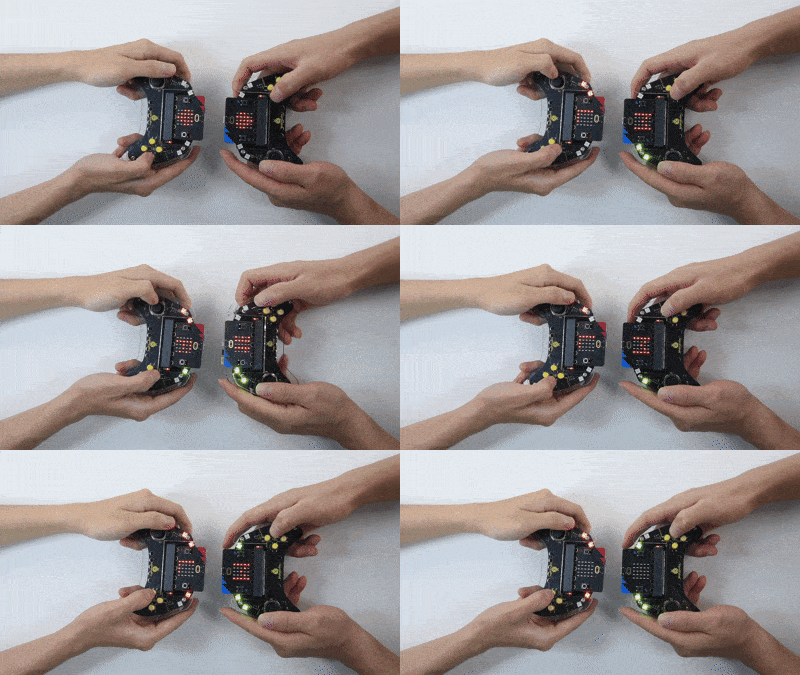
The matrix shows  initially. Players press buttons to select their move (E for rock, D for paper, or C for scissors), with match data exchange between the two devices. They determine the outcome of the current round: a win is indicated by the “W” with RGB light turning green, a draw by the “=” with yellow light, and a loss by the “L” with red (the first RGB light turns on after the first round, and so on). The next round will follow if the game is not over.
The game adopts best-of-three: if all three rounds end in all tie or win-loss-tie, a fourth match is triggered.
If there is a winner after three rounds, it will display “WINNER” for victory and “LOSER” for defeat. Once the result is shown, “GAME OVER” will appear to reset the game. If the fourth round remains undecided, the game will also be over.
Tip: Wait for the heart icon to appear before continuing the next round. If there is no response on the board, please press the reset button on the back of the micro:bit board.
