5.2.4 音楽プレーヤー
5.2.4.1 概要

ここでは、micro:bitボードの内蔵ブザーを介して音を生成する音楽プレーヤー(ボーカル音楽は再生しません)を構築します。20の短いトラックのライブラリを備え、シーケンシャル再生とランダム再生の両方をサポートしています。
シーケンシャルモードでは、C(前の曲)またはE(次の曲)ボタンを押すと、プリセットされたシーケンスに従ってトラックが切り替わり、リストの最後まで到達します。一方、ランダムモードでは、押すたびに20のサウンドからランダムにトラックが選択され、カラーライトが点滅し、1曲が終わるとすぐに停止します。
同時に、micro:bit LEDマトリックスは現在の再生モードをリアルタイムで表示します。

5.2.4.2 必要な部品
|
|
|
|---|---|---|
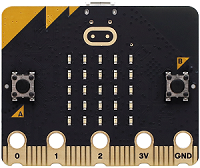
micro:bit V2 ボード (自己調達) ×1 |
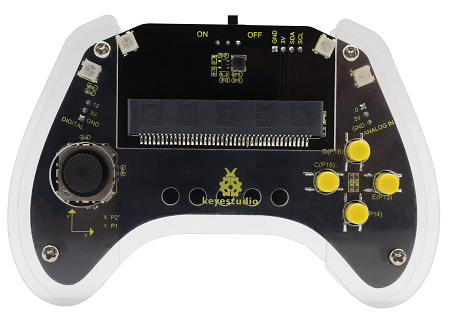
micro:bit スマートゲームパッド (組み立て済み) ×1 |
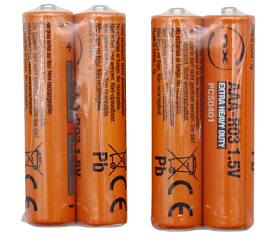
単4電池 (自己調達) ×4 |
5.2.4.3 コードフロー
5.2.4.4 テストコード
完全なコード:
from microbit import *
import music
import neopixel
import utime
import random

# Disable the LED function initially
# led.enable(False)

# Initialize NeoPixel strip (4 LEDs connected to pin P8)
strip = neopixel.NeoPixel(pin8, 4)

# Music library (20 short tracks)
# Each track is a list of notes and durations
# Example: [("C4", 4), ("D4", 4), ("E4", 4)]
# For simplicity, let's use predefined melodies from microbit music module

melodies = [
    music.DADADADUM, music.ENTERTAINER, music.PRELUDE, music.ODE,
    music.NYAN, music.RINGTONE, music.FUNK, music.BLUES,
    music.BIRTHDAY, music.WEDDING, music.FUNERAL, music.PUNCHLINE,
    music.PYTHON, music.BADDY, music.CHASE, music.WAWAWAWAA,
    music.JUMP_UP, music.JUMP_DOWN, music.POWER_UP, music.POWER_DOWN
]

# Global variables
current_track_index = 0
play_mode = 0  # 0 for sequential, 1 for random
volume = 128 # Initial volume (0-255)

# Function to play a track
def play_track(track_index):
    global current_track_index
    current_track_index = track_index
    music.play(melodies[current_track_index], wait=False)

# Function to update RGB lights (breathing effect)
def update_rgb_breathing():
    # Simple breathing effect by cycling brightness
    brightness = (utime.ticks_ms() // 10) % 256
    color = (brightness, brightness, brightness) # White light breathing
    for i in range(4):
        strip[i] = color
    strip.show()

# Initial setup
strip.clear()
strip.show()
display.show(Image.MUSIC)
music.set_volume(volume)

# Play initial track
play_track(current_track_index)

while True:
    # Check button D for sequential mode
    if pin14.read_digital() == 0: # Button D pressed
        if play_mode != 0:
            play_mode = 0
            display.show(Image.ARROW_NORTH) # Indicate sequential mode
            utime.sleep_ms(200)
            play_track(current_track_index) # Restart current track in new mode

    # Check button F for random mode
    elif pin16.read_digital() == 0: # Button F pressed
        if play_mode != 1:
            play_mode = 1
            display.show(Image.RABBIT) # Indicate random mode
            utime.sleep_ms(200)
            music.stop()

    # Handle sequential mode controls
    if play_mode == 0:
        if not music.is_playing(): # If current track finished, play next in sequence
            current_track_index = (current_track_index + 1) % len(melodies)
            play_track(current_track_index)

        # Check button C for previous track
        if pin13.read_digital() == 0: # Button C pressed
            current_track_index = (current_track_index - 1 + len(melodies)) % len(melodies)
            play_track(current_track_index)
            utime.sleep_ms(200)

        # Check button E for next track
        elif pin15.read_digital() == 0: # Button E pressed
            current_track_index = (current_track_index + 1) % len(melodies)
            play_track(current_track_index)
            utime.sleep_ms(200)

    # Handle random mode controls
    elif play_mode == 1:
        # Check button C or E for random track
        if pin13.read_digital() == 0 or pin15.read_digital() == 0: # Button C or E pressed
            random_track_index = random.randint(0, len(melodies) - 1)
            play_track(random_track_index)
            utime.sleep_ms(200)

        if not music.is_playing(): # Stop playing after one random track finishes
            music.stop()

    # Adjust volume with buttons A and B
    if pin5.read_digital() == 0: # Button A (P5) pressed - Volume Up
        volume = min(255, volume + 10)
        music.set_volume(volume)
        display.show(Image.ARROW_NORTH)
        utime.sleep_ms(100)
    elif pin11.read_digital() == 0: # Button B (P11) pressed - Volume Down
        volume = max(0, volume - 10)
        music.set_volume(volume)
        display.show(Image.ARROW_SOUTH)
        utime.sleep_ms(100)

    update_rgb_breathing()
    utime.sleep_ms(10)

簡単な説明:
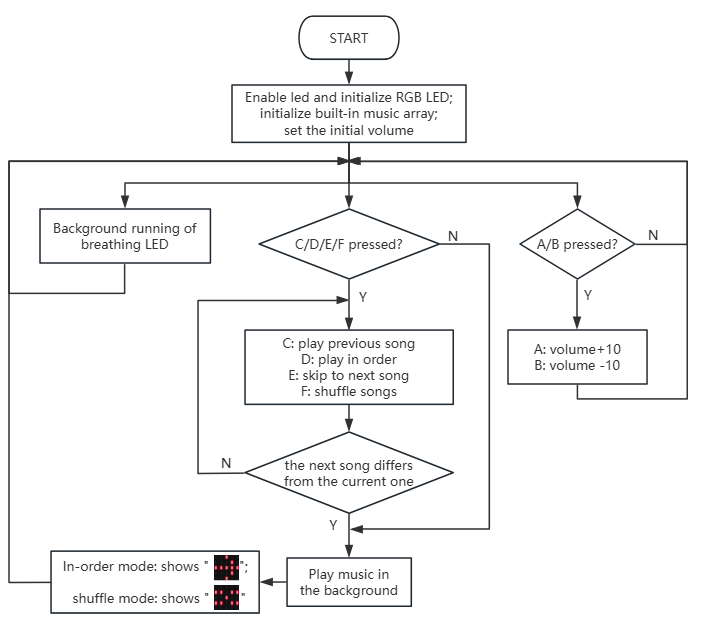
① LEDマトリックスと音量を初期化し、RGBピンをP8に接続し、RGBの数を4に設定します。
from microbit import *
import music
import neopixel
import utime
import random

# Disable the LED function initially
# led.enable(False)

# Initialize NeoPixel strip (4 LEDs connected to pin P8)
strip = neopixel.NeoPixel(pin8, 4)

# Music library (20 short tracks)
# Each track is a list of notes and durations
# Example: [("C4", 4), ("D4", 4), ("E4", 4)]
# For simplicity, let's use predefined melodies from microbit music module

melodies = [
    music.DADADADUM, music.ENTERTAINER, music.PRELUDE, music.ODE,
    music.NYAN, music.RINGTONE, music.FUNK, music.BLUES,
    music.BIRTHDAY, music.WEDDING, music.FUNERAL, music.PUNCHLINE,
    music.PYTHON, music.BADDY, music.CHASE, music.WAWAWAWAA,
    music.JUMP_UP, music.JUMP_DOWN, music.POWER_UP, music.POWER_DOWN
]

# Global variables
current_track_index = 0
play_mode = 0  # 0 for sequential, 1 for random
volume = 128 # Initial volume (0-255)

# Function to play a track
def play_track(track_index):
    global current_track_index
    current_track_index = track_index
    music.play(melodies[current_track_index], wait=False)

# Function to update RGB lights (breathing effect)
def update_rgb_breathing():
    # Simple breathing effect by cycling brightness
    brightness = (utime.ticks_ms() // 10) % 256
    color = (brightness, brightness, brightness) # White light breathing
    for i in range(4):
        strip[i] = color
    strip.show()

# Initial setup
strip.clear()
strip.show()
display.show(Image.MUSIC)
music.set_volume(volume)

# Play initial track
play_track(current_track_index)
② ボタンDまたはFが押されているかを確認します。Dを押すと「0-シーケンシャル再生」、Fを押すと「1-ランダム再生」になります。
while True:
    # Check button D for sequential mode
    if pin14.read_digital() == 0: # Button D pressed
        if play_mode != 0:
            play_mode = 0
            display.show(Image.ARROW_NORTH) # Indicate sequential mode
            utime.sleep_ms(200)
            play_track(current_track_index) # Restart current track in new mode

    # Check button F for random mode
    elif pin16.read_digital() == 0: # Button F pressed
        if play_mode != 1:
            play_mode = 1
            display.show(Image.RABBIT) # Indicate random mode
            utime.sleep_ms(200)
            music.stop()
③ シーケンシャルモードでは、Cを押すと前の曲、Eを押すと次の曲にスキップします。
    # Handle sequential mode controls
    if play_mode == 0:
        if not music.is_playing(): # If current track finished, play next in sequence
            current_track_index = (current_track_index + 1) % len(melodies)
            play_track(current_track_index)

        # Check button C for previous track
        if pin13.read_digital() == 0: # Button C pressed
            current_track_index = (current_track_index - 1 + len(melodies)) % len(melodies)
            play_track(current_track_index)
            utime.sleep_ms(200)

        # Check button E for next track
        elif pin15.read_digital() == 0: # Button E pressed
            current_track_index = (current_track_index + 1) % len(melodies)
            play_track(current_track_index)
            utime.sleep_ms(200)
ただし、ランダムモードでは、C/Eを押すとこれら20曲すべてがシャッフルされます。
    # Handle random mode controls
    elif play_mode == 1:
        # Check button C or E for random track
        if pin13.read_digital() == 0 or pin15.read_digital() == 0: # Button C or E pressed
            random_track_index = random.randint(0, len(melodies) - 1)
            play_track(random_track_index)
            utime.sleep_ms(200)

        if not music.is_playing(): # Stop playing after one random track finishes
            music.stop()
④ 前の曲が現在の曲と一致しないかどうかを判断します。一致する場合は、まず現在の曲を停止してからその曲を再生します。
    # Adjust volume with buttons A and B
    if pin5.read_digital() == 0: # Button A (P5) pressed - Volume Up
        volume = min(255, volume + 10)
        music.set_volume(volume)
        display.show(Image.ARROW_NORTH)
        utime.sleep_ms(100)
    elif pin11.read_digital() == 0: # Button B (P11) pressed - Volume Down
        volume = max(0, volume - 10)
        music.set_volume(volume)
        display.show(Image.ARROW_SOUTH)
        utime.sleep_ms(100)
⑤ モードが「0-シーケンシャル再生」の場合は「 」、または「1-ランダム再生」の場合は「
 」を表示し、100msの遅延を設けます。
    update_rgb_breathing()
    utime.sleep_ms(10)
⑥ RGBライトをバックグラウンドで呼吸させます。
⑦ Aを押すと音量を上げ(+10)、Bを押すと音量を下げます(-10)。micro:bitブザーの音量は、内部接続されたピンの出力電圧によって決定されます。DACを介してデジタル値0〜255をアナログ値に変換することで音量を制御できます。
5.2.4.5 テスト結果

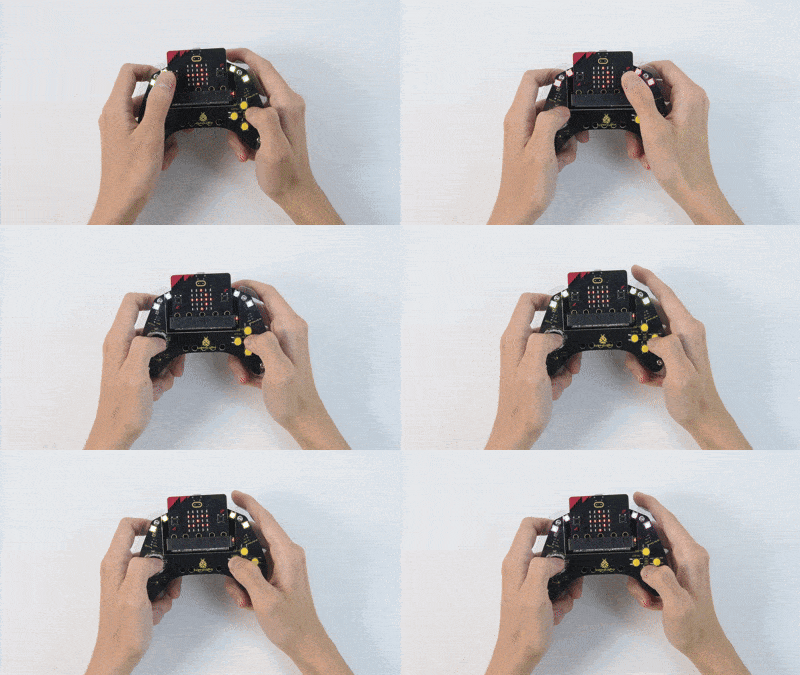
コードを書き込んだ後、micro:bitボードをゲームパッドのスロットに挿入し(電池が取り付けられていることを確認)、「ON」に切り替えます。
電源投入後、デフォルトでシーケンシャルモードになり、N.O.「0」の曲が再生されます。終了したら、Cを押して前の曲、またはEを押して次の曲に進むことができます。
Fを押すとランダムモードに切り替わります。Dを押すとシーケンシャルモードに戻ります。Fモードでは、C/Eを押すと20曲の中からランダムなトラックが再生されます。終了すると停止します。
RGBライトは電源投入時から常に呼吸しています。同時に、micro:bit LEDマトリックスはシーケンシャルモードでは「」、ランダムモードでは「」を表示します。
音量については、Aを押すと上がり、Bを押すと下がります。
ヒント: ボードが応答しない場合は、micro:bitボードの背面にあるリセットボタンを押してください。
