5.2.5 ブロック回避
5.2.5.1 概要

このプロジェクトでは、プレイヤーがMicro:bitゲームパッドを使用してLEDインジケーターを左右に動かし、上から落ちてくるブロックを回避するブロック回避ゲームをプレイします。3つの状態があります: a) 起動時の動的なアイコン、b) ゲームプレイ中のリアルタイム回避アクション、c) 衝突後の最終スコア。
プレイヤーは回避するたびに(ブロックが下部に到達したとき)1ポイントを獲得し、ブロックと衝突するとゲームオーバーになります。最終スコアはスクロール効果で表示されます。
A+Bを同時に押すことでゲームを開始またはリセットできます。このシンプルなゲームプレイメカニズムは、リアルタイムの応答性と戦略的な予測を組み合わせています。

5.2.5.2 必要な部品
|
|
|
|---|---|---|
micro:bit V2 ボード (自己調達) ×1 |
micro:bit スマートゲームパッド (組み立て済み) ×1 |
単4電池 (自己調達) ×4 |
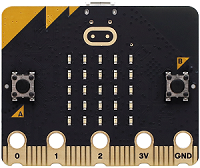
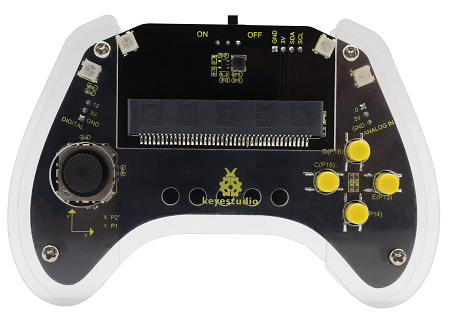
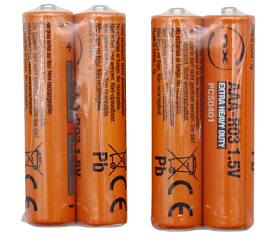
5.2.5.3 コードフロー
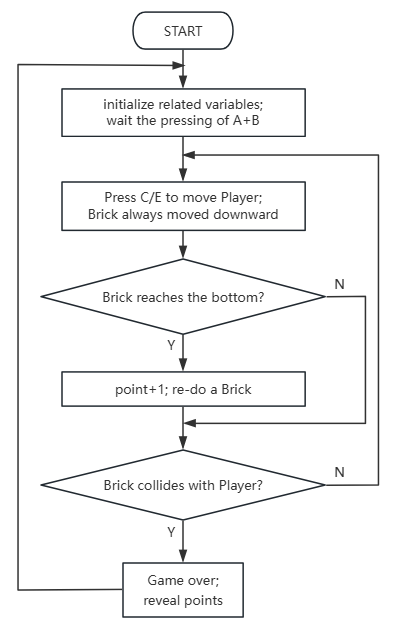
5.2.5.4 テストコード
⚠️ コード内の初期閾値300は、必要に応じて変更できます。値が高いほど、ブロックの落下が遅くなります。
完全なコード:
from microbit import *
import utime
import random

# Game state variables
game_state = 0  # 0: Initial, 1: Gaming, 2: Game Over
player_col = 2  # Player's initial column (0-4)
brick_x = random.randint(0, 4) # Brick's initial random column
brick_y = 0     # Brick's initial row
score = 0
last_brick_time = 0
brick_move_speed = 300 # Initial brick falling speed (ms)

# Button state flags for debouncing and single press detection
a_pressed_flag = False
b_pressed_flag = False
start_button_pressed_time = 0
start_button_hold_duration = 1000 # 1 second hold to start/reset

# Pin definitions for gamepad buttons
pin13.set_pull(pin13.PULL_UP) # Button C (Left)
pin15.set_pull(pin15.PULL_UP) # Button E (Right)
pin5.set_pull(pin5.PULL_UP)   # Button A (Start/Reset)
pin11.set_pull(pin11.PULL_UP) # Button B (Start/Reset)

# Function to draw game elements on the display
def draw_game():
    display.clear()
    # Draw player
    display.set_pixel(player_col, 4, 9) # Player is always at the bottom row
    # Draw brick
    if game_state == 1: # Only draw brick if game is active
        display.set_pixel(brick_x, brick_y, 5)

# Function to check for collision
def check_collision():
    global game_state
    if brick_y == 4 and brick_x == player_col:
        game_state = 2 # Game Over

# Function to reset the game
def reset_game():
    global game_state, player_col, brick_x, brick_y, score, last_brick_time, brick_move_speed
    game_state = 1 # Set to gaming state
    player_col = 2
    brick_x = random.randint(0, 4)
    brick_y = 0
    score = 0
    last_brick_time = utime.ticks_ms()
    brick_move_speed = 300 # Reset speed
    display.clear()

# Initial display (e.g., animated icon)
def on_start():
    display.show(Image.SQUARE_SMALL)
    utime.sleep_ms(200)
    display.show(Image.SQUARE)
    utime.sleep_ms(200)

# Call on_start once at the beginning
on_start()

# Main game loop
while True:
    current_time = utime.ticks_ms()

    # Handle A+B button press for starting/resetting the game
    if pin5.read_digital() == 0 and pin11.read_digital() == 0: # Both A and B pressed
        if start_button_pressed_time == 0:
            start_button_pressed_time = current_time
        elif current_time - start_button_pressed_time >= start_button_hold_duration:
            # A+B held for 1 second, start/reset game
            reset_game()
            start_button_pressed_time = 0 # Reset hold timer
    else:
        start_button_pressed_time = 0 # Reset hold timer if buttons released

    if game_state == 0: # Initial state, flashing icon
        if current_time % 1000 < 500:
            display.show(Image.SQUARE_SMALL)
        else:
            display.show(Image.SQUARE)

    elif game_state == 2: # Game Over state, display score
        display.scroll(str(score))
        utime.sleep(3) # Display score for 3 seconds
        game_state = 0 # Go back to initial state
        on_start() # Show initial animation again

    elif game_state == 1: # Gaming state
        # Player movement (Left: Button C, Right: Button E)
        if pin13.read_digital() == 0 and not a_pressed_flag: # Button C pressed (Left)
            if player_col > 0:
                player_col -= 1
            a_pressed_flag = True
        elif pin13.read_digital() == 1: # Button C released
            a_pressed_flag = False

        if pin15.read_digital() == 0 and not b_pressed_flag: # Button E pressed (Right)
            if player_col < 4:
                player_col += 1
            b_pressed_flag = True
        elif pin15.read_digital() == 1: # Button E released
            b_pressed_flag = False

        # Brick falling logic
        if current_time - last_brick_time > brick_move_speed:
            last_brick_time = current_time
            brick_y += 1
            if brick_y > 4: # Brick reached bottom
                brick_x = random.randint(0, 4)
                brick_y = 0
                score += 1
                # Optionally increase speed as score increases
                # brick_move_speed = max(100, brick_move_speed - 10)

        # Check collision and draw game
        check_collision()
        draw_game()

    utime.sleep_ms(50) # Small delay for main loop

簡単な説明:
① プレイヤーの初期列、行、ブロックの速度など、関連する変数を初期化し、プレイヤーの位置を初期列に設定します。
on_start()関数を呼び出します。
from microbit import *
import utime
import random

# Game state variables
game_state = 0  # 0: Initial, 1: Gaming, 2: Game Over
player_col = 2  # Player's initial column (0-4)
brick_x = random.randint(0, 4) # Brick's initial random column
brick_y = 0     # Brick's initial row
score = 0
last_brick_time = 0
brick_move_speed = 300 # Initial brick falling speed (ms)

# Button state flags for debouncing and single press detection
a_pressed_flag = False
b_pressed_flag = False
start_button_pressed_time = 0
start_button_hold_duration = 1000 # 1 second hold to start/reset

# Pin definitions for gamepad buttons
pin13.set_pull(pin13.PULL_UP) # Button C (Left)
pin15.set_pull(pin15.PULL_UP) # Button E (Right)
pin5.set_pull(pin5.PULL_UP)   # Button A (Start/Reset)
pin11.set_pull(pin11.PULL_UP) # Button B (Start/Reset)

# Function to draw game elements on the display
def draw_game():
    display.clear()
    # Draw player
    display.set_pixel(player_col, 4, 9) # Player is always at the bottom row
    # Draw brick
    if game_state == 1: # Only draw brick if game is active
        display.set_pixel(brick_x, brick_y, 5)

# Function to check for collision
def check_collision():
    global game_state
    if brick_y == 4 and brick_x == player_col:
        game_state = 2 # Game Over

# Function to reset the game
def reset_game():
    global game_state, player_col, brick_x, brick_y, score, last_brick_time, brick_move_speed
    game_state = 1 # Set to gaming state
    player_col = 2
    brick_x = random.randint(0, 4)
    brick_y = 0
    score = 0
    last_brick_time = utime.ticks_ms()
    brick_move_speed = 300 # Reset speed
    display.clear()

# Initial display (e.g., animated icon)
def on_start():
    display.show(Image.SQUARE_SMALL)
    utime.sleep_ms(200)
    display.show(Image.SQUARE)
    utime.sleep_ms(200)

# Call on_start once at the beginning
on_start()
② この関数では、ゲーム開始時にブロックが0〜4のランダムな列に表示されます。
# Call on_start once at the beginning
on_start()
③ 「A+Bが押されており、ゲームが開始されていない」かどうかを判断します。はいの場合、起動が初期状態としてマークされている場合、まず起動状態をマークし、短い遅延の後にもう一度ボタンが押されているかを確認します。押されている場合は、ゲームをリセットし(reset_game()関数を呼び出す)、時間を記録します。そうでない場合は、起動マークをキャンセルします。
# Main game loop
while True:
    current_time = utime.ticks_ms()

    # Handle A+B button press for starting/resetting the game
    if pin5.read_digital() == 0 and pin11.read_digital() == 0: # Both A and B pressed
        if start_button_pressed_time == 0:
            start_button_pressed_time = current_time
        elif current_time - start_button_pressed_time >= start_button_hold_duration:
            # A+B held for 1 second, start/reset game
            reset_game()
            start_button_pressed_time = 0 # Reset hold timer
    else:
        start_button_pressed_time = 0 # Reset hold timer if buttons released

    if game_state == 0: # Initial state, flashing icon
        if current_time % 1000 < 500:
            display.show(Image.SQUARE_SMALL)
        else:
            display.show(Image.SQUARE)

    elif game_state == 2: # Game Over state, display score
        display.scroll(str(score))
        utime.sleep(3) # Display score for 3 seconds
        game_state = 0 # Go back to initial state
        on_start() # Show initial animation again
④ 以下の関数はゲームを初期状態にリセットします。状態を「gaming」(game_state=1)に設定し、プレイヤーを初期位置に配置します。ブロックはランダムな列(0〜4)と0行目に表示され、スコアはゼロになります。最後に、A/Bの押下はトリガーされていないとマークされ、マトリックスはクリアされます。
def reset_game():
    global game_state, player_col, brick_x, brick_y, score, last_brick_time, brick_move_speed
    game_state = 1 # Set to gaming state
    player_col = 2
    brick_x = random.randint(0, 4)
    brick_y = 0
    score = 0
    last_brick_time = utime.ticks_ms()
    brick_move_speed = 300 # Reset speed
    display.clear()
⑤ ゲームの状態が0-初期状態(電源投入後にゲームが開始されていない)の場合、表示されるアイコンが点滅します。
    if game_state == 0: # Initial state, flashing icon
        if current_time % 1000 < 500:
            display.show(Image.SQUARE_SMALL)
        else:
            display.show(Image.SQUARE)
⑥ 2-ゲームオーバーの場合、スコアはフラッシュカウント(flash_count)に応じて制御されます。カウントが3未満の場合、「スコア表示 → 短い遅延 → ディスプレイクリア → 短い遅延 → カウント+1」を繰り返します。カウントが3に達すると、常にスコアを表示し、遅延を延長します。
    elif game_state == 2: # Game Over state, display score
        display.scroll(str(score))
        utime.sleep(3) # Display score for 3 seconds
        game_state = 0 # Go back to initial state
        on_start() # Show initial animation again
⑦ 1-ゲーム中の状態では、押下マークをトリガーせずにCを押すと、プレイヤーの列が-1になり、ボタンCがトリガーされたとマークされます(アンチジッターのために遅延があります)。押下マークをトリガーせずにEを押し、プレイヤーの列が4未満の場合、列が+1になり、Eがトリガーされます(遅延があります)。アクションが実行されない場合、対応するボタンのトリガーマークはリセットされます。
    elif game_state == 1: # Gaming state
        # Player movement (Left: Button C, Right: Button E)
        if pin13.read_digital() == 0 and not a_pressed_flag: # Button C pressed (Left)
            if player_col > 0:
                player_col -= 1
            a_pressed_flag = True
        elif pin13.read_digital() == 1: # Button C released
            a_pressed_flag = False

        if pin15.read_digital() == 0 and not b_pressed_flag: # Button E pressed (Right)
            if player_col < 4:
                player_col += 1
            b_pressed_flag = True
        elif pin15.read_digital() == 1: # Button E released
            b_pressed_flag = False
⑧ 現在の時間と前回のブロック移動時間の差を計算します。この差がブロック速度の閾値を超えている場合、ブロック移動時間を更新し、ブロックの行を+1します。行が4を超えた場合(境界に到達した場合)、ブロックをランダムな列にリセットし、行をゼロにし、スコアを+1します。
衝突検出およびゲームグラフィックレンダリング関数を呼び出して、ブロックの自動進行、境界リセット、スコアの蓄積、およびリアルタイムのゲーム状態更新を実現します。
        # Brick falling logic
        if current_time - last_brick_time > brick_move_speed:
            last_brick_time = current_time
            brick_y += 1
            if brick_y > 4: # Brick reached bottom
                brick_x = random.randint(0, 4)
                brick_y = 0
                score += 1
                # Optionally increase speed as score increases
                # brick_move_speed = max(100, brick_move_speed - 10)
⑨ ゲームオーバーかどうかを判断します。まず「ブロックの列がプレイヤーの列と一致するか」と「ブロックの行がプレイヤーの行と一致するか」を確認します。両方の条件が満たされた場合(つまり、ブロックがプレイヤーと重なっている場合)、ゲームを状態2(ゲームオーバー)に設定し、ディスプレイをクリアしてフラッシュカウントをリセットします。
「衝突でゲームオーバー。」
        # Check collision and draw game
        check_collision()
        draw_game()
⑩ ゲームの視覚効果をレンダリングします。まずディスプレイをクリアし、次にプレイヤーの固定行と現在の列の位置に明るさ9(プレイヤー)の点をプロットします。ゲームが開始されている場合(game_state=1)、ブロックの行と列に明るさ5(ブロック)の点をプロットします。これにより、明るさによってブロックとプレイヤーを区別できます。
def draw_game():
    display.clear()
    # Draw player
    display.set_pixel(player_col, 4, 9) # Player is always at the bottom row
    # Draw brick
    if game_state == 1: # Only draw brick if game is active
        display.set_pixel(brick_x, brick_y, 5)
5.2.5.5 テスト結果

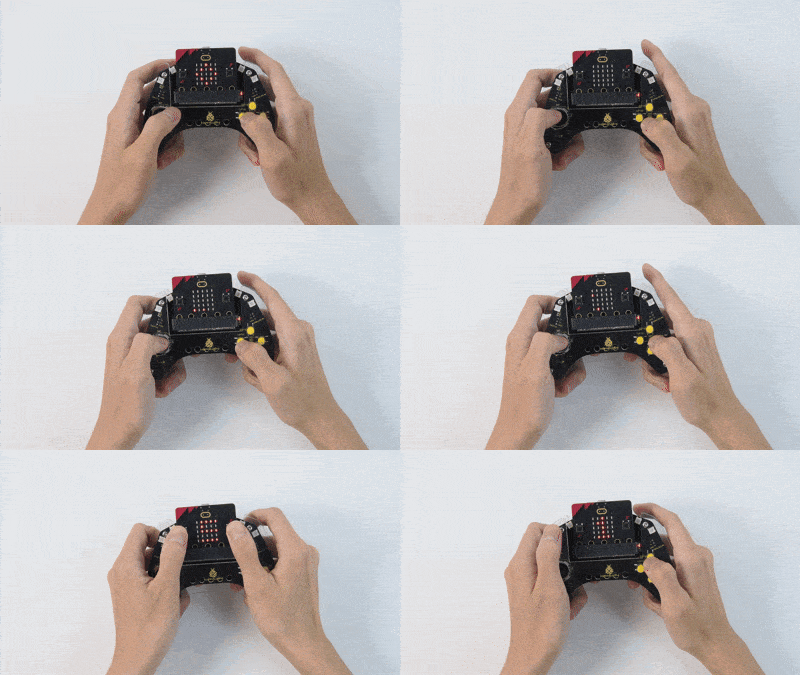
コードを書き込んだ後、micro:bitボードをゲームパッドのスロットに挿入し(電池が取り付けられていることを確認)、「ON」に切り替えます。
電源投入後、0-初期状態になり、マトリックスは2つの四角いアイコンを点滅させます。
AとBを押し(少なくとも1秒間)、ゲームを開始します(1-ゲーム中の状態)。ブロックがランダムな列に落下します。C/Eを押して左右に移動できます。ブロックを回避するたびに、スコアが+1されます。
衝突でゲームオーバーになり(2-ゲームオーバー)、最終スコアがマトリックスに表示されます。もう一度プレイしたい場合は、AとBをもう一度押します。ゲームを終了するには電源をオフにします(DIPスイッチを「OFF」に切り替えます)。
ヒント: ボードが応答しない場合は、micro:bitボードの背面にあるリセットボタンを押してください。
