Project 14 DS3231 Clock Module
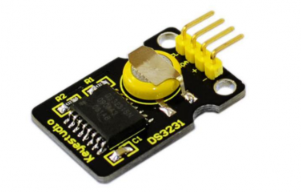
1.Introduction DS3231 is equipped with integrated TCXO and crystal, which makes it a cost-effective I2C real time clock with high precision. The device carries a battery input, so if you disconnect the main power supply, it can still maintain accurate timing. The integrated oscillator ensures the long-term accuracy of the device and reduces the number of components. DS3231 provides both commercial and industrial temperature range and supports 16 pins small-outline package (300mil). The module itself can adapt to the system of 3.3V and 5V without level switch, which is quite convenient!
2.Specification
Temperature range: -40 to +85; Timing accuracy : ± 5ppm (±0.432 seconds / day)
Provide battery backup for continuous timing
Low power consumption
Device package and function compatible with DS3231
Complete clock calendar function contains seconds and minutes, hour, week, date, month, and year timing and provides leap year compensation until 2100.
Two calendar clock
Output: 1Hz and 32.768kHz
Reset output and Input Debounce of Pushbutton
High speed (400kHz), I2C serial bus
Supply voltage: +3.3V to +5.5V
Digital temperature sensor with a precision of±3℃
Working temperature: -40 ~ C to +85 ~ C
16 pins Small Outline Package (300mil)
Certified by American Association of Underwriters Laboratories (UL)
Size: 30*20mm
Weight: 4g
3.Connection Diagram This module adopts the IIC test method, so we only need to connect ‘SDA’ to Arduino A4, ‘SCL’ to A5, ‘+’ to VCC and ‘-’ to GND as follows:

4.Sample Code
#include <Wire.h>
#include "DS3231.h"
DS3231 RTC; //Create the DS3231 object
char weekDay[][4] = {"Sun", "Mon", "Tue", "Wed", "Thu", "Fri", "Sat" };
//year, month, date, hour, min, sec and week-day(starts from 0 and goes to 6)
//writing any non-existent time-data may interfere with normal operation of the RTC.
//Take care of week-day also.
DateTime dt(2011, 11, 10, 15, 18, 0, 5);//open the series port and you can check time here or make a change to the time as needed.

void setup ()
{   Serial.begin(57600);//set baud rate to 57600
    Wire.begin();
    RTC.begin();
    RTC.adjust(dt); //Adjust date-time as defined 'dt' above
}

void loop ()
{
    DateTime now = RTC.now(); //get the current date-time
    Serial.print(now.year(), DEC);
    Serial.print('/');
    Serial.print(now.month(), DEC);
    Serial.print('/');
    Serial.print(now.date(), DEC);
    Serial.print(' ');
    Serial.print(now.hour(), DEC);
    Serial.print(':');
    Serial.print(now.minute(), DEC);
    Serial.print(':');
    Serial.print(now.second(), DEC);
    Serial.println();
    Serial.print(weekDay[now.dayOfWeek()]);
    Serial.println();
    delay(1000);
}
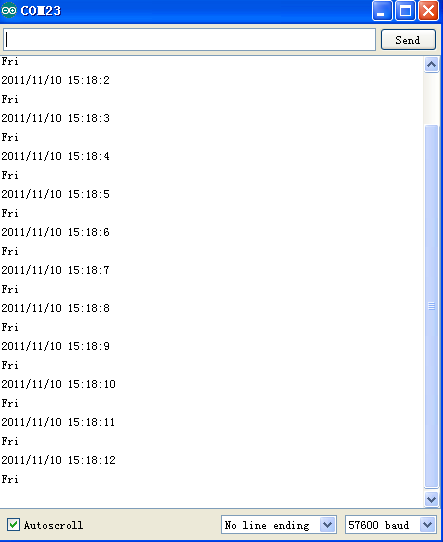
5.results