Project 9 Digital Push Button
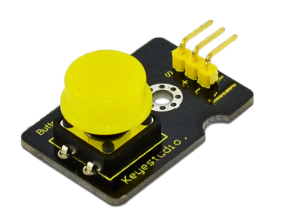
1.Introduction This is a basic application module. You can simply plug it into an IO shield to have your first taste of Arduino.
Advantages:
Wide voltage range from 3.3V to 5V
Standard assembling structure (two 3mm diameter holes with multiple of 5mm as distance from center)
Easily recognizable interfaces of sensors (“A” for analog and “D” for digital)
Icons illustrate sensor function clearly
High quality connector
Immersion gold surface
2.Specification
Supply Voltage: 3.3V to 5V
Easy to ‘plug and operate’
Large button keypad and high-quality first-class cap
Achieve interesting and interactive work
Interface: Digital
Size: 30*20mm
Weight: 4g
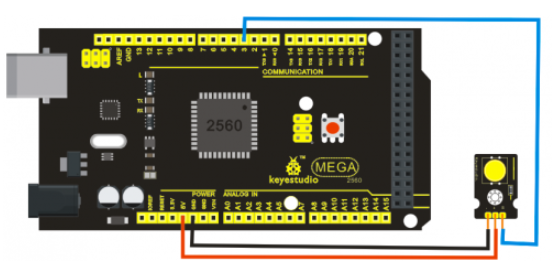
3.Connection Diagram
4.Sample Code
int ledPin = 13;                // choose the pin for the LED
int inputPin = 3;               // Connect sensor to input pin 3

void setup()
{
  pinMode(ledPin, OUTPUT);      // declare LED as output
  pinMode(inputPin, INPUT);     // declare pushbutton as input
}

void loop()
{
  int val = digitalRead(inputPin);  // read input value
  if (val == HIGH)
  {            // check if the input is HIGH
    digitalWrite(ledPin, LOW);  // turn LED OFF
  }
  else
  {
    digitalWrite(ledPin, HIGH); // turn LED ON
  }
}