Project 10 Servo Motor Control
1.Introduction
Servomotor is a commonly used positional-servo actuator.
In this project, we use graphical programming . First , read out analog value controlled by adjustable potentiometer module, ranging from 0 to 1023. Then, map the value to 0-180. Finally, set the mapped value as angle of motor rotation.
2.Materials Required
KEYESTUDIO UNO Control Board *1
V5 Sensor Shield*1
Adjustable Potentiometer*1
Micro Servo*1
Female to Female Dupont Line*3
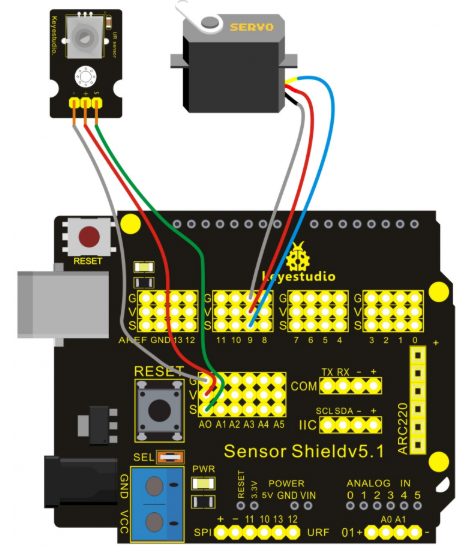
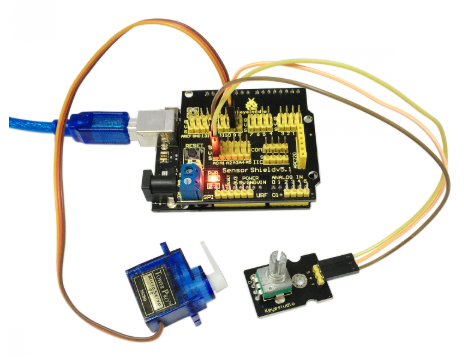
3.Connection Diagram
Note: do not use the USB port for power supply because the current it needs is more than 500ma,it may lead to USB port burnt out. We recommend external power supply.
4.Sample Code
#include <Servo.h>
int _ABVAR_1_val = 0 ;
int _ABVAR_2_servo = 0 ;
Servo servo_pin_9;

void setup()
{
  servo_pin_9.attach(9);
}

void loop()
{
  _ABVAR_1_val = analogRead(0) ;
  _ABVAR_2_servo = map ( _ABVAR_1_val , 0 , 1023 , 0 , 180 )  ;
  servo_pin_9.write( _ABVAR_2_servo );
}
5.Result
Put the program into the development, and we can use potentiometer to control servomotor.
Note:place Servo folder into the compiler of \Arduino\libraries. Otherwise, you can’t compile. Just like this.