Project 24 DHT11 Temperature and Humidity Sensor
1.Introduction
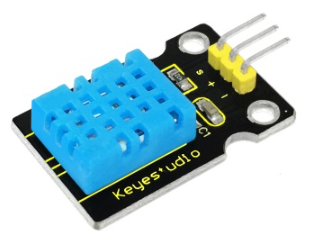
This DHT11 Temperature and Humidity Sensor features calibrated digital signal output with the temperature and humidity sensor complex. Its technology ensures high reliability and excellent long-term stability. It has excellent quality, fast response, anti-interference ability and high cost performance advantages. The single-wire serial interface system is integrated to make it quick and easy.
2.Hardware Required:
Arduino Board *1
V5 Shield*1
USB Cable*1
DHT11 Temperature and Humidity Sensor*1
Dupont Line*3
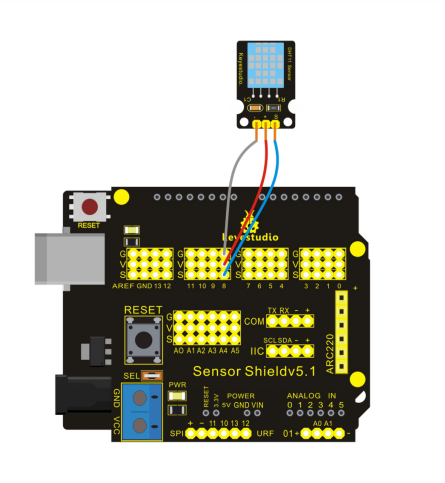
Circuit Connection:
3.Sample Code
int DHpin = 8;
byte dat[5];
byte read_data()
{
   byte data;
  for(int i=0; i<8; i++)
  {
    if(digitalRead(DHpin) == LOW)
    {
      while(digitalRead(DHpin) == LOW);  //waiting for 50us;
      delayMicroseconds(30);  // estimating the duration of high level to decide 0 or 1;
      if(digitalRead(DHpin) == HIGH)
      data |= (1<<(7-i));  //high-order forward, low-order backward
       while(digitalRead(DHpin) == HIGH);  //‘1’,waiting for receiving next one;
    }
  }
     return data;
}
void start_test()
{
  digitalWrite(DHpin,LOW);  //lower bus to delivery START signal;
  delay(30);  //delayed time should be more than 18ms,so that DHT11 can detect START signal;
  digitalWrite(DHpin,HIGH);
  delayMicroseconds(40);  //waiting for DHT11 to respond;
  pinMode(DHpin,INPUT);
  while(digitalRead(DHpin) == HIGH);
    delayMicroseconds(80);  //DHT11 giving out respond,lowering bus at 80us;
 if(digitalRead(DHpin) == LOW);
   delayMicroseconds(80);  //DHT11 pulling up bus at80us and then sending out data;
 for(int i=0;i<4;i++)   //receiving data of temperature and humidity without consideration of check bit;
   dat[i] = read_data();
 pinMode(DHpin,OUTPUT);
 digitalWrite(DHpin,HIGH);  //after sending data once, releasing bus, waiting for next time//START signal;
}
void setup()
{
   Serial.begin(9600);
   pinMode(DHpin,OUTPUT);
}
void loop()
{
   start_test();
   Serial.print("Current humdity = ");
   Serial.print(dat[0], DEC);  //displaying integer bit of humidity;
   Serial.print('.');
   Serial.print(dat[1],DEC);  //displaying decimals bit of humidity;
   Serial.println('%');
   Serial.print("Current temperature = ");
   Serial.print(dat[2], DEC);  //displaying integer bit of temperature;
   Serial.print('.');
   Serial.print(dat[3],DEC);  //displaying decimals bit of temperature;
   Serial.println('C');
  delay(700);

}
4.Result
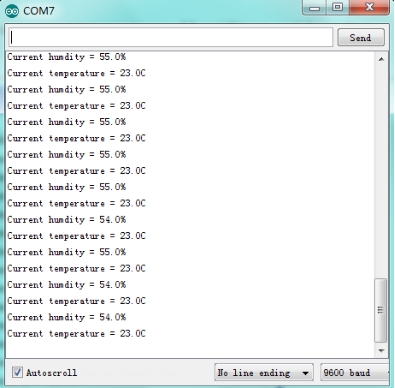
After uploading the codes, you can see current temperature and humidity on serial monitor.