Project 29 Displaying Temperature and Humidity on LCD
1.Introduction
In this project, we use DHT11 temperature and humidity sensor to measure current temperature and humidity, displaying them on LCD1602.
2.Hardware Required
Arduino Board *1
V5 Shield*1
USB Cable*1
DHT11 Temperature and Humidity Sensor*1
LCD1602*1
Dupont Line*Several
3.Circuit Connection
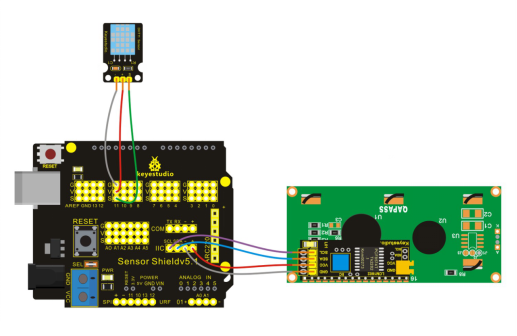
4.Sample Code
#include <Wire.h>
#include <LiquidCrystal_I2C.h>
#include "DHT.h"
LiquidCrystal_I2C lcd(0x27,20,4);
#define DHTPIN 11     // what pin we're connected to

// Uncomment whatever type you're using!
#define DHTTYPE DHT11   // DHT 11
//#define DHTTYPE DHT22   // DHT 22  (AM2302)
//#define DHTTYPE DHT21   // DHT 21 (AM2301)

DHT dht(DHTPIN, DHTTYPE);

void setup() {
  Serial.begin(9600);
  Serial.println("DHTxx test!");

  dht.begin();

  lcd.init();
  lcd.init();
  lcd.backlight();
   lcd.clear();
   lcd.setCursor(0,0);
   lcd.print("DHT-11 test!");
}

void loop()
{
  // Reading temperature or humidity takes about 250 milliseconds!
  // Sensor readings may also be up to 2 seconds 'old' (its a very slow sensor)
  float h = dht.readHumidity();
  float t = dht.readTemperature();

  lcd.clear();
  if (isnan(t) || isnan(h))
  {
    Serial.println("Failed to read from DHT");
    lcd.setCursor(0,0);
    lcd.print("Failed DHT");
  }
  else
  {
    Serial.print("Humidity: ");
    lcd.setCursor(0,0);
    lcd.print("H:");
    Serial.print(h);
    lcd.setCursor(3,0);
    lcd.print(h);
    Serial.print(" %\t");
    lcd.setCursor(9,0);
    lcd.print("%");
    Serial.print("Temperature: ");
    lcd.setCursor(0,1);
    lcd.print("T:");
    Serial.print(t);
    lcd.setCursor(3,1);
    lcd.print(t);
    Serial.println(" *C");
    lcd.setCursor(8,1);
    lcd.print(" *C");
  }
  delay(200);
}
5.Result
After adding the libraries and uploading the codes, you can see current temperature and humidity displayed on LCD1602.