Project 26 I2C1602 Liquid Crystal Display Module
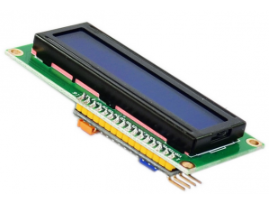
1.Introduction
This module uses I2C communication mode to reduce the usage of I/O port of MCU. You can adjust contrast ratio of screen through potentiometer to get the optimal displaying effect.
2.Hardware Required
Arduino Board *1
V5 Shield*1
USB Cable*1
I2C1602 Liquid Crystal Display Module*1
Dupont Line*4
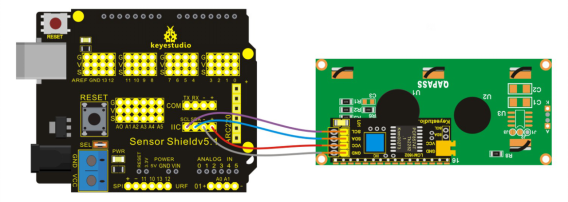
3.Circuit Connection
4.Sample Code
#include <LiquidCrystal_I2C.h>
#include <Wire.h>
LiquidCrystal_I2C lcd(0x27,16,2);  // set the LCD address to 0x27 for a 16 chars and 2

void setup()
{
  lcd.init();                      // initialize the lcd
  // Print a message to the LCD.
  lcd.backlight();
  lcd.print("Hello Arduino");
}

void loop()
{
}
5.Result
After uploading the codes, you can see there is displaying “Hello Arduino”on the screen.