Project 5 Bluetooth smart car controlled by mobile phone

keyestudio Bluetooh XBee Bluetooth wireless module HC-06 adopts XBEE design. It has features of compact size, compatible with XBEE shield, and suitable for various 3.3V MCU systems. The module can use AT command to set baud rate and master/slave mode. The default settings are baud rate 9600, paring password 1234, slave mode.
It comes with efficient on-board antenna. The exposed antenna ensures better signal quality and longer transmitting distance. Transparent serial port can be used to pair up with various Bluetooth adapters, Bluetooth phones. The humanized design offers convenience for secondary development. After testing, the module is known to be suitable in using with all Bluetooth adapters on the market (PC and phones with Bluetooth) .
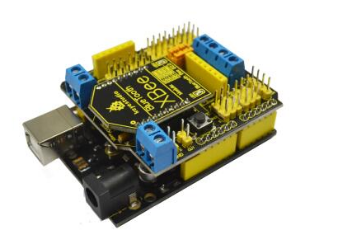
Now, let’s move on to program. I’ll enter “r” and after Arduino receives my command “r”, the LED in PIN 13 will flicker and print character of “keyes”. The program is as follows:
Code 7
char val;
int ledpin=13;

void setup()
{
	Serial.begin(9600);
	pinMode(ledpin,OUTPUT);
}

void loop()
{
    val=Serial.read();
    if(val=='r')
    {
    	digitalWrite(ledpin,HIGH);
    	delay((500);
    	digitalWrite(ledpin,LOW);
    	delay(500);
    	Serial.println("keyes");
    }
}
Now, let’s figure out how to make programmable smart car to go forward, backward, turning left or right via arduino bluetooth remote control. There are two ways to control the movement of smart car, by PC or mobile phone (The phone operating system must support Android 2.3.7 or later version and PC must carry bluetooth). The phone should be paired with bluetooth car during initial use (no need to locate wireless device after first pairing). Please check the following steps for first paring:
Don’t forget to turn on the bluetooth function of the phone. The software will remind users to turn on bluetooth function when the software is started.
Connect bluetooth device according to the text instructions on the photo. Please scan and pair with bluetooth device, otherwise, you would fail to connect with smart car.
The code for pairing with the smart car is “1234”, go try it!
Please download the app here
The program for Arduino bluetooth remote control programmable smart car is as follows:
Code 8
int MotorRight1=5;
int MotorRight2=6;
int MotorLeft1=10;
int MotorLeft2=11;

void setup()
{
    Serial.begin(9600);
    pinMode(MotorRight1, OUTPUT); // pin  5 (PWM)
    pinMode(MotorRight2, OUTPUT); // pin  6 (PWM)
    pinMode(MotorLeft1, OUTPUT); // pin  10 (PWM)
    pinMode(MotorLeft2, OUTPUT); // pin  11 (PWM)
}

void go()// go forward
{
    digitalWrite(MotorRight1,LOW);
    digitalWrite(MotorRight2,HIGH);
    digitalWrite(MotorLeft1,LOW);
    digitalWrite(MotorLeft2,HIGH);
}

void left() // turn right
{
    digitalWrite(MotorRight1,HIGH);
    digitalWrite(MotorRight2,LOW);
    digitalWrite(MotorLeft1,LOW);
    digitalWrite(MotorLeft2,HIGH);
}

void right() // turn left
{
    digitalWrite(MotorRight1,LOW);
    digitalWrite(MotorRight2,HIGH);
    digitalWrite(MotorLeft1,HIGH);
    digitalWrite(MotorLeft2,LOW);
}

void stop() // stop
{
    digitalWrite(MotorRight1,LOW);
    digitalWrite(MotorRight2,LOW);
    digitalWrite(MotorLeft1,LOW);
    digitalWrite(MotorLeft2,LOW);
}

void back() // go backwards
{
    digitalWrite(MotorRight1,HIGH);
    digitalWrite(MotorRight2,LOW);
    digitalWrite(MotorLeft1,HIGH);
    digitalWrite(MotorLeft2,LOW);
}

void loop()
{
    char val = Serial.read();
    Serial.write(val);
    if (-1 != val)
    {
        if ('U' == val)
        	go();
        else if ('L' ==val)
        	left();
        else if ('R' == val)
        	right();
        else if ('D' == val)
        	back();
        else if ('S' == val)
         	stop();
        delay(500);
    }
    else
    {
    	//stop(); delay(500);
    }
}