Project 18 8*16 dot matrix-knob control
1.Project instruction
There are on-board button switches on Max board, we will combine button switch and 8*16 dot matrix to make an interactive display.
2.Project principle
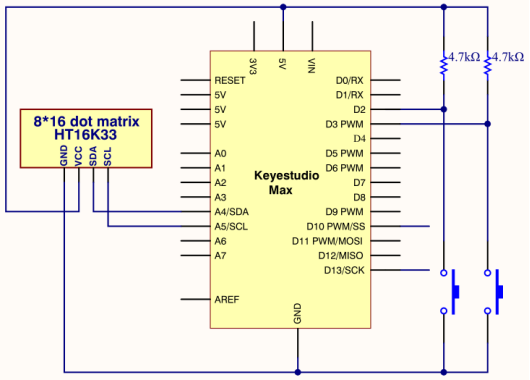
The signal pins of two buttons are connected to D2 and D3. Press left button, 8 * 16 dot matrix shows“L”; press right button, 8 * 16 dot matrix shows“R”.
3.Project circuit
4.Project code
Note: before uploading the code, you need to import the library files; otherwise, the code upload will fail.
#include <Wire.h>
#include "Keyestudio_LEDBackpack.h"
#include "Keyestudio_GFX.h"
Keyestudio_8x16matrix matrix = Keyestudio_8x16matrix();
int K1=3;
int K2=2;
int x;

void setup()
{
 matrix.begin(0x70);  // pass in the address
  pinMode(K1,INPUT);
  pinMode(K2,INPUT);
  matrix.drawCircle(3,8, 3, LED_ON);
  matrix.writeDisplay();  // write the changes we just made to the display
}

void loop()
{
  int K1_level=digitalRead(K1);
  int K2_level=digitalRead(K2);
  if(K1_level==0)
  {
      matrix.setTextSize(1);
      matrix.setTextWrap(false);  // we dont want text to wrap so it scrolls nicely
      matrix.setTextColor(LED_ON);
      matrix.setRotation(1);
      matrix.clear();
      matrix.setCursor(2,0);
      matrix.print("L");
      matrix.writeDisplay();
  }
  if(K2_level==0)
  {
      matrix.setTextSize(1);
      matrix.setTextWrap(false);  // we dont want text to wrap so it scrolls nicely
      matrix.setTextColor(LED_ON);
      matrix.setRotation(1);
      matrix.clear();
      matrix.setCursor(9,0);
      matrix.print("R");
      matrix.writeDisplay();
  }
}