4.11 Project: WIFI Control Smart Farm
Pay attention! Do not overflow water from plastic pools in experiments. Spilling water on other sensors may cause a short circuit or modules to be out of work. If batteries get wet, even explosion may occur. Do be extra careful! For younger users, please operate with your parents. To guarantee security, please obey guidances and safety regulations.

4.11.1 Flow Diagram

4.11.2 WIFI Web Page Display
Description:
ESP32 board is equipped with Wi-Fi(2.4G) and Bluetooth(4.2), which enable it to easily connect to WiFi and communicate with other devices on the network. What’s more, web pages can be displayed in browsers via ESP32.

The ESP32 board provides you with library file <WiFi.h>, which supports Wi-Fi configurations and ESP32 Wi-Fi networking monitoring.
Base station mode (STA or Wi-Fi client-side mode): In this mode, ESP32 connects to the Wi-Fi hotspot (AP).
AP mode (Soft-AP or Wi-Fi hotspot mode): In this mode, other Wi-Fi devices connect to ESP32.
AP-STA mode: In this mode, ESP32 is a Wi-Fi hotspot as well as a Wi-Fi device connecting to another Wi-Fi hotspot.
These modes is compatible with multiple safe modes, like WPA, WPA2 and WEP.
It is able to scan for Wi-Fi hotspot, including active and passive scan.
It supports promiscuous mode to monitor IEEE802.11 Wi-Fi Packets.
For wifi details, please refer to:
https://docs.espressif.com/projects/esp-idf/en/latest/esp32/api-reference/network/esp_wifi.html
ESPRESSIF official website: https://www.espressif.com.cn/en/home

Import Library
Click

Click
 to choose “ Web Page Editing PRO ”, and libraries will be loaded.

Test Code:
Connect to the WiFi hotspot, input your SSID and password.

Display IP address on LCD

Define a web page components named temperature (unit: ℃)


Add a button named “button”


Complete code:

Visit the Website
Once connected to WiFi, you can use the ESP32’s web server library to serve web pages. In the following example, we will create a simple web page to display a fixed temperature information:
Last but not least, you may open the IP address in browser to visit the web page. In our example code, please input “http://[IP address of ESP32]” to visit the website.
NOTE: When PC, mobile phones and ESP32 board are connected to one network, you can visit this website at PC and phones at the same time.
Here is the ESP32 IP address of your own.
PC:

Mobile phone:

4.11.3 WIFI Control Smart Farm
Code Flow:

Upload the code.
SSID and PASSWORD are needed to modify to your wifi name and password:
Complete Code:
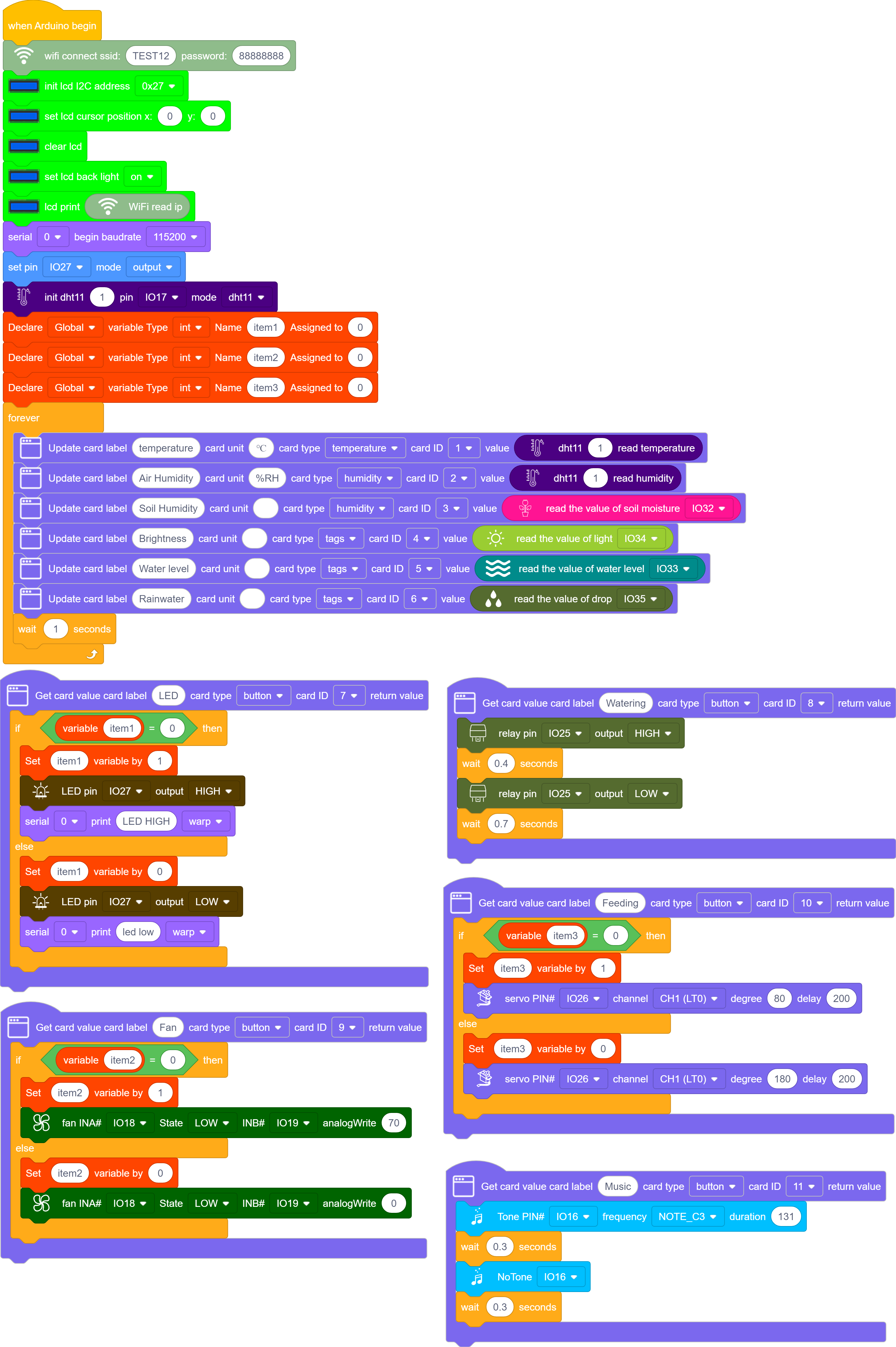
Result:
PC:

Mobile Phone:

Input the IP address in browsers at mobile phones or PC, you can check the sensor values and control the LED and fan.
Sensor Values |
Controllable Devices |
|---|---|
Temperature (℃) |
LED |
Humidity (%rh) |
Fan |
Water level (%) |
Feeding box |
Rainfall (%) |
Water pump |
Brightness (0~4095) |
|
Soil humidity (%) |
With the ESP32 development board, we have learned how to create a web page to display the sensor values, like temperature, humidity, water level and soil humidity, and we can also control LED lights, fans, feeding boxes and pumps. Moreover, these operations can be remotely finished through mobile phones or computers.

In this project, we stimulate a smart farm with intelligent and remote management. Such technology facilitates the control of equipments and improves agricultural efficiency and quality, which make Internet of Things, informatization, automation and intelligence possible.
4.11.4 FAQ
Q: Wifi always fails to be connected.
A: Move ESP32 to the side of the router and reboot the board, and just be patient to wait. If it still fails to connected, please check whether the WiFi name and password are correct.
Q: The response is slow during remote opterations on web page.
A: Possible reasons:
The router CPU resources are insufficient due to multiple connections. Please reboot the router to try a reconnection.
The router works for a long time. Please reboot the router.
Wireless interference. Wireless signal is unstable, so please do not use it through the wall.
For knowledge of routers, please Google by yourself.
Q: Fail to pump water?
A: Several pumping operations are required to fill the water pump before using it. These initial pumpings do not actually draw the water, but to introduce sufficient water into the pump. Only after the pump is full can water be carried out. So we are first for filling, not pumping.