4.3 Project : Alarm System
In this project, we use a PIR motion sensor and a buzzer to consist an alarm system, which can be controlled by ESP32 development board.
How does it work? The electric signals are detected and read by the PIR motion sensor through programming on KidsBlock IDE, and then it determines whether there is a person. If there is, the buzzer alarms. In this way, this alarm system costs much lower for families and offices.
4.3.1 Flow Diagram

4.3.2 PIR Motion Sensor
Description:
A PIR motion sensor detects the presence of a person by sensing the heat given off by the human body.
Moreover, this sensor is small and easy to use.

Schematic Diagram:

Parameters:
Voltage: 3~5V
Current: 3.6mA
Power: 18mW
Angle of View: Y = 90°, X = 110° (theoretical value)
Detection Distance: ≤5m
Wiring Diagram:
Connect the PIR motion sensor to io23.
Attention: Connect yellow to S(Signal), red to V(Power), and black to GND. Do not reverse them!

Test Code:
Read the value at pin IO23 to determine whether there is a human motion.
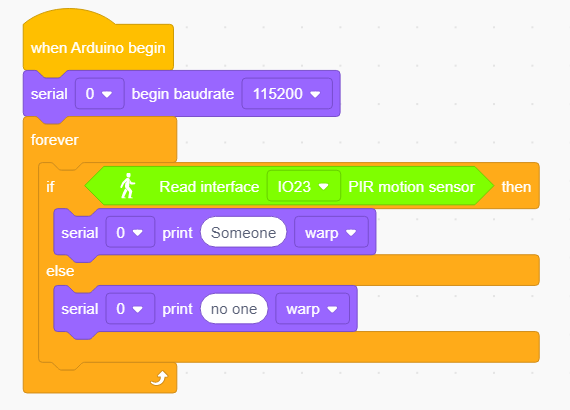
Test Result:
Open the serial monotor.
When someone is in the area, Someone is displayed on the monitor, and the red LED on the sensor goes off. However, if there is no one, No one will be printed and the LED will always be on.
ATTENTION: PIR motion sensor is not able to penetrate things, so please do not cover the sensor while detecting motions.

4.3.3 Buzzer
Description:
A buzzer is an electronic sounder, which emits sounds with different frequencies and durations and is powered by DC voltage. Thus, it can be used as a reminder or an alarm in considerable electronic devices, such as computers, printers, copiers, alarms, electronic toys, automotive electronics, telephones and timers.

A buzzer consists of vibration device and resonance device. And there are two categories: Passive buzzers and active buzzers.
A Passive Buzzer cannot
vibrateto emit sound itself, unless putting asquare wavesignal with a certain frequency. Moreover, the emitting sound varies due to the different frequency of square wave, so a passive buzzer can simulate tunes.An analog squire wave can be generated by changing the power level at pins. For example, after the high level lasting for 500ms, it shifts to a low level for another 500ms then to a high level again…
**We drive the buzzer via a squire wave within 200~5000Hz, and we can compute the frequency(f): f=1/T; T is the period (the total time of high and low level). **

An Active Buzzer is able to emit sound automatically without an external motivator, because it includes a driving circuit which only needs
DC power supply. However, its sound is flat with relatively fixed frequency.
In this experiment, a passive buzzer is applied to” play music”.
Schematic Diagram:

Parameters:
Voltage: 3~5V
Current: ≤5mA
Power: ≤25mW
Wiring Diagram:
Connect the buzzer to io16.
Attention: Connect yellow to S(Signal), red to V(Power), and black to GND. Do not reverse them!

Test Code:
Method 1: Analog Squire Wave
A passive buzzer is driven by squire waves, so we stimulate the wave.
An analog squire wave can be generated by changing the power level of pin: high level for 500us and low level for 500us. So, the buzzer will emit sound. Also, the durations can adjust the sound volume.
Please try 1000us, 1500us, 3000us…What’s the difference?

Code:

In delay function, the time unit us micro-seconds. So the following block represents a 500ms delay.

According to formula:
Thus, 500us is the duration, and we can calculate the frequency = 2kHz, i.e., the high and low level alter 2000 times per second.
Method 2: Speaker Blocks
We adopt Speaker  code blocks to drive the buzzer to vibrate.
Speaker Blocks generates PWM signal with a certain frequency to drive the buzzer to vibrate, and the duration and tone is controlled by related parameters.
There are two ways to define the duration. One is to adjust the parameters of the tone() function to set a duration, and the other is to adopt a noTone() function to directly stop the sound. If you do not define a duration in tone(), the sound signal will always be generated unless a noTone() stops it.
For ESP32 board, one sound can only be produced at a time. If one pin of ESP32 is generating a sound signal via tone(), it is not acceptable to emit sound by this function on another pin.
Tone Table

Code:
Drag a “Tone” block from
as shown below, and set pin to IO16.

You may select a frequency at will.

No Tone: It is used to turn off all tones.

Complete code:

Test Result:
Method 1: Buzzer keeps emitting sound.
Method 2: Buzzer alarms via tone() function.
Expansion: Play Music
Play music through tone().
Complete Code:

4.3.4 Alarm System
In this experiment, we will construct an alarm system by a PIR motion sensor, a buzzer and an LED. When the sensor detects a motion, buzzer emits sound and LED blinks to remind of an invasion.
Wiring Diagram:
Connect the PIR motionsensor to io23, buzzer to io16, and LED to io27.
Attention: Connect yellow to S(Signal), red to V(Power), and black to GND. Do not reverse them!

Test Code:
Code flow:

Complete code:
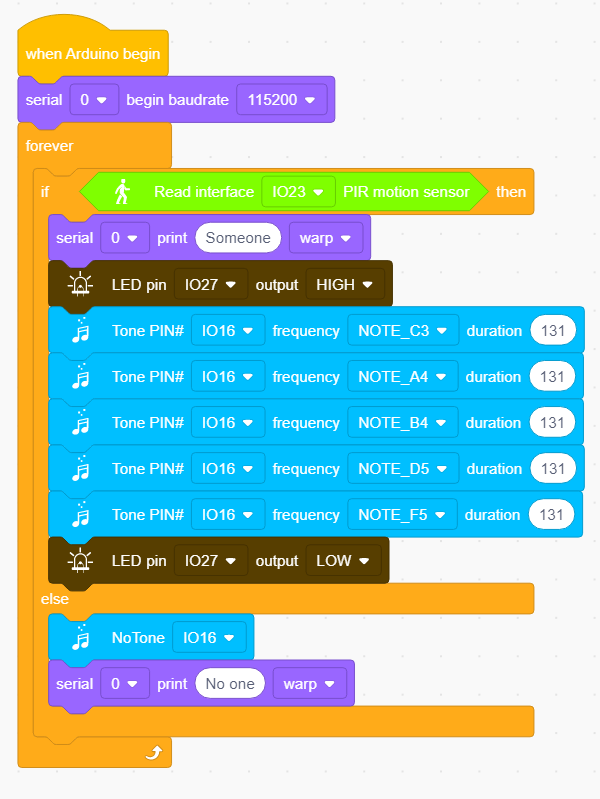
Test Result:
Upload the code and the alarm system starts to work. When it detects a motion, buzzer alarms and LED blinks.
4.3.5 FAQ
Q: Tones of buzzer is not accurate with actual ones.
A: This regular buzzer just stimulates tones, so it is not able to meet professional requirements. If you want standard tones, a more specialized speaker is required.
Q: The PIR motion sensor misinforms results.
A: This PIR motion sensor is also not a professional one.
Please guarantee the following situations to avoid a misinformation:
Avoid objects blown by wind to flutter within the detection area, such as curtains, clothing and flowers.
Avoid strong light in the detection area, such as sunlight, car lights, spotlights and other light sources.
And so on…