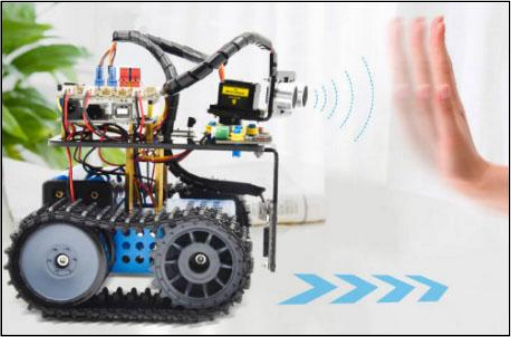
Project 11: Ultrasonic Following Tank
(1)Description:
In the previous lesson, we learned about the light-following smart car. And in this lesson, we can combine the knowledge to make an ultrasonic sound-following car.
In the project, we use ultrasonic sensors to detect the distance between the car and the obstacle in front, and then control the rotation of the two motors based on this data so as to control the movements of the smart car.
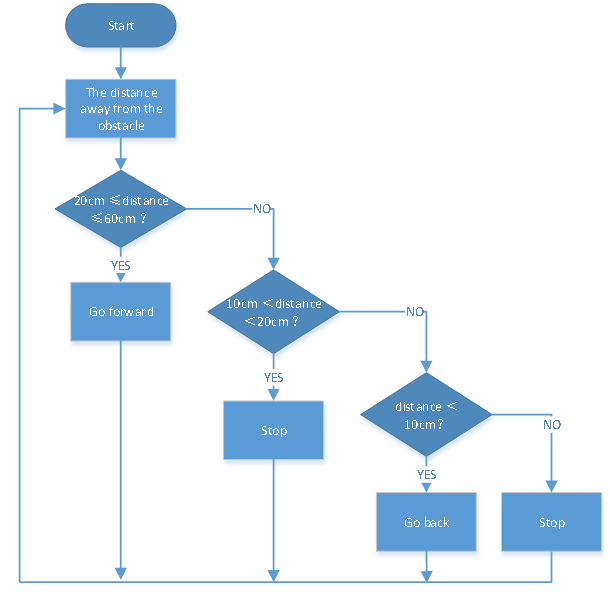
The specific logic of the ultrasonic sound- following smart car is shown in the table blow:
Detection |
Setting |
|---|---|
The distance(cm) between the car and the obstacle front |
Set the angle of the servo to 90° |
Condition |
Movement |
distance≥20 and distance≤50 |
Go front |
10<distance<20 |
Stop |
distance≤10 |
go back |
(2)Flow chart:
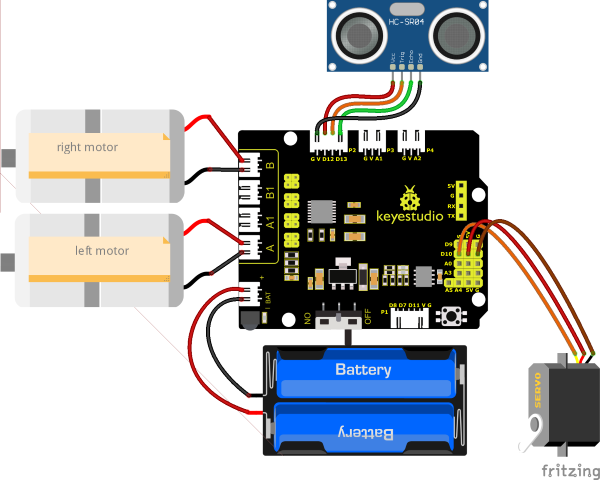
(3)Connection Diagram:
(4)Test Code:
(Note: Do not connect the Bluetooth module before uploading the code, because uploading the code also uses serial communication, and there may be conflicts with the Bluetooth serial communication, which can cause the upload to fail.)
/*
  Keyestudio Mini Tank Robot V3 (Popular Edition)
  lesson 11
  Ultrasonic follow tank
  http://www.keyestudio.com
*/
#define servoPin 10  //The pin of servo

#define ML_Ctrl 4  //Define the direction control pin of the left motor
#define ML_PWM 6   //Define the PWM control pin of the left motor
#define MR_Ctrl 2  //Define the direction control pin of the right motor
#define MR_PWM 5   //Define the PWM control pin of the right motor
#define Trig 12
#define Echo 13
float distance;

void setup()
{
  pinMode(servoPin, OUTPUT);
  pinMode(Trig, OUTPUT);
  pinMode(Echo, INPUT);
  pinMode(ML_Ctrl, OUTPUT);
  pinMode(ML_PWM, OUTPUT);
  pinMode(MR_Ctrl, OUTPUT);
  pinMode(MR_PWM, OUTPUT);
  procedure(90); //Set the angle of the servo to 90°
  delay(500); //delay in 500ms
}

void loop()
{
  distance = checkdistance();  //Assign the distance measured by ultrasonic sound to distance
  if (distance >= 20 && distance <= 50) //go front
  {
    Car_front();
  }
  else if (distance > 10 && distance < 20)  //stop
  {
    Car_Stop();
  }
  else if (distance <= 10)  //go back
  {
    Car_back();
  }
  else  //In other conditions, it stops
  {
    Car_Stop();
  }
}

void Car_front()
{
  digitalWrite(MR_Ctrl, HIGH);
  analogWrite(MR_PWM, 55);
  digitalWrite(ML_Ctrl, HIGH);
  analogWrite(ML_PWM, 55);
}

void Car_back()
{
  digitalWrite(MR_Ctrl, LOW);
  analogWrite(MR_PWM, 200);
  digitalWrite(ML_Ctrl, LOW);
  analogWrite(ML_PWM, 200);
}

void Car_left()
{
  digitalWrite(MR_Ctrl, HIGH);
  analogWrite(MR_PWM, 55);
  digitalWrite(ML_Ctrl, LOW);
  analogWrite(ML_PWM, 200);
}

void Car_right()
{
  digitalWrite(MR_Ctrl, LOW);
  analogWrite(MR_PWM, 200);
  digitalWrite(ML_Ctrl, HIGH);
  analogWrite(ML_PWM, 55);
}

void Car_Stop()
{
  digitalWrite(MR_Ctrl, LOW);
  analogWrite(MR_PWM, 0);
  digitalWrite(ML_Ctrl, LOW);
  analogWrite(ML_PWM, 0);
}

//The function to control servos
void procedure(byte myangle)
{
  int pulsewidth;
  for (int i = 0; i < 5; i++)
  {
    pulsewidth = myangle * 11 + 500;  //Calculate the value of pulse width    digitalWrite(servoPin, HIGH);
    delayMicroseconds(pulsewidth);   //The time in high level represents the pulse width
    digitalWrite(servoPin, LOW);
    delay((20 - pulsewidth / 1000));  //As the cycle is 20ms, the time left is in low level
  }
}
//The function to control ultrasonic sound
float checkdistance()
{
  static float distance;
  digitalWrite(Trig, LOW);
  delayMicroseconds(2);
  digitalWrite(Trig, HIGH);
  delayMicroseconds(10);
  digitalWrite(Trig, LOW);
  distance = pulseIn(Echo, HIGH) / 58.20;  //The 58.20 here comes from 2*29.1=58.2
  delay(10);
  return distance;
}
(5)Test Results:
Upload the test code successfully, wire up, dial the DIP switch to the right end, power up and set the servo to 90°,the smart car follows the obstacle to move.