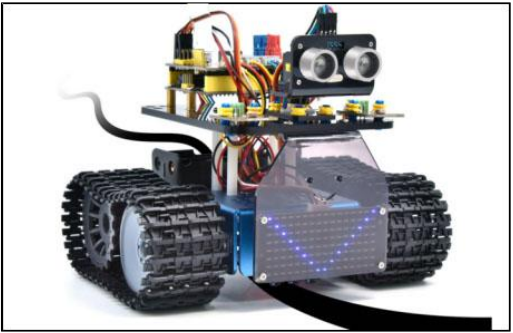
Project 14: Line-tracking Tank
(1)Description:
The previous project has introduced how to confine the smart car to move in a certain space. In this project, we could use the knowledge learned before to make it a line-tracking smart car. In the experiment, we use the line-tracking sensor to detect whether there is a black line around the smart car, and then control the rotation of the two motors according to the detection results, so as to make the smart car to move along the black line.
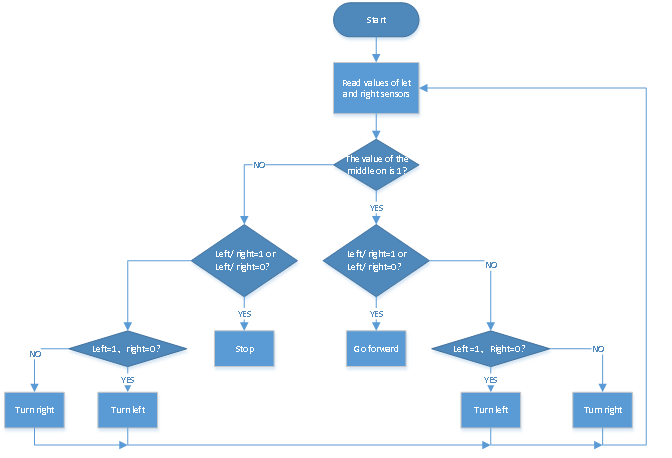
The specific logic of the line-tracking smart car is shown in the table blow:
Sensor |
Detection |
|---|---|
Line-tracking sensor in the middle |
Black line detected: in high level |
Line-tracking sensor on the left |
Black line detected: in high level |
Line-tracking sensor on the right |
Black line detected: in high level |
Condition 1 |
Condition 2 |
Movement |
|---|---|---|
Line-tracking sensor in the middle |
Line-tracking sensor on the left detects the black line |
Rotate left |
Line-tracking sensor in the middle |
Line-tracking sensor on the left detects white line |
Rotate right |
Line-tracking sensor in the middle |
Both the left and right line-tracking sensors detect white line |
Move forward |
Line-tracking sensor in the middle |
Line-tracking sensor on the left detects the black line |
Rotate left |
Line-tracking sensor in the middle |
Line-tracking sensor on the left detects white line |
Rotate right |
Line-tracking sensor in the middle |
Both the left and right line-tracking sensors detect white line |
Stop |
(2)Flow chart:
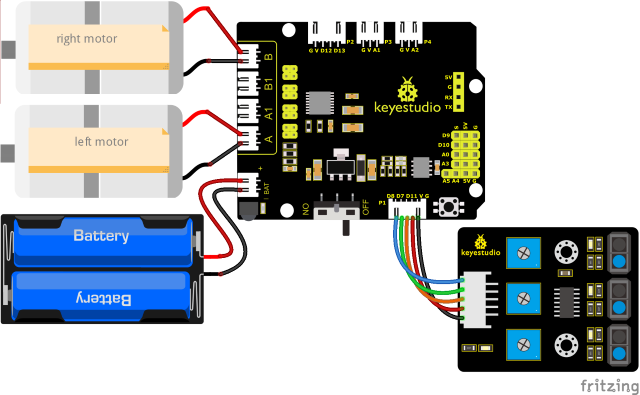
(3)Wiring Diagram:
(4)Test Code:
(Note: Do not connect the Bluetooth module before uploading the code, because uploading the code also uses serial communication, and there may be conflicts with the Bluetooth serial communication, which can cause the upload to fail.)
/*
  Keyestudio Mini Tank Robot V3 (Popular Edition)
  lesson 14
  Line track tank
  http://www.keyestudio.com
*/

//The wiring of line tracking sensor
#define L_pin  11  //left
#define M_pin  7  //middle
#define R_pin  8  //right
#define ML_Ctrl 4  //Define the direction control pin of the left motor
#define ML_PWM 6   //Define the PWM control pin of the left motor
#define MR_Ctrl 2  //Define the direction control pin of the right motor
#define MR_PWM 5   //Define the PWM control pin of the right motor
int L_val, M_val, R_val;

void setup()
{
  Serial.begin(9600); //Set the baud rate to 9600
  pinMode(L_pin, INPUT); //Set all pins of the line tracking sensor as input mode
  pinMode(M_pin, INPUT);
  pinMode(R_pin, INPUT);
  pinMode(ML_Ctrl, OUTPUT);
  pinMode(ML_PWM, OUTPUT);
  pinMode(MR_Ctrl, OUTPUT);
  pinMode(MR_PWM, OUTPUT);
}

void loop ()
{
  L_val = digitalRead(L_pin); //Read the value of the left sensor
  M_val = digitalRead(M_pin); //Read the value of the middle sensor
  R_val = digitalRead(R_pin); //Read the value of the right sensor
  if (M_val == 1) { //the middle one detects black lines
    if (L_val == 1 && R_val == 0)  //If a black line is detected on the left, but not on the right, turn left
    {
      Car_left();
    }
    else if (L_val == 0 && R_val == 1)  //If a black line is detected on the right, not on the left, turn right
    {
      Car_right();
    }
    else  //otherwise, go front
    {
      Car_front();
    }
  }
  else  //The middle one doesn't detect black lines
  {
    if (L_val == 1 && R_val == 0)  //If a black line is detected on the left, but not on the right, turn left
    {
      Car_left();
    }
    else if (L_val == 0 && R_val == 1)  //If a black line is detected on the right, not on the left, turn right
    {
      Car_right();
    }
    else  //otherwise, stop
    {
      Car_Stop();
    }
  }
}

//go front
void Car_front()
{
  digitalWrite(MR_Ctrl, HIGH);
  analogWrite(MR_PWM, 100);
  digitalWrite(ML_Ctrl, HIGH);
  analogWrite(ML_PWM, 100);
}

//go back
void Car_back()
{
  digitalWrite(MR_Ctrl, LOW);
  analogWrite(MR_PWM, 150);
  digitalWrite(ML_Ctrl, LOW);
  analogWrite(ML_PWM, 150);
}

//turn left
void Car_left()
{
  digitalWrite(MR_Ctrl, HIGH);
  analogWrite(MR_PWM, 100);
  digitalWrite(ML_Ctrl, LOW);
  analogWrite(ML_PWM, 150);
}

//turn right
void Car_right()
{
  digitalWrite(MR_Ctrl, LOW);
  analogWrite(MR_PWM, 150);
  digitalWrite(ML_Ctrl, HIGH);
  analogWrite(ML_PWM, 100);
}

//stop
void Car_Stop()
{
  digitalWrite(MR_Ctrl, LOW);
  analogWrite(MR_PWM, 0);
  digitalWrite(ML_Ctrl, LOW);
  analogWrite(ML_PWM, 0);
}
(5)Test Result:
After uploading the test code successfully and powering it up, the smart car moves along the black line.