Project 19: Ultrasonic Tank Robot Multiple Functions
(1)Description:
The smart car has performed a single function in every previous project.
Can it display multiply functions at a time ? Positive.
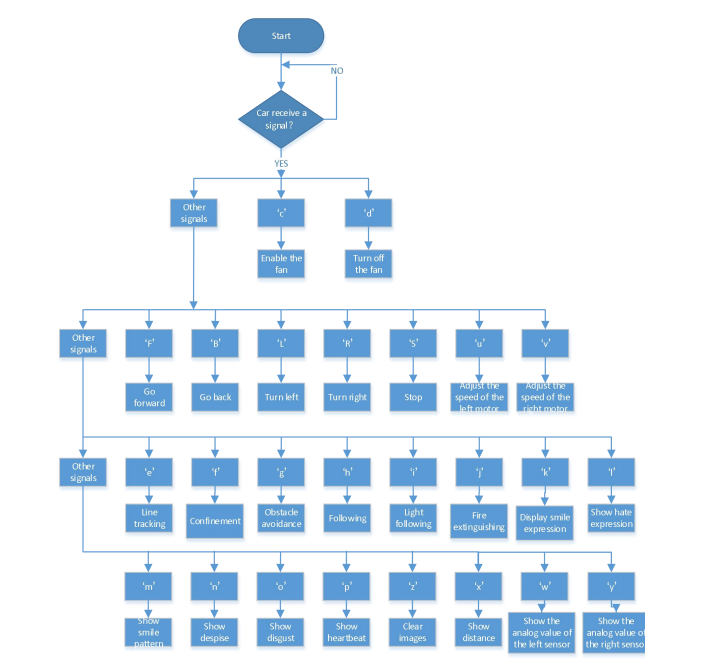
In this last big project, we intend to use a complete code to control the smart car to show off all functions mentioned in previous projects. We use the keys on the Bluetooth APP to automatically switch various functions, quite simple and convenient.
(2)Flow Diagram:
(3)Connection Diagram:
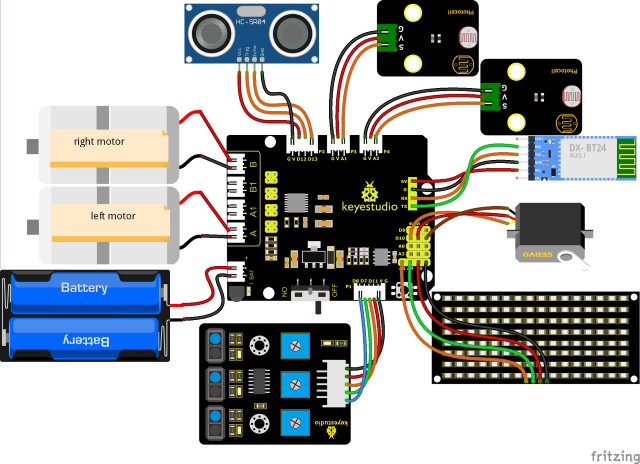
1. GND, VCC, SDA, and SCL of the 8x16 board are connected to G (GND), + (VCC), A4, and A5 of the expansion board.
2. VCC, Trig, Echo, and Gnd of the ultrasonic sensor are connected to 5V (V), 12 (S), 13 (S), and Gnd (G).
3. The brown wire, red wire, and orange wire of the servo are connected to Gnd (G), 5v (V), and D10.
4. RXD, TXD, GND, and VCC of the BT module are connected to TX, RX, G (GND), and 5V (VCC). STATE and BRK don’t need to be interfaced.
5. The pins “G”, “V”, and S of the left photoresistor module are connected to G (GND), V (VCC), and A1, respectively; The right photoresistor module is connected to G (GND), V (VCC), and A2, respectively.
6. The distal ports of the line tracking sensor are 11, 7, and 8.
(4)Test Code:
(Note: Do not connect the Bluetooth module before uploading the code, because uploading the code also uses serial communication, and there may be conflicts with the Bluetooth serial communication, which can cause the upload to fail.)
/*
  Keyestudio Mini Tank Robot V3 (Popular Edition)
  lesson 19
  Ultrasonic Tank Robot Multiple Functions
  http://www.keyestudio.com
*/
#include <IRremote.h>
IRrecv irrecv(3);  //
decode_results results;
long ir_rec;  //used to save the IR value

/***********/
#define USE_FAN_FUNCTION   0

//Array, used to save data of images, can be calculated by yourself or gotten from modulus tool
unsigned char start01[] = {0x01, 0x02, 0x04, 0x08, 0x10, 0x20, 0x40, 0x80, 0x80, 0x40, 0x20, 0x10, 0x08, 0x04, 0x02, 0x01};
unsigned char STOP01[] = {0x2E, 0x2A, 0x3A, 0x00, 0x02, 0x3E, 0x02, 0x00, 0x3E, 0x22, 0x3E, 0x00, 0x3E, 0x0A, 0x0E, 0x00};
unsigned char front[] = {0x00, 0x00, 0x00, 0x00, 0x00, 0x24, 0x12, 0x09, 0x12, 0x24, 0x00, 0x00, 0x00, 0x00, 0x00, 0x00};
unsigned char back[] = {0x00, 0x00, 0x00, 0x00, 0x00, 0x24, 0x48, 0x90, 0x48, 0x24, 0x00, 0x00, 0x00, 0x00, 0x00, 0x00};
unsigned char left[] = {0x00, 0x00, 0x00, 0x00, 0x00, 0x00, 0x44, 0x28, 0x10, 0x44, 0x28, 0x10, 0x44, 0x28, 0x10, 0x00};
unsigned char right[] = {0x00, 0x10, 0x28, 0x44, 0x10, 0x28, 0x44, 0x10, 0x28, 0x44, 0x00, 0x00, 0x00, 0x00, 0x00, 0x00};

unsigned char Smile[] = {0x00, 0x00, 0x1c, 0x02, 0x02, 0x02, 0x5c, 0x40, 0x40, 0x5c, 0x02, 0x02, 0x02, 0x1c, 0x00, 0x00};
unsigned char Disgust[] = {0x00, 0x00, 0x02, 0x02, 0x02, 0x12, 0x08, 0x04, 0x08, 0x12, 0x22, 0x02, 0x02, 0x00, 0x00, 0x00};
unsigned char Happy[] = {0x02, 0x02, 0x02, 0x02, 0x08, 0x18, 0x28, 0x48, 0x28, 0x18, 0x08, 0x02, 0x02, 0x02, 0x02, 0x00};
unsigned char Squint[] = {0x00, 0x00, 0x00, 0x41, 0x22, 0x14, 0x48, 0x40, 0x40, 0x48, 0x14, 0x22, 0x41, 0x00, 0x00, 0x00};
unsigned char Despise[] = {0x00, 0x00, 0x06, 0x04, 0x04, 0x04, 0x24, 0x20, 0x20, 0x26, 0x04, 0x04, 0x04, 0x04, 0x00, 0x00};
unsigned char Heart[] = {0x00, 0x00, 0x0C, 0x1E, 0x3F, 0x7F, 0xFE, 0xFC, 0xFE, 0x7F, 0x3F, 0x1E, 0x0C, 0x00, 0x00, 0x00};

unsigned char clear[] = {0x00, 0x00, 0x00, 0x00, 0x00, 0x00, 0x00, 0x00, 0x00, 0x00, 0x00, 0x00, 0x00, 0x00, 0x00, 0x00};

#define SCL_Pin  A5  //set the pin of clock to A5
#define SDA_Pin  A4  //set the data pin to A4

#define ML_Ctrl 4  //define the direction control pin of the left motor as 4
#define ML_PWM 6   //define the PWM control pin of the left motor
#define MR_Ctrl 2  //define the direction control pin of the right sensor
#define MR_PWM 5   //define the PWM control pin of the right motor
char ble_val;      //used to save the Bluetooth value
byte speeds_L = 200; //the initial speed of the left motor is 200
byte speeds_R = 200; //the initial speed of the right motor is 200
String speeds_l, speeds_r; //receive PWM characters and convert them into PWM value

//wire up the line tracking sensor
#define L_pin  11  //left
#define M_pin  7  //middle
#define R_pin  8  //right
int L_val, M_val, R_val;

#if USE_FAN_FUNCTION  /****use fan*******/
int flame_L = A1; //define the analog port of the left flame sensor to A1
int flame_R = A2; //define the analog port of the right flame sensor to A2
int flame_valL, flame_valR;

//the pin of 130 motor
int INA = 12;
int INB = 13;

#else /****use the ultrasonic sensor*******/
#define servoPin    10  //servo Pin
#define light_L_Pin A1   //define the pin of the left photoresistor
#define light_R_Pin A2   //define the pin of the right photoresistor
int left_light;
int right_light;

#define Trig 12
#define Echo 13
float distance;//Store the distance values detected by ultrasonic for following

//Store the distance values detected by ultrasonic for obstacle avoidance
int a;
int a1;
int a2;

#endif

bool flag;  //flag invariable, used to enter and exit a mode

void setup()
{
  Serial.begin(9600);
  irrecv.enableIRIn();  //Initialize the library of the IR remote

  pinMode(SCL_Pin, OUTPUT);
  pinMode(SDA_Pin, OUTPUT);

  pinMode(ML_Ctrl, OUTPUT);
  pinMode(ML_PWM, OUTPUT);
  pinMode(MR_Ctrl, OUTPUT);
  pinMode(MR_PWM, OUTPUT);

  pinMode(L_pin, INPUT); //define the pins of sensors to INPUT
  pinMode(M_pin, INPUT);
  pinMode(R_pin, INPUT);

  matrix_display(clear);    //clear screen
  matrix_display(start01);  //show start

#if USE_FAN_FUNCTION/****use the fan*******/
  pinMode(INA, OUTPUT);//set INA to OUTPUT
  pinMode(INB, OUTPUT);//set INB to OUTPUT

  //define inputs of the flame sensor
  pinMode(flame_L, INPUT);
  pinMode(flame_R, INPUT);
#else/****use the ultrasonic sensor*******/
  pinMode(servoPin, OUTPUT);
  pinMode(light_L_Pin, INPUT);
  pinMode(light_R_Pin, INPUT);

  pinMode(Trig, OUTPUT);
  pinMode(Echo, INPUT);
  procedure(90); //set the angle of the servo to 90°
#endif
}

void loop()
{
  if (Serial.available()) //if there is data in the serial buffer
  {
    ble_val = Serial.read();
    Serial.println(ble_val);
    switch (ble_val)
    {
      case 'F': Car_front(); break; //the command to go front

      case 'B': Car_back(); break;  //the command to go back

      case 'L': Car_left(); break;  //the command to turn left

      case 'R': Car_right(); break; //the command to turn right

      case 'S': Car_Stop();  break; //stop

      case 'e': Tracking();  break; //enter the line tracking mode

      case 'f': Confinement(); break;  //enter the confinement mode

#if USE_FAN_FUNCTION/****use fan*******/
      case 'j': Fire(); break;  //enable extinguishing fire mode

      case 'c': fan_begin(); break;  //enable the fan

      case 'd': fan_stop();  break;  //turn off the fan

#else/****use the ultrasonic sensor*******/
      case 'g': Avoid(); break;  //enter obstacle avoidance mode

      case 'h': Follow(); break;  //enter light following mode

      case 'i': Light_following();  break;  //enter light following mode
#endif
      case 'u':
        speeds_l = Serial.readStringUntil('#');
        speeds_L = String(speeds_l).toInt();
        break; //start by receiving u, end by receiving characters # and convert into the integer

      case 'v':
        speeds_r = Serial.readStringUntil('#');
        speeds_R = String(speeds_r).toInt();
        break; //start by receiving u, end by receiving characters # and convert into the integer

      case 'k': matrix_display(Smile);    break;  //show "smile" face
      case 'l': matrix_display(Disgust);  break;  //show "disgust" face
      case 'm': matrix_display(Happy);    break;  //show "happy" face
      case 'n': matrix_display(Squint);   break;  //show "Sad" face
      case 'o': matrix_display(Despise);  break;  //show "despise" face
      case 'p': matrix_display(Heart);    break;  //show the hearbeat image
      case 'z': matrix_display(clear);    break;  //clear images

      default: break;
    }
  }

#if (USE_FAN_FUNCTION != 1)/****the function to not use the fan*******/
  //The following three signals are mainly used for cyclic printing
  if (ble_val == 'x')
  {
    distance = checkdistance(); Serial.println(distance);
    delay(50);
  }
  else if (ble_val == 'w')
  {
    left_light = analogRead(light_L_Pin);
    Serial.println(left_light);
    delay(50);
  }
  else if (ble_val == 'y')
  {
    right_light = analogRead(light_R_Pin);
    Serial.println(right_light);
    delay(50);
  }
#endif

  if (irrecv.decode(&results))  //Receive infrared remote control value
  {
    ir_rec = results.value;
    Serial.println(ir_rec, HEX);
    switch (ir_rec)
    {
      case 0xFF629D: Car_front();   break;   //go front
      case 0xFFA857: Car_back();    break;   //go back
      case 0xFF22DD: Car_left();    break;   //rotate to left
      case 0xFFC23D: Car_right();   break;   //rotate to right
      case 0xFF02FD: Car_Stop();    break;   //stop
      default: break;
    }
    irrecv.resume();
  }
}

#if (USE_FAN_FUNCTION != 1)/****use the ultrasonic sensor*******/

//Control the ultrasonic sensor
float checkdistance()
{
  float distance;
  digitalWrite(Trig, LOW);
  delayMicroseconds(2);
  digitalWrite(Trig, HIGH);
  delayMicroseconds(10);
  digitalWrite(Trig, LOW);
  distance = pulseIn(Echo, HIGH) / 58.20;  //
  delay(10);
  return distance;
}


//the function to control the servo
void procedure(int myangle)
{
  int pulsewidth;
  pulsewidth = map(myangle, 0, 180, 500, 2000);  //Calculate the pulse width value, which should be the mapping value from 500 to 2500. Considering the influence of the infrared library, 500~2000 is used here.
  for (int i = 0; i < 5; i++)
  {
    digitalWrite(servoPin, HIGH);
    delayMicroseconds(pulsewidth);   //The duration of the high level is the pulse width
    digitalWrite(servoPin, LOW);
    delay((20 - pulsewidth / 1000));  //The period is 20ms, so the low level lasts the rest of the time
  }
}

/*****************obstacle avoidance******************/
void Avoid()
{
  flag = 0;
  while (flag == 0)
  {
    a = checkdistance();  //the front distance is set to a
    if (a < 20) //When the distance in front is less than 20cm
    {
      Car_Stop();  //stop
      delay(500); //delay in 500ms
      procedure(180);  //servo turns left
      delay(500); //delay in 500ms
      a1 = checkdistance();  //the left distance is set to a1
      delay(100); //read value

      procedure(0); //servo turns right
      delay(500); //delay in 500ms
      a2 = checkdistance(); ///the right distance is set to a2
      delay(100); //read value

      procedure(90);  //back to 90°
      delay(500);
      if (a1 > a2)  //When the distance on the left is greater than the distance on the right
      {
        Car_left();  //the robot turns left
        delay(700);  //turn left 700ms
      }
      else
      {
        Car_right(); //turn right
        delay(700);
      }
    }
    else  //if the front distance ≥20cm,robot goes front
    {
      Car_front(); //go front
    }
    //receive the Bluetooth value to exit the loop
    if (Serial.available())
    {
      ble_val = Serial.read();
      if (ble_val == 'S')  //receive S
      {
        flag = 1;  //Set flag to 1 to exit the loop
        Car_Stop();
      }
    }
  }
}

/*******************following***************/
void Follow()
{
  flag = 0;
  while (flag == 0)
  {
    distance = checkdistance();  //set the distance value to distance
    if (distance >= 20 && distance <= 60) //go front
    {
      Car_front();
    }
    else if (distance > 10 && distance < 20)  // stop
    {
      Car_Stop();
    }
    else if (distance <= 10)  //go back
    {
      Car_back();
    }
    else  //stop
    {
      Car_Stop();
    }
    if (Serial.available())
    {
      ble_val = Serial.read();
      if (ble_val == 'S')
      {
        flag = 1;  //exit the loop
        Car_Stop();
      }
    }
  }
}

/****************light following******************/
void Light_following()
{
  flag = 0;
  while (flag == 0)
  {
    left_light = analogRead(light_L_Pin);
    right_light = analogRead(light_R_Pin);
    if (left_light > 650 && right_light > 650) //go forward
    {
      Car_front();
    }
    else if (left_light > 650 && right_light <= 650)  //turn left
    {
      Car_left();
    }
    else if (left_light <= 650 && right_light > 650) //turn right
    {
      Car_right();
    }
    else  //or else, stop
    {
      Car_Stop();
    }
    if (Serial.available())
    {
      ble_val = Serial.read();
      if (ble_val == 'S')
      {
        flag = 1;
        Car_Stop();
      }
    }
  }
}

#else/****use the fan*******/
/***************enable the fan*****************/
void fan_begin()
{
  digitalWrite(INA, LOW);
  digitalWrite(INB, HIGH);
}

/***************stop fanning*****************/
void fan_stop()
{
  digitalWrite(INA, LOW);
  digitalWrite(INB, LOW);
}

/***************extinguish fire****************/
void Fire()
{
  flag = 0;
  while (flag == 0)
  {
    //Read the analog value of the flame sensor
    flame_valL = analogRead(flame_L);
    flame_valR = analogRead(flame_R);
    if (flame_valL <= 700 || flame_valR <= 700)
    {
      Car_Stop();
      fan_begin();
    }
    else
    {
      fan_stop();
      L_val = digitalRead(L_pin); //Read the value of the left sensor
      M_val = digitalRead(M_pin); //Read the value of the left sensor
      R_val = digitalRead(R_pin); //Read the value of the right sensor

      if (M_val == 1)  //the middle one detects black lines
      {
        if (L_val == 1 && R_val == 0)  //If a black line is detected on the left, but not on the right, turn left
        {
          Car_left();
        }
        else if (L_val == 0 && R_val == 1)  //If a black line is detected on the right, not on the left, turn right
        {
          Car_right();
        }
        else  //go front
        {
          Car_front();
        }
      }
      else  //the middle one detects black lines
      {
        if (L_val == 1 && R_val == 0)  //If a black line is detected on the left, but not on the right, turn left
        {
          Car_left();
        }
        else if (L_val == 0 && R_val == 1)  //If a black line is detected on the right, not on the left, turn right
        {
          Car_right();
        }
        else  //otherwise stop
        {
          Car_Stop();
        }
      }
    }
    if (Serial.available())
    {
      ble_val = Serial.read();
      if (ble_val == 'S')
      {
        flag = 1;
        Car_Stop();
      }
    }
  }
}

#endif

/***************line tracking*****************/
void Tracking()
{
  flag = 0;
  while (flag == 0)
  {
    L_val = digitalRead(L_pin); //Read the value of the left sensor
    M_val = digitalRead(M_pin); //Read the value of the intermediate sensor
    R_val = digitalRead(R_pin); //Read the value of the sensor on the right
    if (M_val == 1)  //the middle one detects black lines
    {
      if (L_val == 1 && R_val == 0)  //If a black line is detected on the left, but not on the right, turn left
      {
        Car_left();
      }
      else if (L_val == 0 && R_val == 1)  //If a black line is detected on the right, not on the left, turn right
      {
        Car_right();
      }
      else  //go front
      {
        Car_front();
      }
    }
    else  //the middle sensor doesn’t detect black lines
    {
      if (L_val == 1 && R_val == 0)  //If a black line is detected on the left, but not on the right, turn left
      {
        Car_left();
      }
      else if (L_val == 0 && R_val == 1) //If a black line is detected on the right, not on the left, turn right
      {
        Car_right();
      }
      else //otherwise stop
      {
        Car_Stop();
      }
    }
    if (Serial.available())
    {
      ble_val = Serial.read();
      if (ble_val == 'S')
      {
        flag = 1;
        Car_Stop();
      }
    }
  }
}

/***************Confinement*****************/
void Confinement()
{
  flag = 0;
  while (flag == 0)
  {
    L_val = digitalRead(L_pin); //Read the value of the left sensor
    M_val = digitalRead(M_pin); //Read the value of the intermediate sensor
    R_val = digitalRead(R_pin); //Read the value of the sensor on the right
    if ( L_val == 0 && M_val == 0 && R_val == 0 ) //Go front when no black lines are detected
    {
        Car_front();
    }
    else
    {
      Car_back();
      delay(700);
      Car_left();
      delay(800);
    }
    if (Serial.available())
    {
      ble_val = Serial.read();
      if (ble_val == 'S')
      {
        flag = 1;
        Car_Stop();
      }
    }
  }
}


/***************dot matrix******************/
//this function is used for the display of dot matrix
void matrix_display(unsigned char matrix_value[])
{
  IIC_start();  //use the function to start transmitting data
  IIC_send(0xc0);  //select an address
  for (int i = 0; i < 16; i++) //image data have 16 characters
  {
    IIC_send(matrix_value[i]); //data to transmit pictures
  }
  IIC_end();   //end the data transmission of pictures
  IIC_start();
  IIC_send(0x8A);  //show control and select pulse width 4/16
  IIC_end();
}

//the condition that data starts transmitting
void IIC_start()
{
  digitalWrite(SDA_Pin, HIGH);
  digitalWrite(SCL_Pin, HIGH);
  delayMicroseconds(3);
  digitalWrite(SDA_Pin, LOW);
  delayMicroseconds(3);
  digitalWrite(SCL_Pin, LOW);
}

//transmit data
void IIC_send(unsigned char send_data)
{
  for (byte mask = 0x01; mask != 0; mask <<= 1) //each character has 8 digits, which is detected one by one
  {
    if (send_data & mask) //set high or low levels in light of each bit(0 or 1)
    {
      digitalWrite(SDA_Pin, HIGH);
    }
    else
    {
      digitalWrite(SDA_Pin, LOW);
    }
    delayMicroseconds(3);
    digitalWrite(SCL_Pin, HIGH); //pull up the clock pin SCL_Pin to end the transmission of data
    delayMicroseconds(3);
    digitalWrite(SCL_Pin, LOW); //pull down the clock pin SCL_Pin to change signals of SDA
  }
}

//the sign that transmission of data ends
void IIC_end()
{
  digitalWrite(SCL_Pin, LOW);
  digitalWrite(SDA_Pin, LOW);
  delayMicroseconds(3);
  digitalWrite(SCL_Pin, HIGH);
  delayMicroseconds(3);
  digitalWrite(SDA_Pin, HIGH);
  delayMicroseconds(3);
}

/***************motor runs****************/
void Car_back()
{
  digitalWrite(MR_Ctrl, LOW);
  analogWrite(MR_PWM, speeds_R);
  digitalWrite(ML_Ctrl, LOW);
  analogWrite(ML_PWM, speeds_L);
  matrix_display(back);  //show the image of going back
}

void Car_front()
{
  digitalWrite(MR_Ctrl, HIGH);
  analogWrite(MR_PWM, 255 - speeds_R);
  digitalWrite(ML_Ctrl, HIGH);
  analogWrite(ML_PWM, 255 - speeds_L);
  matrix_display(front);  //show the image of going front
}

void Car_left()
{
  digitalWrite(MR_Ctrl, HIGH);
  analogWrite(MR_PWM, 255 - speeds_R);
  digitalWrite(ML_Ctrl, LOW);
  analogWrite(ML_PWM, speeds_L);
  matrix_display(left);  //show the image of turning left
}

void Car_right()
{
  digitalWrite(MR_Ctrl, LOW);
  analogWrite(MR_PWM, speeds_R);
  digitalWrite(ML_Ctrl, HIGH);
  analogWrite(ML_PWM, 255 - speeds_L);
  matrix_display(right);  //show the image of turning right
}

void Car_Stop()
{
  digitalWrite(MR_Ctrl, LOW);
  analogWrite(MR_PWM, 0);
  digitalWrite(ML_Ctrl, LOW);
  analogWrite(ML_PWM, 0);
  matrix_display(STOP01);  //show the stop image
}
(5)Test Result:
Before uploading the program code, the Bluetooth module needs to be removed; otherwise, the code upload will fail.
After uploading the code successfully, turn on location services on your device, and then connect the Bluetooth module.
Once the Bluetooth module is plugged in and powered on, and the mobile APP is successfully connected to the Bluetooth, we can use the mobile APP to control the tank robot.
You can also control the robot with the remote control.