Project 4 DC Reduction Motor
1.Description
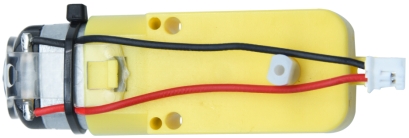
The kit is equipped with 4 DC reduction motors, which are developed on the ordinary DC motors. It has a matching gear reduction box which provides a lower speed but a larger torque. Furthermore, different reduction ratios of the box can provide different speeds and torques.
The reduction motor is the integration of gearmotor and motor, which is applied widely in steel and machine industry.
The current of the motor driver is relatively large. If we use the IO port to force the motor to drive, either the motor will not rotate or the IO port will be burned, thereby it entails a motor driver chip. The DRV8833 motor driver chip has been included on the motor driver base board, which is used to control the rotation direction and speed of the 4 DC reduction motors. The circuit schematic diagram of the two chips are as below.
2.Component Knowledge
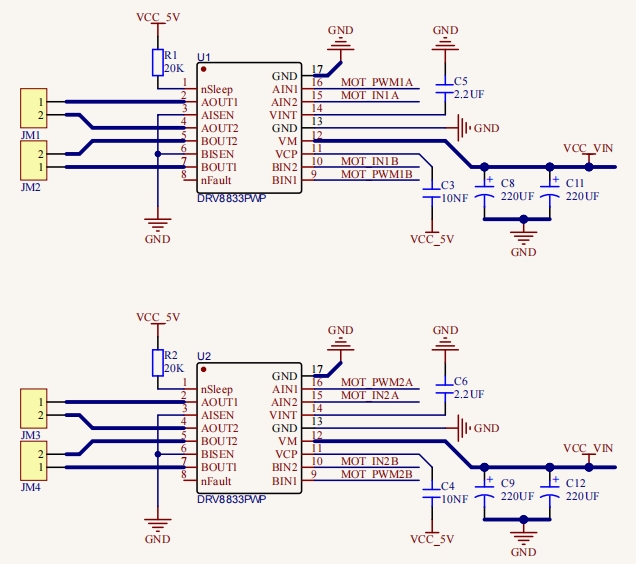
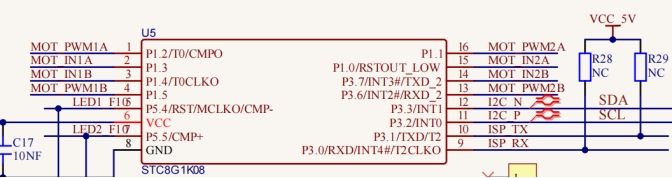
Each chip controls 4 pins, and 2 pins control one motor.
3.Test Code
#include "MecanumCar_v2.h"
mecanumCar mecanumCar(20, 21);  //sda-->20,scl-->21

void setup()
{
  mecanumCar.Init();  //Initialize the drive
}

void loop()
{
  mecanumCar.Advance();
  delay(2000);            //Wait for 2s

  mecanumCar.Back();      //Move back
  delay(2000);

  mecanumCar.Turn_Left(); //Turn left
  delay(2000);

  mecanumCar.Turn_Right();//Turn right
  delay(2000);

  mecanumCar.Stop();      //Stop
  delay(1000);
}
4.Test Result
First, make sure the library files are installed, otherwise the code will fail to compile. Here we use the library file MecanumCar_v2, please refer to the develop environment for installation. After compiling and uploading the code, turn on the switch and power on, and we can see that the car goes forward for 2s, goes back for 2s, turns left for 2s, turns right for 2s and then stops for 1s.
5.Code Explanation
include MecanumCar_v2.h” |
Import the MecanumCar_v2 file |
|---|---|
mecanumCar mecanumCar(sda, scl); |
sda is connected to GPIO20,scl is connected to GPIO21 |
mecanumCar.Init(); |
Initialize the car driver |
mecanumCar.Advance(); |
4 motors and the car go forward |
mecanumCar.Back(); |
4 motors the car move back |
mecanumCar.Turn_Left(); |
The left motors move back, the right motors turn forward and the car turns left |
mecanumCar.Turn_Right(); |
The left motors turn forward, the right motors move back and the car turns right |
mecanumCar.Stop(); |
4 motors and the car stop |
delay(2000); |
delay(2000); |