5.4.11 Proyecto 6.1 Control SK6812
1. Descripción
La lámpara ambiental de la casa inteligente está compuesta por 4 SK6812RGB LEDs. El RGB LED pertenece a un módulo luminoso sencillo, que puede ajustar el color para producir efectos de iluminación de distintos colores. Además, puede usarse ampliamente en edificios, puentes, carreteras, jardines, patios, pisos y otros ámbitos de iluminación decorativa y disposición de recintos, en Navidad, Halloween, San Valentín, Pascua, Día Nacional y otros festivales y escenas ambientales.
En este experimento, crearemos varios efectos de iluminación.
2. Conocimientos de componentes
A partir del diagrama esquemático, podemos ver que estos cuatro RGB LEDs están todos conectados en serie. De hecho, sin importar cuántos sean, podemos usar un pin para controlar un RGB LED y hacer que muestre cualquier color. Cada RGBLED es un píxel independiente, compuesto por los colores R, G y B, que puede alcanzar 256 niveles de brillo y completar la visualización de color verdadero completa de 16777216 colores.
Además, el punto de píxel contiene una señal de retención de datos, un circuito amplificador de conducción y conformado de señal y un circuito de conformado de señal, lo que garantiza de manera efectiva que el color de la luz del píxel sea altamente consistente.

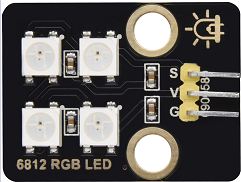
3. Pines
SK6812 |
26 |
|---|---|
\ |
4. Código de prueba
#include <Adafruit_NeoPixel.h>
#ifdef __AVR__
 #include <avr/power.h>                              // Required for 16 MHz Adafruit Trinket
#endif
#define LED_PIN    26                                // Which pin on the Arduino is connected to the NeoPixels?
#define LED_COUNT 4                                  // How many NeoPixels are attached to the Arduino?
Adafruit_NeoPixel strip(LED_COUNT, LED_PIN, NEO_GRB + NEO_KHZ800); // Declare our NeoPixel strip object:

void setup() {
#if defined(__AVR_ATtiny85__) && (F_CPU == 16000000)
  clock_prescale_set(clock_div_1);                   // These lines are specifically to support the Adafruit Trinket 5V 16 MHz.
#endif
  strip.begin();                                     // INITIALIZE NeoPixel strip object (REQUIRED)
  strip.show();                                      // Turn OFF all pixels ASAP
  strip.setBrightness(50);                           // Set BRIGHTNESS to about 1/5 (max = 255)
}

void loop() {
  colorWipe(strip.Color(255,   0,   0), 50);         // Red
  colorWipe(strip.Color(  0, 255,   0), 50);         // Green
  colorWipe(strip.Color(  0,   0, 255), 50);         // Blue

  theaterChase(strip.Color(127, 127, 127), 50);      // White, half brightness
  theaterChase(strip.Color(127,   0,   0), 50);      // Red, half brightness
  theaterChase(strip.Color(  0,   0, 127), 50);      // Blue, half brightness

  rainbow(10);                                       // Flowing rainbow cycle along the whole strip
  theaterChaseRainbow(50);                           // Rainbow-enhanced theaterChase variant
}

void colorWipe(uint32_t color, int wait) {
  for(int i=0; i<strip.numPixels(); i++) {           // For each pixel in strip...
    strip.setPixelColor(i, color);                   // Set pixel's color (in RAM)
    strip.show();                                    // Update strip to match
    delay(wait);                                     // Pause for a moment
  }
}

void theaterChase(uint32_t color, int wait) {
  for(int a=0; a<10; a++) {                         // Repeat 10 times...
    for(int b=0; b<3; b++) {                        // 'b' counts from 0 to 2...
      strip.clear();                                // Set all pixels in RAM to 0 (off)
      for(int c=b; c<strip.numPixels(); c += 3) {    // 'c' counts up from 'b' to end of strip in steps of 3...
        strip.setPixelColor(c, color);               // Set pixel 'c' to value 'color'
      }
      strip.show();                                 // Update strip with new contents
      delay(wait);                                  // Pause for a moment
    }
  }
}

void rainbow(int wait) {
  for(long firstPixelHue = 0; firstPixelHue < 5*65536; firstPixelHue += 256) {
    for(int i=0; i<strip.numPixels(); i++) {        // For each pixel in strip...
      int pixelHue = firstPixelHue + (i * 65536L / strip.numPixels());
      strip.setPixelColor(i, strip.gamma32(strip.ColorHSV(pixelHue)));
    }
    strip.show();                                   // Update strip with new contents
    delay(wait);                                   // Pause for a moment
  }
}

void theaterChaseRainbow(int wait) {
  int firstPixelHue = 0;                           // First pixel starts at red (hue 0)
  for(int a=0; a<30; a++) {                        // Repeat 30 times...
    for(int b=0; b<3; b++) {                       // 'b' counts from 0 to 2...
      strip.clear();                               // Set all pixels in RAM to 0 (off)
      for(int c=b; c<strip.numPixels(); c += 3) {  // 'c' counts up from 'b' to end of strip in increments of 3...
        int      hue   = firstPixelHue + c * 65536L / strip.numPixels();
        uint32_t color = strip.gamma32(strip.ColorHSV(hue)); // hue -> RGB
        strip.setPixelColor(c, color);             // Set pixel 'c' to value 'color'
      }
      strip.show();                               // Update strip with new contents
      delay(wait);                               // Pause for a moment
      firstPixelHue += 65536 / 90;               // One cycle of color wheel over 90 frames
    }
  }
}
5. Resultado de la prueba
Las lámparas ambientales de la casa inteligente mostrarán una variedad de colores y efectos de luz.