5.4.11 Projet 6.1 Contrôle de SK6812
1. Description
La lampe d’ambiance de la maison intelligente est composée de 4 SK6812RGB LEDs. Une RGB LED est un module lumineux simple, qui peut ajuster la couleur pour produire des effets lumineux de différentes teintes. De plus, elle peut être largement utilisée dans les bâtiments, ponts, routes, jardins, cours, étages et autres domaines d’éclairage décoratif et d’aménagement de lieux, ainsi que pour Noël, Halloween, la Saint-Valentin, Pâques, la Fête nationale et d’autres festivals ou scènes d’ambiance.
Dans cette expérience, nous réaliserons différents effets d’éclairage.
2. Connaissance des composants
D’après le schéma, on voit que ces quatre RGB LEDs sont toutes connectées en série. En fait, peu importe leur nombre, on peut utiliser une broche pour contrôler une RGB LED et lui faire afficher n’importe quelle couleur. Chaque RGB LED est un pixel indépendant, composé des couleurs R, G et B, qui peut atteindre 256 niveaux de luminosité et réaliser l’affichage en vraie couleur complète de 16777216 couleurs.
De plus, chaque pixel intègre un circuit d’amplification et de mise en forme du signal de verrouillage de données ainsi qu’un circuit de mise en forme du signal, ce qui garantit efficacement une grande uniformité de couleur des pixels.

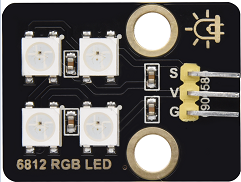
3. Broche
SK6812 |
26 |
|---|---|
\ |
4. Test Code
#include <Adafruit_NeoPixel.h>
#ifdef __AVR__
 #include <avr/power.h>                              // Required for 16 MHz Adafruit Trinket
#endif
#define LED_PIN    26                                // Which pin on the Arduino is connected to the NeoPixels?
#define LED_COUNT 4                                  // How many NeoPixels are attached to the Arduino?
Adafruit_NeoPixel strip(LED_COUNT, LED_PIN, NEO_GRB + NEO_KHZ800); // Declare our NeoPixel strip object:

void setup() {
#if defined(__AVR_ATtiny85__) && (F_CPU == 16000000)
  clock_prescale_set(clock_div_1);                   // These lines are specifically to support the Adafruit Trinket 5V 16 MHz.
#endif
  strip.begin();                                     // INITIALIZE NeoPixel strip object (REQUIRED)
  strip.show();                                      // Turn OFF all pixels ASAP
  strip.setBrightness(50);                           // Set BRIGHTNESS to about 1/5 (max = 255)
}

void loop() {
  colorWipe(strip.Color(255,   0,   0), 50);         // Red
  colorWipe(strip.Color(  0, 255,   0), 50);         // Green
  colorWipe(strip.Color(  0,   0, 255), 50);         // Blue

  theaterChase(strip.Color(127, 127, 127), 50);      // White, half brightness
  theaterChase(strip.Color(127,   0,   0), 50);      // Red, half brightness
  theaterChase(strip.Color(  0,   0, 127), 50);      // Blue, half brightness

  rainbow(10);                                       // Flowing rainbow cycle along the whole strip
  theaterChaseRainbow(50);                           // Rainbow-enhanced theaterChase variant
}

void colorWipe(uint32_t color, int wait) {
  for(int i=0; i<strip.numPixels(); i++) {           // For each pixel in strip...
    strip.setPixelColor(i, color);                   // Set pixel's color (in RAM)
    strip.show();                                    // Update strip to match
    delay(wait);                                     // Pause for a moment
  }
}

void theaterChase(uint32_t color, int wait) {
  for(int a=0; a<10; a++) {                         // Repeat 10 times...
    for(int b=0; b<3; b++) {                        // 'b' counts from 0 to 2...
      strip.clear();                                // Set all pixels in RAM to 0 (off)
      for(int c=b; c<strip.numPixels(); c += 3) {    // 'c' counts up from 'b' to end of strip in steps of 3...
        strip.setPixelColor(c, color);               // Set pixel 'c' to value 'color'
      }
      strip.show();                                 // Update strip with new contents
      delay(wait);                                  // Pause for a moment
    }
  }
}

void rainbow(int wait) {
  for(long firstPixelHue = 0; firstPixelHue < 5*65536; firstPixelHue += 256) {
    for(int i=0; i<strip.numPixels(); i++) {        // For each pixel in strip...
      int pixelHue = firstPixelHue + (i * 65536L / strip.numPixels());
      strip.setPixelColor(i, strip.gamma32(strip.ColorHSV(pixelHue)));
    }
    strip.show();                                   // Update strip with new contents
    delay(wait);                                   // Pause for a moment
  }
}

void theaterChaseRainbow(int wait) {
  int firstPixelHue = 0;                           // First pixel starts at red (hue 0)
  for(int a=0; a<30; a++) {                        // Repeat 30 times...
    for(int b=0; b<3; b++) {                       // 'b' counts from 0 to 2...
      strip.clear();                               // Set all pixels in RAM to 0 (off)
      for(int c=b; c<strip.numPixels(); c += 3) {  // 'c' counts up from 'b' to end of strip in increments of 3...
        int      hue   = firstPixelHue + c * 65536L / strip.numPixels();
        uint32_t color = strip.gamma32(strip.ColorHSV(hue)); // hue -> RGB
        strip.setPixelColor(c, color);             // Set pixel 'c' to value 'color'
      }
      strip.show();                               // Update strip with new contents
      delay(wait);                               // Pause for a moment
      firstPixelHue += 65536 / 90;               // One cycle of color wheel over 90 frames
    }
  }
}
5. Résultat du test
Les lampes d’ambiance de la maison intelligente afficheront une variété de couleurs et d’effets lumineux.