5.4.11 プロジェクト6.1 SK6812の制御
1. 説明
スマートホームのアトモスフィアランプは4つのSK6812RGB LEDsで構成されています。RGB LEDは単純な発光モジュールに属し、色を調整してさまざまな色の照明効果を表現できます。さらに、建物、橋、道路、庭園、中庭、フロアなどの装飾照明や会場配置、クリスマス、ハロウィン、バレンタインデー、イースター、国民の祝日などのイベントや雰囲気を演出するシーンで広く使用できます。
この実験では、さまざまな照明効果を作成します。
2. コンポーネントの知識
回路図から、これら4つのRGB LEDsはすべて直列に接続されていることがわかります。実際には個数にかかわらず、1本のピンでRGB LEDを制御して任意の色を表示させることができます。各RGBLEDは独立したピクセルで、R、G、Bの各色から構成され、256階調の輝度表示を実現し、16777216色のフルカラー表示を行えます。
さらに、ピクセルはデータラッチ、信号整形、増幅駆動回路などの信号整形回路を内蔵しており、ピクセルの発色の一貫性を効果的に確保しています。

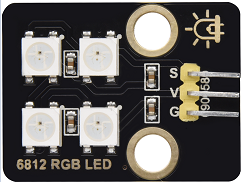
3. ピン
SK6812 |
26 |
|---|---|
\ |
4. テストコード
#include <Adafruit_NeoPixel.h>
#ifdef __AVR__
 #include <avr/power.h>                              // Required for 16 MHz Adafruit Trinket
#endif
#define LED_PIN    26                                // Which pin on the Arduino is connected to the NeoPixels?
#define LED_COUNT 4                                  // How many NeoPixels are attached to the Arduino?
Adafruit_NeoPixel strip(LED_COUNT, LED_PIN, NEO_GRB + NEO_KHZ800); // Declare our NeoPixel strip object:

void setup() {
#if defined(__AVR_ATtiny85__) && (F_CPU == 16000000)
  clock_prescale_set(clock_div_1);                   // These lines are specifically to support the Adafruit Trinket 5V 16 MHz.
#endif
  strip.begin();                                     // INITIALIZE NeoPixel strip object (REQUIRED)
  strip.show();                                      // Turn OFF all pixels ASAP
  strip.setBrightness(50);                           // Set BRIGHTNESS to about 1/5 (max = 255)
}

void loop() {
  colorWipe(strip.Color(255,   0,   0), 50);         // Red
  colorWipe(strip.Color(  0, 255,   0), 50);         // Green
  colorWipe(strip.Color(  0,   0, 255), 50);         // Blue

  theaterChase(strip.Color(127, 127, 127), 50);      // White, half brightness
  theaterChase(strip.Color(127,   0,   0), 50);      // Red, half brightness
  theaterChase(strip.Color(  0,   0, 127), 50);      // Blue, half brightness

  rainbow(10);                                       // Flowing rainbow cycle along the whole strip
  theaterChaseRainbow(50);                           // Rainbow-enhanced theaterChase variant
}

void colorWipe(uint32_t color, int wait) {
  for(int i=0; i<strip.numPixels(); i++) {           // For each pixel in strip...
    strip.setPixelColor(i, color);                   // Set pixel's color (in RAM)
    strip.show();                                    // Update strip to match
    delay(wait);                                     // Pause for a moment
  }
}

void theaterChase(uint32_t color, int wait) {
  for(int a=0; a<10; a++) {                         // Repeat 10 times...
    for(int b=0; b<3; b++) {                        // 'b' counts from 0 to 2...
      strip.clear();                                // Set all pixels in RAM to 0 (off)
      for(int c=b; c<strip.numPixels(); c += 3) {    // 'c' counts up from 'b' to end of strip in steps of 3...
        strip.setPixelColor(c, color);               // Set pixel 'c' to value 'color'
      }
      strip.show();                                 // Update strip with new contents
      delay(wait);                                  // Pause for a moment
    }
  }
}

void rainbow(int wait) {
  for(long firstPixelHue = 0; firstPixelHue < 5*65536; firstPixelHue += 256) {
    for(int i=0; i<strip.numPixels(); i++) {        // For each pixel in strip...
      int pixelHue = firstPixelHue + (i * 65536L / strip.numPixels());
      strip.setPixelColor(i, strip.gamma32(strip.ColorHSV(pixelHue)));
    }
    strip.show();                                   // Update strip with new contents
    delay(wait);                                   // Pause for a moment
  }
}

void theaterChaseRainbow(int wait) {
  int firstPixelHue = 0;                           // First pixel starts at red (hue 0)
  for(int a=0; a<30; a++) {                        // Repeat 30 times...
    for(int b=0; b<3; b++) {                       // 'b' counts from 0 to 2...
      strip.clear();                               // Set all pixels in RAM to 0 (off)
      for(int c=b; c<strip.numPixels(); c += 3) {  // 'c' counts up from 'b' to end of strip in increments of 3...
        int      hue   = firstPixelHue + c * 65536L / strip.numPixels();
        uint32_t color = strip.gamma32(strip.ColorHSV(hue)); // hue -> RGB
        strip.setPixelColor(c, color);             // Set pixel 'c' to value 'color'
      }
      strip.show();                               // Update strip with new contents
      delay(wait);                               // Pause for a moment
      firstPixelHue += 65536 / 90;               // One cycle of color wheel over 90 frames
    }
  }
}
5. テスト結果
スマートホームのアトモスフィアランプは、多様な色や光の効果を表示します。