Project 3 Motor Driving
1.Description
The micro:bit robot shield has a built-in TB6612FNG chip. When using, you just need to insert the micro:bit main board into the shield, and send the test code to micro:bit main board. Insert well the 18650 battery into the shield to control the two motors rotate, thus control the micro:bit car run.
2.Below is a table of TB6612FNG chip pins (PWM range of 0~1023)
Car state |
Left motor control pin (P5) state |
PWM(P0) |
Left motor |
Right motor control pin(P16) state |
PWM(P1) |
Right motor |
|---|---|---|---|---|---|---|
Forward |
1 |
500 |
Go forward |
1 |
500 |
Go forward |
Backward |
0 |
500 |
Go backward |
0 |
500 |
Go backward |
Stop |
0 |
0 |
Stop |
0 |
0 |
Stop |
Turn left |
0 |
500 |
Go backward |
1 |
500 |
Go forward |
Turn right |
1 |
500 |
Go forward |
0 |
500 |
Go backward |
3.Test Code
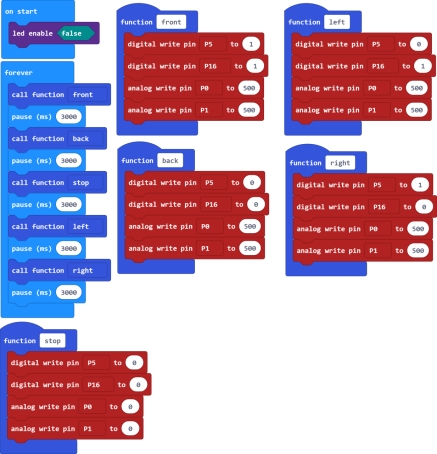
4.Test Result Send well the test code to micro:bit main board, then insert the micro:bit main board into the car shield, and connect a 18650 battery into the car shield.
Turn the POWER switch ON. The micro:bit car will go forward for 3 seconds, backward for 3 seconds, stop for 3 seconds, turn left for 3 seconds and turn right for 3 seconds, repeatedly.