Project 15 Multi-purpose Bluetooth Robot
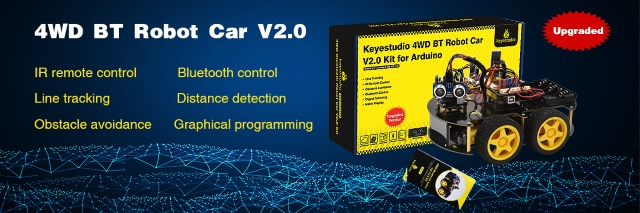
1. Description
In previous projects, the robot car only performs a single function. However, in this lesson, we will integrate all of its functions via Bluetooth control.
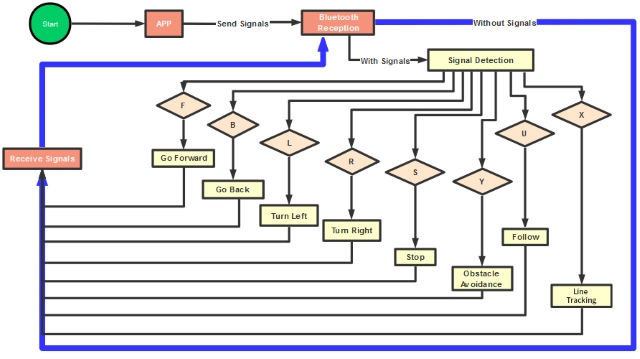
Here is a simple flow chart of multi-purpose robot car for your reference.
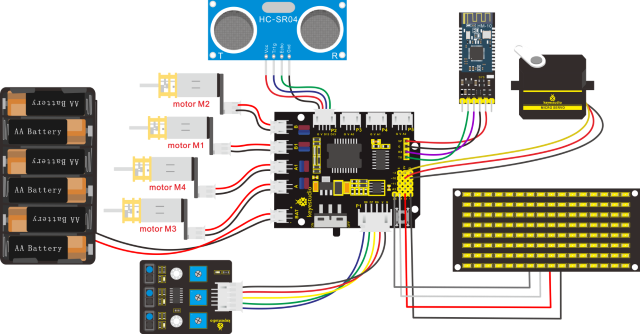
2. Connection Diagram
3. Test Code
/*
keyestudio 4wd BT Car V2.0
lesson 15
Multifunctional Robot car
http://www.keyestudio.com
*/
unsigned char start01[] = {0x01,0x02,0x04,0x08,0x10,0x20,0x40,0x80,0x80,0x40,0x20,0x10,0x08,0x04,0x02,0x01};
unsigned char front_matrix[] = {0x00,0x00,0x00,0x00,0x00,0x24,0x12,0x09,0x12,0x24,0x00,0x00,0x00,0x00,0x00,0x00};
unsigned char back_matrix[] = {0x00,0x00,0x00,0x00,0x00,0x24,0x48,0x90,0x48,0x24,0x00,0x00,0x00,0x00,0x00,0x00};
unsigned char left_matrix[] = {0x00,0x00,0x00,0x00,0x00,0x00,0x44,0x28,0x10,0x44,0x28,0x10,0x44,0x28,0x10,0x00};
unsigned char right_matrix[] = {0x00,0x10,0x28,0x44,0x10,0x28,0x44,0x10,0x28,0x44,0x00,0x00,0x00,0x00,0x00,0x00};
unsigned char STOP01[] = {0x2E,0x2A,0x3A,0x00,0x02,0x3E,0x02,0x00,0x3E,0x22,0x3E,0x00,0x3E,0x0A,0x0E,0x00};
unsigned char clear[] = {0x00,0x00,0x00,0x00,0x00,0x00,0x00,0x00,0x00,0x00,0x00,0x00,0x00,0x00,0x00,0x00};

#define SCL_Pin  A5
#define SDA_Pin  A4

#include "SR04.h"
#define TRIG_PIN 12
#define ECHO_PIN 13
SR04 sr04 = SR04(ECHO_PIN,TRIG_PIN);
long distance,distance1,distance2,distance3;

const int left_ctrl = 4;
const int left_pwm = 5;
const int right_ctrl = 2;
const int right_pwm = 6;
const int sensor_l = 11;
const int sensor_c = 7;
const int sensor_r = 8;
int l_val,c_val,r_val;
const int servopin = 10;
char BLE_val;

void setup()
{
    Serial.begin(9600);
    //irrecv.enableIRIn(); // Start the receiver
    servopulse(servopin,90);
    pinMode(left_ctrl,OUTPUT);
    pinMode(left_pwm,OUTPUT);
    pinMode(right_ctrl,OUTPUT);
    pinMode(right_pwm,OUTPUT);
    pinMode(sensor_l,INPUT);
    pinMode(sensor_c,INPUT);
    pinMode(sensor_r,INPUT);
    pinMode(SCL_Pin,OUTPUT);
    pinMode(SDA_Pin,OUTPUT);
    //Clear the screen
    matrix_display(clear);
    matrix_display(start01);
}

void loop()
{
    if(Serial.available()>0)
    {
        BLE_val = Serial.read();
        Serial.println(BLE_val);
    }
    switch(BLE_val)
    {
    case 'F': front(); matrix_display(front_matrix); break;
    case 'B': back(); matrix_display(back_matrix); break;
    case 'L': left(); matrix_display(left_matrix); break;
    case 'R': right(); matrix_display(right_matrix); break;
    case 'S': Stop(); matrix_display(STOP01); break;
    case 'X': tracking(); break;
    case 'Y': avoid();break;
    case 'U': follow_car();break;
    }
}

void avoid()
{
    matrix_display(start01);
    int track_flag = 0;
    while(track_flag == 0)
    {
    distance1=sr04.Distance();
    if((distance1 < 20)&&(distance1 != 0))
    {
        Stop2();
        delay(100);
        servopulse(servopin,180);
        delay(500);
        distance2=sr04.Distance();
        delay(100);
        servopulse(servopin,0);
        delay(500);
        distance3=sr04.Distance();
        delay(100);
        if(distance2 > distance3)
        {
            left();
            servopulse(servopin,90);
        }
        else
        {
            right();
            servopulse(servopin,90);
        }
    }
    else
    {
        front();
    }
    if(Serial.available()>0)
    {
        BLE_val = Serial.read();
        if(BLE_val == 'S')
        {
        track_flag = 1;
        }
    }
    }
}

void follow_car()
{
    matrix_display(start01);
    servopulse(servopin,90);
    int track_flag = 0;
    while(track_flag == 0)
    {
        distance = sr04.Distance();
        if(distance<8)
        {
            back2();
        }
        else if((distance>=8)&&(distance<13))
        {
            Stop();
        }
        else if((distance>=13)&&(distance<35))
        {
            front();
        }
        else
        {
            Stop();
        }
        if(Serial.available()>0)
        {
            BLE_val = Serial.read();
            if(BLE_val == 'S')
            {
            	track_flag = 1;
            }
        }
    }
}

void servopulse(int servopin,int myangle)
{
    for(int i=0;i<30;i++)
    {
        int pulsewidth = (myangle*11)+500;
        digitalWrite(servopin,HIGH);
        delayMicroseconds(pulsewidth);
        digitalWrite(servopin,LOW);
        delay(20-pulsewidth/1000);
    }
}

void tracking()
{
    matrix_display(start01);
    int track_flag = 0;
    while(track_flag == 0)
    {
        l_val = digitalRead(sensor_l);
        c_val = digitalRead(sensor_c);
        r_val = digitalRead(sensor_r);
        if(c_val == 1)
        {
            front2();
        }
        else
        {
            if((l_val == 1)&&(r_val == 0))
            {
            	left();
            }
            else if((l_val == 0)&&(r_val == 1))
            {
            	right();
            }
            else
            {
            	Stop();
            }
        }
        if(Serial.available()>0)
        {
            BLE_val = Serial.read();
            if(BLE_val == 'S')
            {
            	track_flag = 1;
            }
        }
    }
}

void front()
{
    digitalWrite(left_ctrl,HIGH);
    analogWrite(left_pwm,220);
    digitalWrite(right_ctrl,HIGH);
    analogWrite(right_pwm,190);
}

void front2()
{
    digitalWrite(left_ctrl,HIGH);
    analogWrite(left_pwm,75);
    digitalWrite(right_ctrl,HIGH);
    analogWrite(right_pwm,70);
}

void back()
{
    digitalWrite(left_ctrl,LOW);
    analogWrite(left_pwm,220);
    digitalWrite(right_ctrl,LOW);
    analogWrite(right_pwm,190);
}

void back2()
{
    digitalWrite(left_ctrl,LOW);
    analogWrite(left_pwm,110);
    digitalWrite(right_ctrl,LOW);
    analogWrite(right_pwm,90);
}

void left()
{
    digitalWrite(left_ctrl,LOW);
    analogWrite(left_pwm,220);
    digitalWrite(right_ctrl,HIGH);
    analogWrite(right_pwm,190);
}

void right()
{
    digitalWrite(left_ctrl,HIGH);
    analogWrite(left_pwm,220);
    digitalWrite(right_ctrl,LOW);
    analogWrite(right_pwm,190);
}

void Stop()
{
    analogWrite(left_pwm,0);
    analogWrite(right_pwm,0);
}

void Stop2()
{
    digitalWrite(left_ctrl,LOW);
    analogWrite(left_pwm,200);
    digitalWrite(right_ctrl,LOW);
    analogWrite(right_pwm,200);
    delay(50);
    analogWrite(left_pwm,0);
    analogWrite(right_pwm,0);
}

//this function is used for dot matrix display
void matrix_display(unsigned char matrix_value[])
{
    IIC_start();  // the function to transmit data
    IIC_send(0xc0);  //select address
    for(int i = 0;i < 16;i++) //pattern data has 16 bytes
    {
        IIC_send(matrix_value[i]); //data transmits patterns
    }
    IIC_end();   //end the transmission of patterns data
    IIC_start();
    IIC_send(0x8A);  //display the control, set pulse width to 4/16
    IIC_end();
}

// The condition of data transmission starts
void IIC_start()
{
    digitalWrite(SCL_Pin,HIGH);
    delayMicroseconds(3);
    digitalWrite(SDA_Pin,HIGH);
    delayMicroseconds(3);
    digitalWrite(SDA_Pin,LOW);
    delayMicroseconds(3);
}

// transmit data
void IIC_send(unsigned char send_data)
{
    for(char i = 0;i < 8;i++)  //Every character has 8 bits
    {
        digitalWrite(SCL_Pin,LOW);  //pull down the SCL_Pin to change the signal of SDA
        delayMicroseconds(3);
        if(send_data & 0x01)  // 1 or 0 of byte is used to set high and low level of SDA_Pin
        {
        	digitalWrite(SDA_Pin,HIGH);
        }
        else
        {
        	digitalWrite(SDA_Pin,LOW);
        }
        delayMicroseconds(3);
        digitalWrite(SCL_Pin,HIGH); //pull up the SCL_Pin to stop transmitting data      delayMicroseconds(3);
        send_data = send_data >> 1;  //Detect bit by bit, so move the data right by one bit detect bit by bit, move data
    }
}

//the sign that data ends transmitting
void IIC_end()
{
    digitalWrite(SCL_Pin,LOW);
    delayMicroseconds(3);
    digitalWrite(SDA_Pin,LOW);
    delayMicroseconds(3);
    digitalWrite(SCL_Pin,HIGH);
    delayMicroseconds(3);
    digitalWrite(SDA_Pin,HIGH);
    delayMicroseconds(3);
}
4. Test Result
Special note: before uploading the test code, you need to remove the Bluetooth module. Otherwise, the test code will fail to upload. You can reconnect the Bluetooth module when the code is uploaded successfully
Uploading code to development board, plugging in and turning on it , the 4WD robot can not only go forward and back but turn left and right. Moreover, it is known that the mobile APP, connected to Bluetooth successfully, can be used to control the movement of the robot.