4.3.13 Ultrasonic Avoiding Robot
4.3.13.1 Introduction
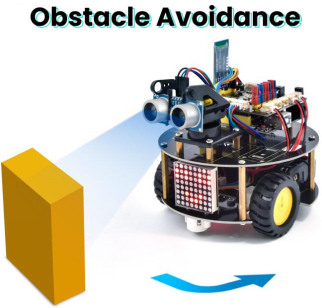
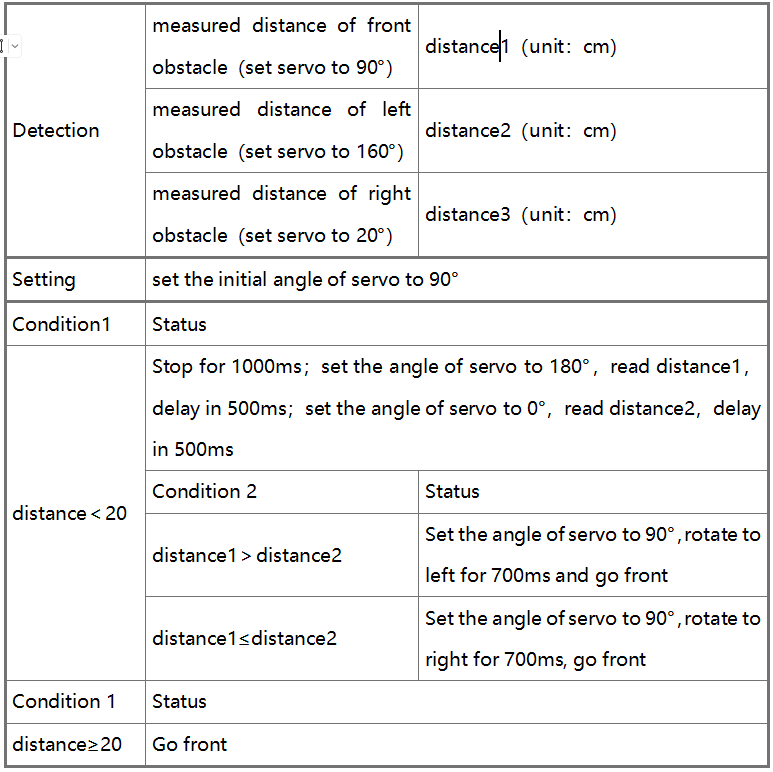
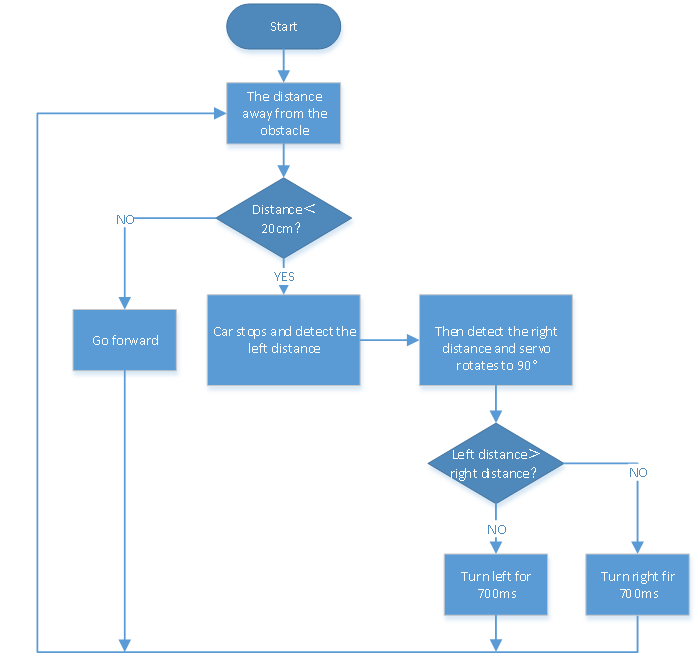
We’ve learned LED matrix, motor drive, ultrasonic sensor and servo in previous lessons. Next, we could make an ultrasonic avoiding robot! The measured distance between an ultrasonic sensor and obstacle can be used to control the servo to rotate so as to make robot car move. The specific logic of ultrasonic avoiding smart car is shown below:
4.3.13.2 Wiring Diagram
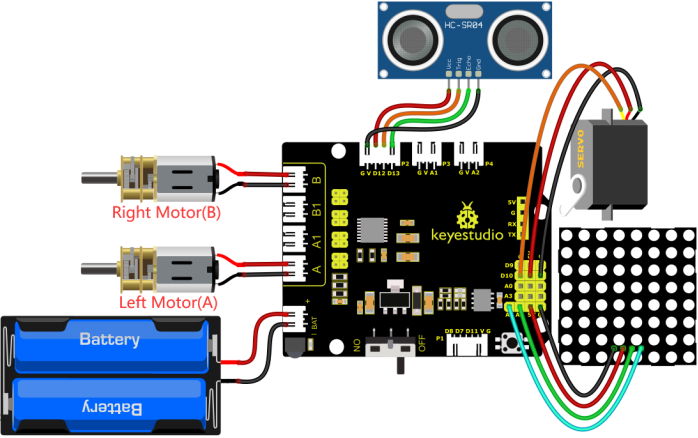
GND, VCC, SDA and SCL of the 8*8 dot matrix module are connected to G(GND), V(VCC), A4 and A5 of the expansion board.
VCC, Trig, Echo and Gnd of the ultrasonic sensor are connected to 5V(V), D12(S), D13(S) and Gnd(G)
The servo is connected to G, V and D10. The brown wire is interfaced with Gnd(G), the red wire is interfaced with 5V(V) and the orange wire is interfaced with D10.
The power is connected to the BAT port
⚠️ Attention: You do not need to disassemble the Smart Little Turtle Robot and re-connect the module. Here this disgram will be convenient for you to program and write code.
4.3.13.3 Test Code
/*
 keyestudio smart turtle robot
 lesson 13
 avoiding turtle
 http://www.keyestudio.com
*/
#include <ks_Matrix.h>
Matrix myMatrix(A4,A5);// set the pins of dot matrix to A4 and A5.
//Array, used to store the data of pattern, can be calculated by yourself or obtained from the modulus tool
uint8_t matrix_heart[8]={0x66,0x99,0x81,0x81,0x42,0x24,0x18,0x00};
uint8_t matrix_smile[8]={0x42,0xa5,0xa5,0x00,0x00,0x24,0x18,0x00};
uint8_t matrix_front2[8]={0x18,0x24,0x42,0x99,0x24,0x42,0x81,0x00};
uint8_t matrix_back2[8]={0x00,0x81,0x42,0x24,0x99,0x42,0x24,0x18};
uint8_t matrix_left2[8]={0x12,0x24,0x48,0x90,0x90,0x48,0x24,0x12};
uint8_t matrix_right2[8]={0x48,0x24,0x12,0x09,0x09,0x12,0x24,0x48};
uint8_t matrix_stop2[8]={0x18,0x18,0x18,0x18,0x18,0x00,0x18,0x18};
uint8_t  LEDArray[8];
const int left_ctrl = 4;//define direction control pin of A motor
const int left_pwm = 6;//define PWM control pin of A motor
const int right_ctrl = 2;//define direction control pin of B motor
const int right_pwm = 5;//define PWM control pin of B motor
#include "SR04.h"//define the library of ultrasonic sensor
#define TRIG_PIN 12// set the signal input of ultrasonic sensor to D12
#define ECHO_PIN 13//set the signal output of ultrasonic sensor to D13
SR04 sr04 = SR04(ECHO_PIN,TRIG_PIN);
long distance1,distance2,distance3;//define three distance
const int servopin = 10;//set the pin of servo to D10
int myangle;
int pulsewidth;
int val;

void setup() {
  Serial.begin(9600);//open serial monitor and set baud rate to 9600
  pinMode(left_ctrl,OUTPUT);//set direction control pin of A motor to OUTPUT
  pinMode(left_pwm,OUTPUT);//set PWM control pin of A motor to OUTPUT
  pinMode(right_ctrl,OUTPUT);//set direction control pin of B motor to OUTPUT
  pinMode(right_pwm,OUTPUT);//set PWM control pin of B motor to OUTPUT
  servopulse(servopin,90);//the angle of servo is 90 degree
  delay(300);
  myMatrix.begin(112);
  myMatrix.clear();
}

void loop()
 {
  avoid();//run the main program
}

void avoid()
{
  distance1=sr04.Distance(); //obtain the value detected by ultrasonic sensor

  if((distance1 < 20)&&(distance1 != 0))//if the distance is greater than 0 and less than 10

  {
    car_Stop();//stop
    myMatrix.clear();
    myMatrix.writeDisplay();//show stop pattern
    matrix_display(matrix_stop2);  //show stop pattern
    delay(500);
    servopulse(servopin,160);//servo rotates to 160°
    delay(500);
    distance2=sr04.Distance();//measure the distance
    delay(100);
    servopulse(servopin,20);//rotate to 20 degree
    delay(500);
    distance3=sr04.Distance();//measure the distance
    delay(100);
    servopulse(servopin,90);  //Return to the 90 degree position
    delay(500);
    if(distance2 > distance3)//compare the distance, if left distance is more than right distance
    {
      car_left();//turn left
      myMatrix.clear();
      myMatrix.writeDisplay();
      matrix_display(matrix_left2);    //display left-turning pattern
      servopulse(servopin,90);//servo rotates to 90 degree
      delay(700); //turn left 700ms
      myMatrix.clear();
      myMatrix.writeDisplay();
      matrix_display(matrix_front2);   //show forward pattern
    }
    else//if the right distance is greater than the left
    {
      car_right();//turn right
      myMatrix.clear();
      myMatrix.writeDisplay();
      matrix_display(matrix_right2);   //display right-turning pattern
      servopulse(servopin,90);//servo rotates to 90 degree
      delay(700);
      myMatrix.clear();
      myMatrix.writeDisplay();
      matrix_display(matrix_front2);  //show forward pattern
    }
  }
  else//otherwise
  {
    car_front();//go forward
    myMatrix.clear();
    myMatrix.writeDisplay();
    matrix_display(matrix_front2);  // show forward pattern
  }
}

void servopulse(int servopin,int myangle)//the running angle of servo
{
  for(int i=0; i<20; i++)
  {
    pulsewidth = (myangle*11)+500;
    digitalWrite(servopin,HIGH);
    delayMicroseconds(pulsewidth);
    digitalWrite(servopin,LOW);
    delay(20-pulsewidth/1000);
  }

}

void car_front()//car goes forward
{
  digitalWrite(left_ctrl,HIGH);
  analogWrite(left_pwm,155);
  digitalWrite(right_ctrl,HIGH);
  analogWrite(right_pwm,155);
}
void car_back()//go back
{
  digitalWrite(left_ctrl,LOW);
  analogWrite(left_pwm,100);
  digitalWrite(right_ctrl,LOW);
  analogWrite(right_pwm,100);
}
void car_left()//car turns left
{
  digitalWrite(left_ctrl,LOW);
  analogWrite(left_pwm,100);
  digitalWrite(right_ctrl,HIGH);
  analogWrite(right_pwm,155);
}
void car_right()//car turns right
{
  digitalWrite(left_ctrl,HIGH);
  analogWrite(left_pwm,155);
  digitalWrite(right_ctrl,LOW);
  analogWrite(right_pwm,100);
}

void car_Stop()//stop
{
  digitalWrite(left_ctrl,LOW);
  analogWrite(left_pwm,0);
  digitalWrite(right_ctrl,LOW);
  analogWrite(right_pwm,0);
}

//this function is used for dot matrix display
void matrix_display(unsigned char matrix_value[])
{
  for(int i=0; i<8; i++)
    {
      LEDArray[i]=matrix_value[i];
      for(int j=7; j>=0; j--)
      {
        if((LEDArray[i]&0x01)>0)
        myMatrix.drawPixel(j, i,1);
        LEDArray[i] = LEDArray[i]>>1;
      }
    }
    myMatrix.writeDisplay();
}
4.3.13.4 Test Result
After upload the test code successfully, power on the external power and turn the DIP switch to the ON end, the smart car moves forward and automatically avoids obstacles.