プロジェクト 6: 雰囲気ランプ
説明
スマートホームの雰囲気ランプは4つのSK6812RGB LEDsで構成されています。RGB LEDは単純な発光モジュールで、色を調整してさまざまな色の照明効果を表現できます。さらに、建物、橋、道路、庭、中庭、フロアなどの装飾照明や会場演出、クリスマス、ハロウィン、バレンタインデー、イースター、国慶節などの祝祭時の演出といったさまざまなシーンで広く使用できます。
この実験では、さまざまなライティング効果を作成します。
コンポーネントについて
回路図から、これら4つのRGB LEDsがすべて直列に接続されていることがわかります。実際には、個数がいくつであっても、1つのピンでRGB LEDを制御して任意の色を表示させることができます。各RGBLEDは独立したピクセルで、R、G、Bの各色で構成され、256段階の輝度表示を実現し、16777216色のフルフルカラー表示を完了できます。
さらに、ピクセルはデータラッチ、信号整形/増幅のドライブ回路および信号整形回路を含んでおり、ピクセルの発色が高い一致性を保つことを効果的に保証します。

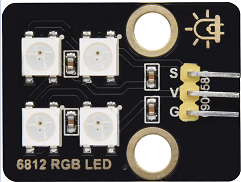
ピン
SK6812 |
26 |
|---|---|
\ |
プロジェクト 6.1 RGB Sk6812
SK6812を制御してさまざまなライティング効果を表示します。
テストコード
#Import Pin, neopiexl and time modules.
from machine import Pin
import neopixel
import time

#Define the number of pin and LEDs connected to neopixel.
pin = Pin(26, Pin.OUT)
np = neopixel.NeoPixel(pin, 4)

#brightness :0-255
brightness=100
colors=[[brightness,0,0],                    #red
        [0,brightness,0],                    #green
        [0,0,brightness],                    #blue
        [brightness,brightness,brightness],  #white
        [0,0,0]]                             #close

#Nest two for loops to make the module repeatedly display five states of red, green, blue, white and OFF.
while True:
    for i in range(0,5):
        for j in range(0,4):
            np[j]=colors[i]
            np.write()
            time.sleep_ms(50)
        time.sleep_ms(500)
    time.sleep_ms(500)
テスト結果
スマートホームの雰囲気ランプは赤、緑、青、および白を表示します。
プロジェクト 6.2 Sk6812のボタン制御
説明
雰囲気ランプの色を切り替えるためのスイッチボタンが2つあります。
テストコード
#Import Pin, neopiexl and time modules.
from machine import Pin
import neopixel
import time

button1 = Pin(16, Pin.IN, Pin.PULL_UP)
button2 = Pin(27, Pin.IN, Pin.PULL_UP)
count = 0

#Define the number of pin and LEDs connected to neopixel.
pin = Pin(26, Pin.OUT)
np = neopixel.NeoPixel(pin, 4)

#brightness :0-255
brightness=100
colors=[[0,0,0],
        [brightness,0,0],                    #red
        [0,brightness,0],                    #green
        [0,0,brightness],                    #blue
        [brightness,brightness,brightness]  #white
        ]                             #close

def func_color(val):
    for j in range(0,4):
        np[j]=colors[val]
        np.write()
        time.sleep_ms(50)

#Nest two for loops to make the module repeatedly display five states of red, green, blue, white and OFF.
while True:
    btnVal1 = button1.value()  # Reads the value of button 1
    #print("button1 =",btnVal1)  #Print it out in the shell
    if(btnVal1 == 0):
        time.sleep(0.01)
        while(btnVal1 == 0):
            btnVal1 = button1.value()
            if(btnVal1 == 1):
                count = count - 1
                print(count)
                if(count <= 0):
                    count = 0

    btnVal2 = button2.value()
    if(btnVal2 == 0):
        time.sleep(0.01)
        while(btnVal2 == 0):
            btnVal2 = button2.value()
            if(btnVal2 == 1):
                count = count + 1
                print(count)
                if(count >= 4):
                    count = 4

    if(count == 0):
        func_color(0)
    elif(count == 1):
        func_color(1)
    elif(count == 2):
        func_color(2)
    elif(count == 3):
        func_color(3)
    elif(count == 4):
        func_color(4)
テスト結果
ボタン1とボタン2を押すことで雰囲気ランプの色を切り替えられます。