プロジェクト 8: LCD1602 ディスプレイ
説明
ご存知の通り、画面は人が電子機器とやり取りするための最良の方法の一つです。
コンポーネントの知識
1602は16文字を表示できる表示モジュールです。2行あり、IIC通信プロトコルを使用します。
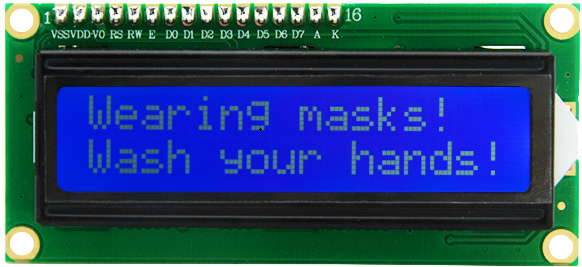
制御ピン
SDA |
SDA |
|---|---|
SCL |
SCL |
プロジェクト 8.1 LCD 1602 表示文字
説明
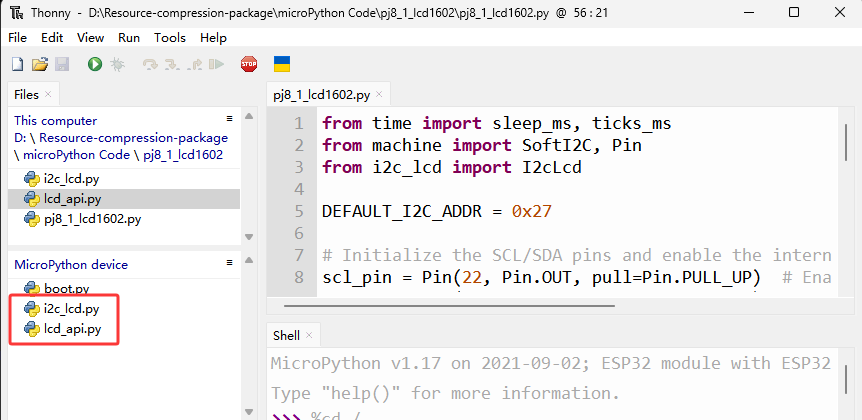
ライブラリファイル i2c_lcd.py と lcd_api.py を使用します。これらは ESP32 のメモリに保存してください。
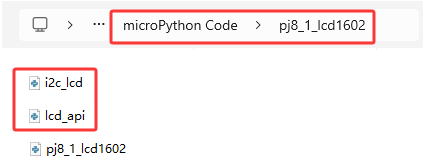
操作
Thonny を開き、"This computer"→"D:“→"2. Python Projects"→"pj8_1_lcd1602” をクリックします。“i2c_lcd.py” を選択し、右クリックして “\ Upload to /\ ” を選択し、“i2c_lcd.py” が ESP32 にアップロードされるのを待ちます。次に “lcd_api.py” を選択し、右クリックして “\ Upload to /\ ” を選択し、“lcd_api.py” が ESP32 にアップロードされるのを待ちます。
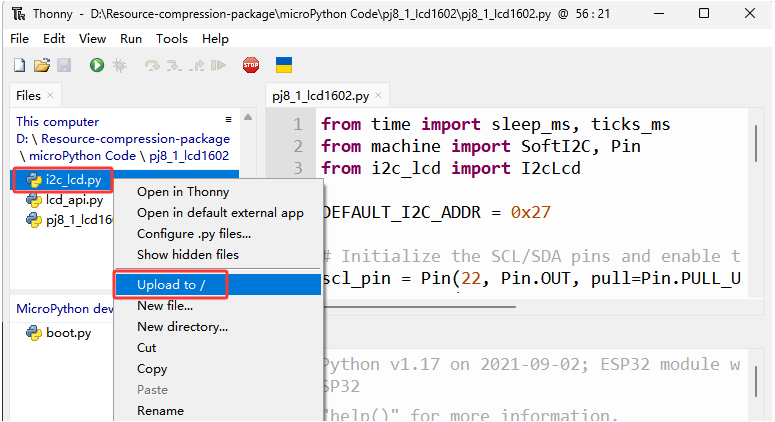
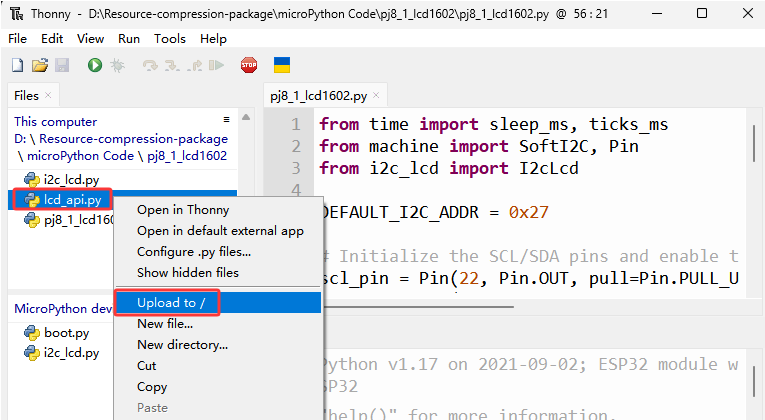
保存された名前は i2c_lcd.py と lcd_api.py です
テストコード
from time import sleep_ms, ticks_ms
from machine import I2C, Pin
from i2c_lcd import I2cLcd

DEFAULT_I2C_ADDR = 0x27

i2c = I2C(scl=Pin(22), sda=Pin(21), freq=400000)
lcd = I2cLcd(i2c, DEFAULT_I2C_ADDR, 2, 16)

lcd.move_to(1, 0)
lcd.putstr('Hello')
lcd.move_to(1, 1)
lcd.putstr('keyestudio')

# The following line of code should be tested
# using the REPL:

# 1. To print a string to the LCD:
#    lcd.putstr('Hello world')
# 2. To clear the display:
#lcd.clear()
# 3. To control the cursor position:
# lcd.move_to(2, 1)
# 4. To show the cursor:
# lcd.show_cursor()
# 5. To hide the cursor:
#lcd.hide_cursor()
# 6. To set the cursor to blink:
#lcd.blink_cursor_on()
# 7. To stop the cursor on blinking:
#lcd.blink_cursor_off()
# 8. To hide the currently displayed character:
#lcd.display_off()
# 9. To show the currently hidden character:
#lcd.display_on()
# 10. To turn off the backlight:
#lcd.backlight_off()
# 11. To turn ON the backlight:
#lcd.backlight_on()
# 12. To print a single character:
#lcd.putchar('x')
# 13. To print a custom character:
#happy_face = bytearray([0x00, 0x0A, 0x00, 0x04, 0x00, 0x11, 0x0E, 0x00])
#lcd.custom_char(0, happy_face)
#lcd.putchar(chr(0))
テスト結果
LCD1602の1行目に hello が表示され、2行目に keyestudio が表示されます。
プロジェクト 8.2 危険ガスアラーム
説明
ガスセンサーが高濃度の危険ガスを検知すると、ブザーが鳴りアラームを発し、ディスプレイに “dangerous” と表示されます。
コンポーネントの知識
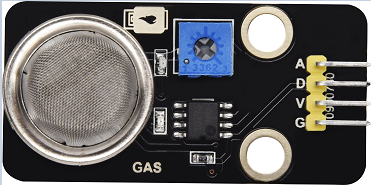
MQ2 スモークセンサー:
家庭や工場のガス漏れ監視用デバイスで、液化ガス、ベンゼン、アルキル、アルコール、水素および煙の検出に適しています。本センサーはデジタルピン D とアナログ出力ピン A を持ち、本プロジェクトではデジタルセンサーとして D に接続しています。
制御ピン
ガスセンサー |
23 |
|---|---|
\ |
テストコード
from time import sleep_ms, ticks_ms
from machine import SoftI2C, Pin
from i2c_lcd import I2cLcd

DEFAULT_I2C_ADDR = 0x27

scl_pin = Pin(22, Pin.OUT, pull=Pin.PULL_UP)  # GPIO22 with internal pull-up enabled
sda_pin = Pin(21, Pin.OUT, pull=Pin.PULL_UP)  # GPIO21 with internal pull-up enabled

i2c = SoftI2C(scl=Pin(22), sda=Pin(21), freq=100000)
lcd = I2cLcd(i2c, DEFAULT_I2C_ADDR, 2, 16)

from machine import Pin
import time
gas = Pin(23, Pin.IN, Pin.PULL_UP)

while True:
    gasVal = gas.value()  # Reads the value of button 1
    print("gas =",gasVal)  #Print it out in the shell
    lcd.move_to(1, 1)
    lcd.putstr('val: {}'.format(gasVal))
    if(gasVal == 1):
        #lcd.clear()
        lcd.move_to(1, 0)
        lcd.putstr('Safety       ')
    else:
        lcd.move_to(1, 0)
        lcd.putstr('dangerous')
    time.sleep(0.1) #delay 0.1s
テスト結果
通常時は画面に “safety” と表示されます。しかし、ガスセンサーが一酸化炭素などの危険なガスをある濃度で検出すると、ブザーが鳴り、画面には “dangerous” と表示されます。