プロジェクト11: モールス信号
モールス信号(Morse code)はモールス記号とも呼ばれ、オンとオフの信号で文字、数字、句読点などを異なる配列で表現する符号です。ここではこれをパスワードゲートとして使用します。
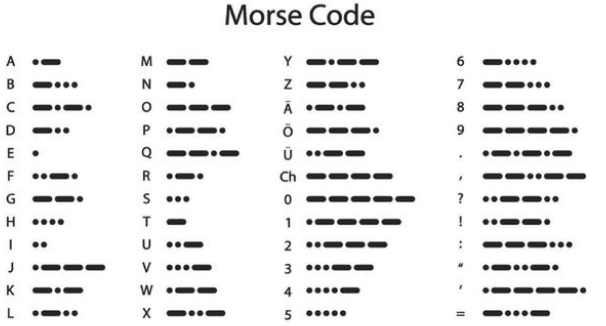
The Morse code corresponds to the following characters:
プロジェクト11.1 モールス信号でドアを開ける
説明
正しいパスワードとして 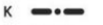 を使用します。さらに、OneButtonというボタン用ライブラリファイルがあり、クリック、ダブルクリック、長押しなどの機能を簡単に扱えます。モールスパスワードでは、クリックが「.」、長押しして離すのが「-」です。
Test Code
# Import machine, time and dht modules.
from machine import Pin, PWM
from time import sleep_ms, ticks_ms
from machine import SoftI2C, Pin
from i2c_lcd import I2cLcd

DEFAULT_I2C_ADDR = 0x27

# Initialize SCL/SDA pins and enable internal pull-up
scl_pin = Pin(22, Pin.OUT, pull=Pin.PULL_UP)  # GPIO22 with internal pull-up
sda_pin = Pin(21, Pin.OUT, pull=Pin.PULL_UP)  # GPIO21 with internal pull-up

i2c = SoftI2C(scl=Pin(22), sda=Pin(21), freq=100000)
lcd = I2cLcd(i2c, DEFAULT_I2C_ADDR, 2, 16)

button1 = Pin(16, Pin.IN, Pin.PULL_UP)
button2 = Pin(27, Pin.IN, Pin.PULL_UP)
count = 0
time_count = 0
password = ""   # Input password
correct_password = "-.-"  # Correct password
lcd.putstr("Enter password")
pwm = PWM(Pin(13))
pwm.freq(50)

while True:
    btnVal1 = button1.value()  # Reads the value of button 1
    if(btnVal1 == 0):
        sleep_ms(10)
        while(btnVal1 == 0):
            time_count = time_count + 1  # Start counting how long the button is pressed
            sleep_ms(200)                # Time accumulates in 200ms increments
            btnVal1 = button1.value()
            if(btnVal1 == 1):
                count = count + 1
                print(count)
                print(time_count)
                if(time_count > 3):      # If button pressed longer than 200*3ms, add "-" to password
                    lcd.clear()
                    #lcd.move_to(1, 1)
                    password = password + "-"
                else:
                    lcd.clear()
                    password = password + "."  # Otherwise add "."
                lcd.putstr('{}'.format(password))
                time_count = 0

    btnVal2 = button2.value()
    if(btnVal2 == 0):
        if(password == correct_password):  # If password is correct
            lcd.clear()
            lcd.putstr("open")
            pwm.duty(128)  # Open door
            password = ""  # Clear password
            sleep_ms(1000)
        else:              # If password is wrong
            lcd.clear()
            lcd.putstr("error")
            pwm.duty(25)  # Close door
            sleep_ms(2000)
            lcd.clear()
            lcd.putstr("enter again")
            password = ""  # Clear password
テスト結果
最初にLCD1602には “Enter password” と表示され、ボタン1をクリックまたは長押ししてパスワードを入力します。正しいパスワード “-.-” を入力してボタン2を押すと、ドアが開き、LCD1602には “open” と表示されます。
もし他の誤ったパスワードが入力された場合、ドアは閉じられ、LCD1602には “error” と表示され、2秒後に “enter again” と表示されます。