Projet 28 Portail Intelligent
1. Description
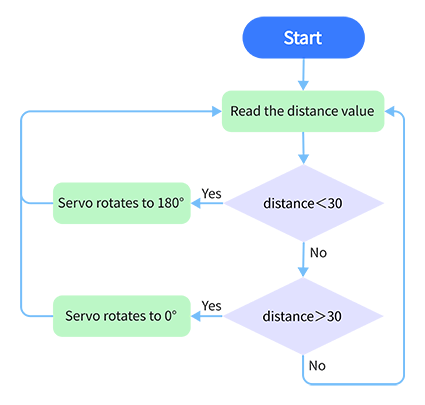
Le portail intelligent est un système de parking intelligent qui intègre un MCU et un capteur ultrasonique, contrôlant automatiquement le portail en fonction de la distance des voitures, afin de mieux gérer l’accès des véhicules.
Lorsqu’une certaine distance est atteinte, le MCU reçoit le signal du capteur et estime la distance via l’intensité du signal. Si la voiture s’approche ou s’éloigne, le MCU ouvrira ou fermera le portail via un servo.
2. Organigramme
3. Schéma de câblage
4. Code de test
/*
  keyestudio ESP32 Inventor Learning Kit
  Project 28 Intelligent Gate
  http://www.keyestudio.com
*/
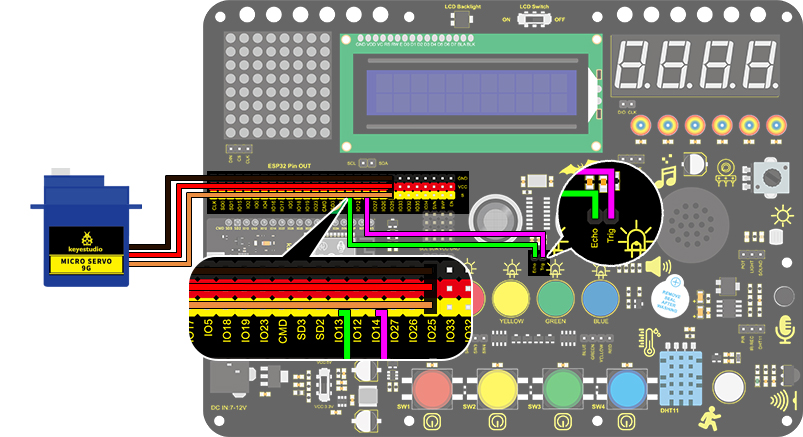
#define servo_pin  25
int distance = 0; //Define a variable to receive the distance
int EchoPin = 14; //Connect Echo pin to IO14
int TrigPin = 13; //Connect Trig pin to IO13

//Ultrasonic ranging program
float checkdistance() { //Acquire distance
  //preserve a short low level to ensure a clear high pulse:
  digitalWrite(TrigPin, LOW);
  delayMicroseconds(2);
  //Trigger the sensor by a high pulse of 10um or longer
  digitalWrite(TrigPin, HIGH);
  delayMicroseconds(10);
  digitalWrite(TrigPin, LOW);
  //Read the signal from the sensor: a high level pulse
  //Duration is detected from the point sending "ping" command to the time receiving echo signal (unit: um).
  float distance = pulseIn(EchoPin, HIGH) / 58.00;  //Convert into distance
  delay(10);
  return distance;
}

//Servo rotation program
void Set_Angle(int angle_val) //Impulse function
{
  int pulsewidth = map(angle_val, 0, 180, 500, 2500); //Map Angle to pulse width
  for (int i = 0; i < 10; i++) { //Output a few more pulses
    digitalWrite(servo_pin, HIGH);//Set the servo interface level to high
    delayMicroseconds(pulsewidth);//The number of microseconds of delayed pulse width value
    digitalWrite(servo_pin, LOW);//Lower the level of servo interface
    delay(20 - pulsewidth / 1000);  //Add the bracket
  }
}

void setup()
{
  // put your setup code here, to run once:
  pinMode(servo_pin,OUTPUT);
  pinMode(TrigPin, OUTPUT);//Set Trig pin to output
  pinMode(EchoPin, INPUT);  //Set Echo pin to input
}

void loop()
{
  // put your main code here, to run repeatedly:
 distance = checkdistance();
 Serial.println();
  if(distance < 30)
  {
    Set_Angle(180);
    delay(5000);//Wait for 5s
  }
  if(distance > 30)
  {
    Set_Angle(0);
  }
}
5. Résultat du test
Après avoir connecté le câblage et téléchargé le code, le servo tournera à 180° pendant 5 secondes si la distance détectée est inférieure à 30 cm. Dans le cas contraire, le servo tournera à 0°.