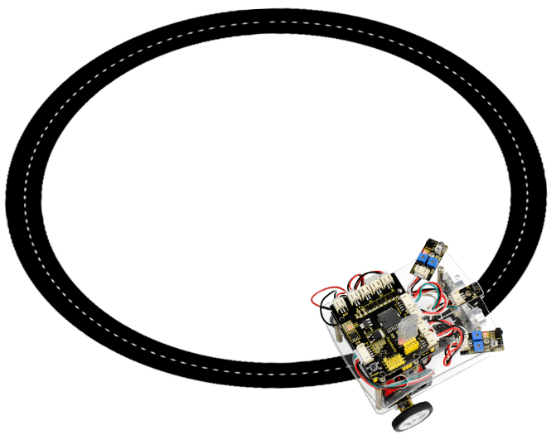
Project 5 Line Tracking Smart Car
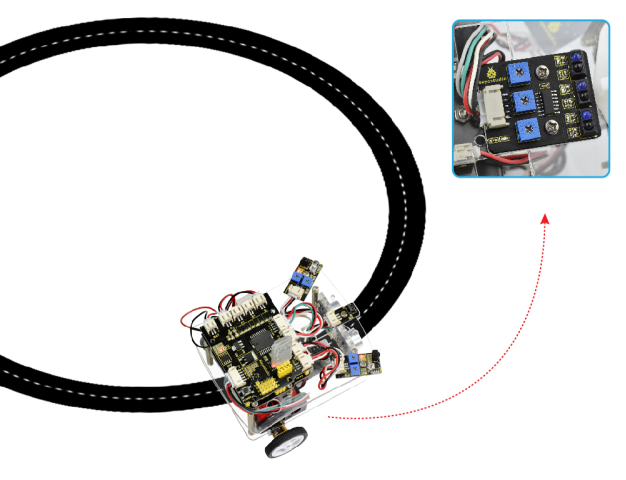
1.Project Overview
In the previous sections, you have learned the principles and applications of both tracking module and the motor drive module. After master that knowledge, let’s combine these two modules to make a smart car with line tracking function. Sound great? Well, let’s do it right now.
So first what does line tracking mean? You should figure it out. It refers to following the line trajectory. For instance, the smart car will always follow or track the black line.
The principle is using the tracking sensor to detect the black track on the pavement, and detection signal will feed back to ARDUINO main control board.
Then main control board will analyze and judge the collected signals to control and drive the motor in time, thus can adjust the turning direction of smart car. That is why the smart car can automatically follow the black track, achieving the automatic line tracking function.
This technology has been applied to many areas such as driverless vehicles, unmanned factories, warehouses, and service robots.
2.Project Principle
Using the characteristic that black has low reflectivity to light. When flat surface is not black, the infrared light transmitted by the sensor will be reflected back mostly, so the sensor outputs low level 0.When the flat surface has a black line and the sensor is above the black line, the reflected infrared light is very less due to the weak reflectivity of black, so it does not reach theaction level and sensor outputs high level 1.
Use the main control board to determine whether the output end of sensor is 0 or 1, finally detect the black line. The main control board will control the turning direction of motor according to the received signal, so finally can control the movement of smart car. This is a simple line tracking smart car.
3.Wiring Diagram
Connect the tracking sensor, two motors and battery pack to the motor drive shield as follows.
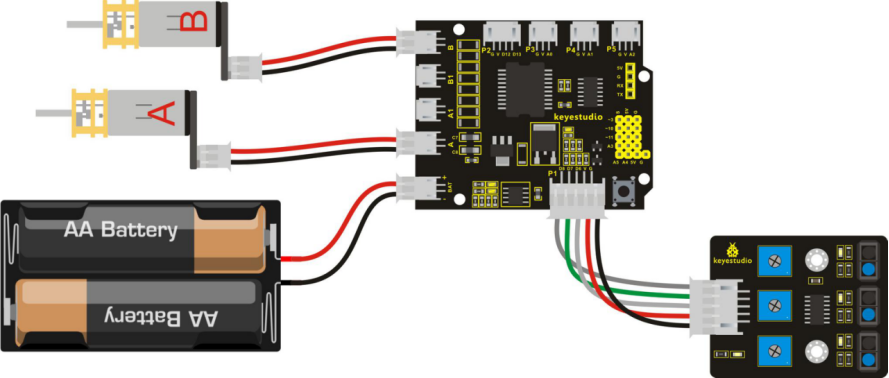
4.Example Code 7 as below
Wire it up well as the above diagram. Okay, let’s move on to write the test code. Think about the logic of code.
There are two kinds of tracking sensor’s states as follows:
The middle tracking sensor detects a black line, the car will go forward.
The middle tracking sensor does not detect a black line, if the sensor on the left side detects a white line, while the sensor on the right side detects a black line, the smart car will turn right. On the contrary, if the sensor on the right detects a white line, but the left one detects a black line, the smart car will turn left. If three sensors all detect a white line, car will stop.
Well, figure out the logic, then combine the example code of motor driving mentioned in the above section, you can have a try to write out the logic of line tracking.
int E1 = 9;   // set the speed pin of motor A as D9
int E2 = 5;   // set the speed pin of motor B as D5
int M1 = 2;   // set the directional pin of motor A as D2
int M2 = 4;   //  set the directional pin of motor B as D4
int SensorLeft = 6;   // input pin of tracking sensor on left side
int SensorMiddle= 7 ; //  input pin of tracking sensor on middle
int SensorRight = 8;  //  input pin of tracking sensor on right side
int SL;     // define the state of left side sensor
int SM;    // define the state of left side sensor
int SR;    // define the state of left side sensor
void setup(void)
{
  pinMode(M1,OUTPUT);   // set M1 as OUTPUT mode
  pinMode(M2,OUTPUT);   // set M2 as OUTPUT mode
  pinMode(E1,OUTPUT);   // set E1 as OUTPUT mode
  pinMode(E2,OUTPUT);   // set E2 as OUTPUT mode
  pinMode(SensorLeft, INPUT);    // define the left side sensor as INPUT
  pinMode(SensorMiddle, INPUT);  // define the left side sensor as INPUT
  pinMode(SensorRight, INPUT);    // define the left side sensor as INPUT
}

void advance(void)        // set the forward motion
{
  digitalWrite(M1,HIGH);  // motor A turns forward, wheel will go forward
  digitalWrite(M2,HIGH);  // motor B turns forward, wheel will go forward
  analogWrite(E1,250);    // speed of motor A(can be adjusted according to the actual speed of motor. Turn up the value to accelerate, lower the value to decelerate.)
  analogWrite(E2,250);    // speed of motor B(can be adjusted according to the actual speed of motor. Turn up the value to accelerate, lower the value to decelerate.)
}

void back(void)        // set the backward motion
{
 digitalWrite(M1,LOW);   // motor A turns reverse, wheel will go backward
 digitalWrite(M2, LOW);   // motor B turns reverse, wheel will go backward
 analogWrite(E1,250);     // rotating speed of motor A
 analogWrite(E2,250);    // rotating speed of motor B
}
void turnL(void)     // set the left turn motion
{
   digitalWrite(M1,LOW);    //motor A turns reverse, wheel will go backward
   digitalWrite(M2, HIGH);  // motor B turns forward, wheel will go forward, the whole car turn left.
   analogWrite(E1,250);  // rotating speed of motor A
   analogWrite(E2,250);  //  rotating speed of motor B
}

void turnR(void)            // set the right turn motion
{
   digitalWrite(M1,HIGH);   // motor A turns forward, wheel will go forward.
   digitalWrite(M2,LOW);    // motor B turns reverse, wheel will go backward, the whole car turn right.
   analogWrite(E1,250);     // rotating speed of motor A
   analogWrite(E2,250);    //  rotating speed of motor B
}

void stopp(void)   // set the stop motion
{
   digitalWrite(M1,LOW);  //  motor A turns reverse
   digitalWrite(M2, LOW);  //  motor B turns reverse
   analogWrite(E1, 0);      //  speed of motor A, speed as zero, means stop.
   analogWrite(E2, 0);      //  speed of motor B, speed as zero, means stop.
}

void loop()
{
   SL = digitalRead(SensorLeft);     //  left state value read is the digital input of left side sensor
   SM = digitalRead(SensorMiddle);  //  middle state value read is the digital input of middle sensor
   SR = digitalRead(SensorRight);    // right state value read is the digital input of right side sensor
   if(SM == HIGH)  // if middle tracking sensor detects a black line
   {
      if(SL == HIGH && SR == LOW)
        turnL();  //  if left side sensor detects a white line, but right side sensor detects a black line, the car turn right.
      else if(SR == HIGH && SL == LOW)
         turnR();  //  if right side sensor detects a white line, but left side sensor detects a black line, the car turn left.
      else advance(); // if not the above two states, means that both side sensor detect a white line or a black line, the car goes forward.
   }
   else  // if the middle sensor detects white, but not detect the black line.
   {
       if(SL == HIGH && SR == LOW)
       		turnL();       // left side sensor detects a black line, but right side sensor detects a white line, the car turn left.
       else if(SR == HIGH && SL == LOW)
       		turnR();     // left side sensor detects a white line, but right side sensor detects a black line, the car turn right.
      else stopp();  // if all white, means that the three sensors do not detect the black line, car will stop.
   }
}
5.Example Picture
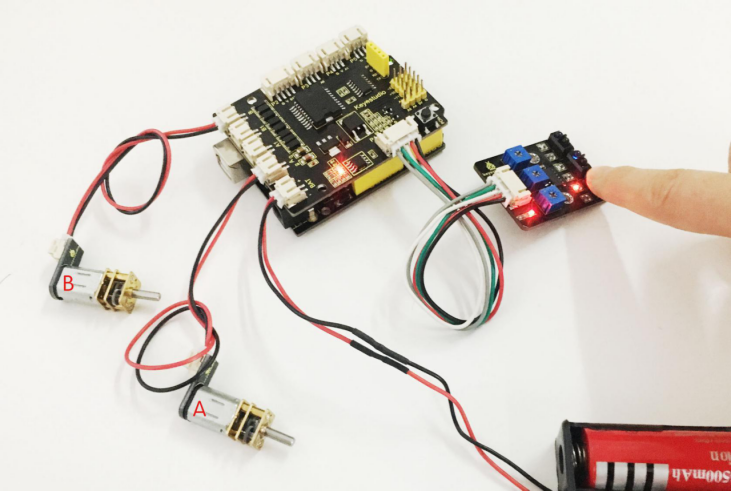
Upload well the above code to the main board, then press down the POWER button on the motor drive shield. If draw a black line on the ground, you should see that the smart car will track the black line.