Project 19 8*8 LED Matrix
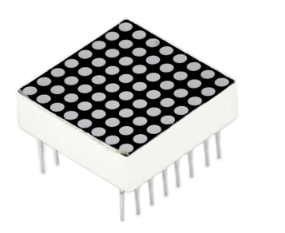
1. Introduction With low-voltage scanning, LED dot-matrix displays have some advantages such as power saving, long service life, low cost, high brightness, wide angle of view, long visual range, waterproof, and numerous specifications.
LED dot-matrix displays can meet the needs of different applications and thus have a broad development prospect.
This time, we will conduct an LED dot-matrix experiment to experience its charm firsthand.
2. Hardware Required
1 * REV4 board
1 * 8x8 dot-matrix
8 * Resistor (220Ω)
1 * Breadboard
1 * USB cable
16 * Jumper wires
3. Connection
The external view of a dot-matrix is shown as follows:
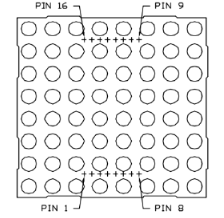
4. The display principle of the 8*8 dot-matrix The 8*8 dot-matrix is made up of sixty-four LEDs, and each LED is placed at the cross point of a row and a column. When the electrical level of a certain row is 1 and the electrical level of a certain column is 0, the corresponding LED will light up.
If you want to light up the LED on the first dot, you should set pin 9 to high level and pin 13 to low level. If you want to light LEDs on the first row, you should set pin 9 to high level and pins 13, 3, 4, 10, 6, 11, 15 and 16 to low level. If you want to light the LEDs on the first column, set pin 13 to low level and pins 9, 14, 8, 12, 1, 7, 2 and 5 to high level.
The internal view of a dot-matrix is shown as follows:
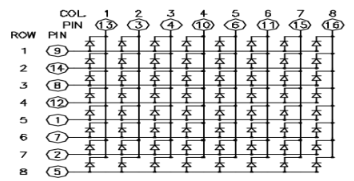
The principle of 74HC595 has been previously illustrated. One chip is used to control the rows of the dot-matrix while the other chip is used to control the columns.
5. Connection for REV4
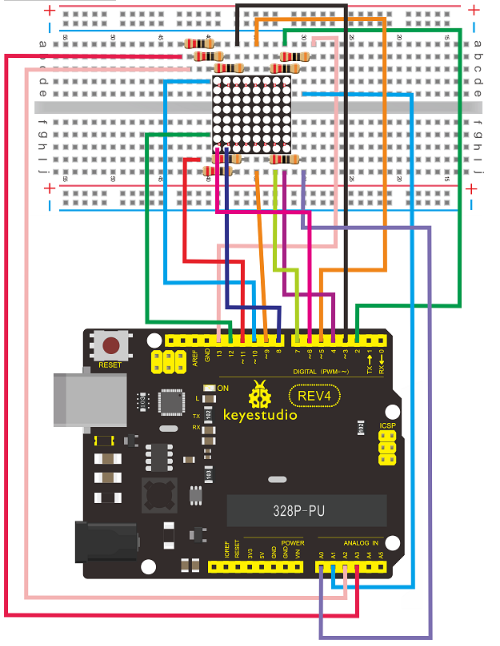
6. Connection for 2560 R3
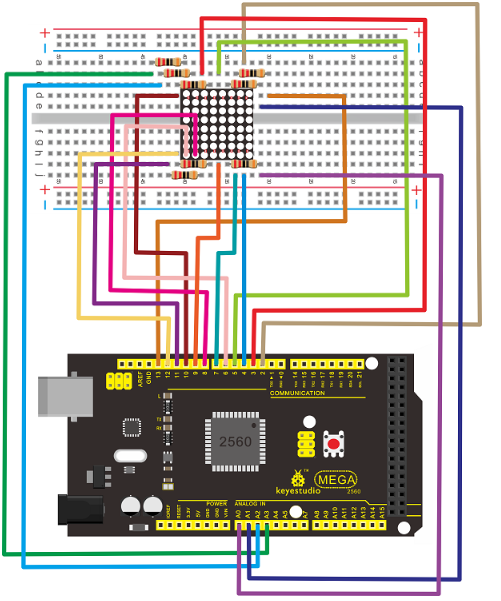
7. Sample Code for Displaying “0”
// set an array to store character of “0”
unsigned char Text[]={0x00,0x1c,0x22,0x22,0x22,0x22,0x22,0x1c};
void Draw_point(unsigned char x,unsigned char y)// point drawing function
{ clear_();
   digitalWrite(x+2, HIGH);
   digitalWrite(y+10, LOW);
   delay(1);
}

void show_num(void)// display function, call point drawing function
{
  unsigned char i,j,data;
  for(i=0;i<8;i++)
  {
    data=Text[i];
    for(j=0;j<8;j++)
    {
      if(data & 0x01)Draw_point(j,i);
      data>>=1;

    }
  }
}

void setup()
{
    int i = 0 ;
    for(i=2;i<18;i++)
     {
       pinMode(i, OUTPUT);
      }
      clear_();
}

void loop()
{
	show_num();
}

void clear_(void)// clear screen
{
    for(int i=2;i<10;i++)
      digitalWrite(i, LOW);
    for(int i=0;i<8;i++)
      digitalWrite(i+10, HIGH);
}
8. Result Burn the program into REV4 board, the dot-matrix will display 0.
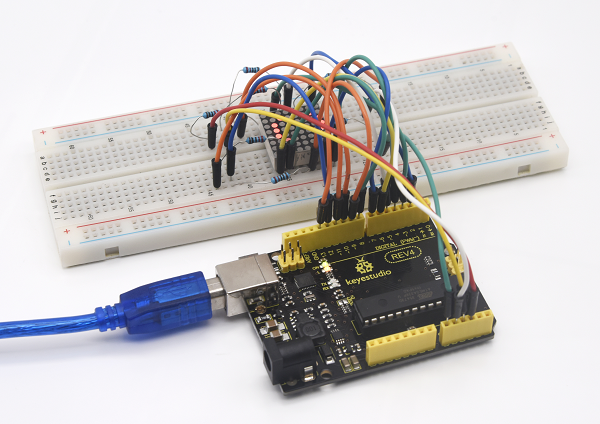
Note: if it’s not displaying correctly, check the wiring.