Project 10 XGO Follows Light
Ⅰ. Teaching Aims
Read the value
light level(0-100) of the Fox:bit on-board photoresistor.Use
map()to linearly map light intensity to step size or speed.Suppress bright and dark jitter through “double thresholds + return difference”.
Be capable of independently completing two types of self-developed scripts:
Bright → Stand up / Dark → sit down
Light following mode: the brighter the light is, the faster it will walk.
Ⅱ. Pre-class Check
XGO + Foxbit + MicroBlocks IDE.
XGO battery power ≥ 60 %. Place the robot on a 1m × 1m flat ground and avoid direct strong light or flickering.
MicroBlocks status bar shows a green dot, XGO-lite extension is loaded and the development board model is Foxbit.
Run
XGO reset poseand confirm that the zero position and step size are normal.
Ⅲ. Key Blocks Analysis
|
|
|---|---|
Functions |
Return the ambient light intensity from 0 to 100 |
Fallible points |
Must be placed in |
|
|
Functions |
Linear mapping |
Fallible points |
|
|
|
Functions |
Determine the light intensity and switch actions |
Fallible points |
Missing “return difference” → shaking |
|
|
Functions |
Set the forward step size to n mm |
Fallible points |
Step size > 90 mm → Prone to falling |




Comparison table of photosensitivity and step size:
Environment |
|
Recommended step size |
|---|---|---|
Dark room |
0 – 10 |
0(stop) |
Ordinary classroom |
20 – 40 |
30 – 50 |
Beside the desk lamp |
60 – 80 |
60 – 80 |
Direct flashlight |
100+ |
80 – 90(upper limit) |
Ⅳ. Practice
Test 1: Read Real-time Light Intensity (for debugging)
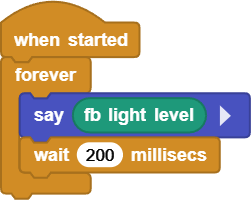
Online code: Click here
Test 2: Stand Up When Bright, Sit Down When Dark
High threshold hiCut = 100, low threshold loCut = 60, return difference 40 lx
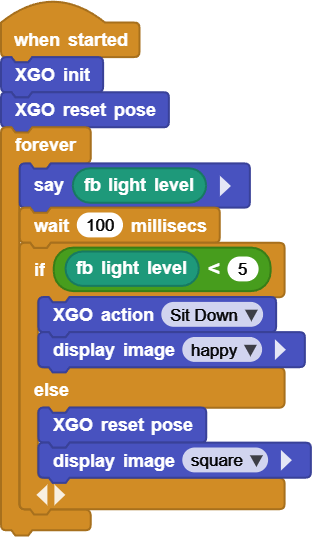
Online code: Click here
Test 3: Light Following Dog: Brighter Light for Faster Speed
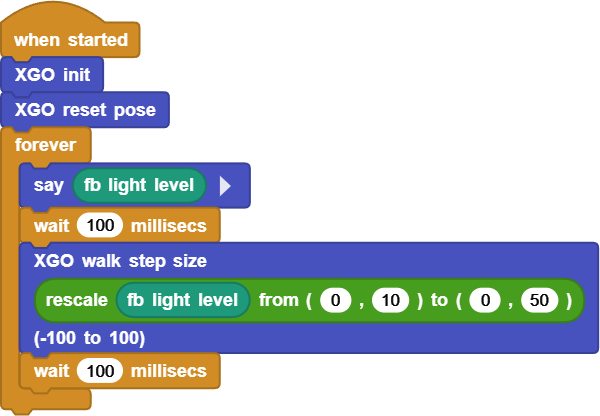
Online code: Click here
Ⅴ. Quiz
Why does Test 2 require “double thresholds” instead of just one?
What would happen if the
wait 100 msin Test 3 were changed to20 ms?Besides photoresistor, what other sensors can you use to “drive” the step size? Please give two examples and explain their mapping range.
Ⅵ. FAQ
Questions |
Possible causes |
Solutions |
|---|---|---|
Frequent switch between standing up |
The interval between |
Return difference ≥ 30 lx |
The step size changes randomly |
Ambient light flickering |
|
Fall while walking |
Step size > 90 mm |
Set the upper limit of |
The reading is always either 0 or 100 |
The sensor is blocked |
Clean the photoresistor holes; |
Response delay |
|
Shorten to 80–120 ms |