Project 8 XGO Emoji Show
Ⅰ. Teaching Aims
Invoke the built-in LED dot matrix emoji of Foxbit and control the switching rhythm.
Use the buzzer
play noteto play a single sound and add sound effects to the emojis.Without using loop statements, present the “emoji + sound” in sequence.
Ⅱ. Pre-class Check
XGO + Foxbit + MicroBlocks IDE.
XGO battery power ≥ 60 %. The robot is placed on a stable table.
MicroBlocks status bar shows a green dot, XGO-lite extension is loaded and the development board model is Foxbit.
First, run
play note "C4" 300to confirm that the buzzer sounds normally.
Ⅲ. Key Blocks Analysis
|
|
|---|---|
Functions |
5 × 7 dot matrix display preset expressions |
Common misuses |
Spell it as |
|
|
Functions |
The buzzer plays a single tone |
Common misuses |
note is blank or the duration is 0 → silent |
|
|
Functions |
Maintain the current emoji or note |
Common misuses |
|
|
|
Functions |
Tuzrn off the LED dot matrix |
Common misuses |
Omit this → The LED remains on constantly |




Ⅳ. Test 1: Emoji
Drag
when started → XGO initto initialize.Copy the following script to MicroBlocks (without any loop statements):
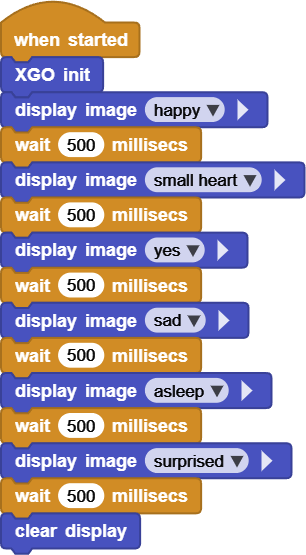
After running, the 6 emojis are displayed in sequence, each frame for 500 ms, and clear display at the end.
Online code: Click here
Ⅴ. Test 2: Emoji + Sound
Based on Test 1, add a note to each frame of emoji:
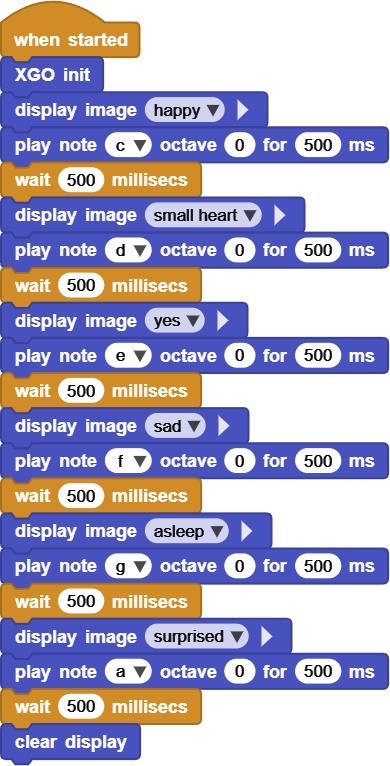
Every time an emoji is changed, the corresponding note is played immediately to form a “music-emoji show”.
Online code: Click here
Ⅵ. Quiz
Why does
display imagehave to be redone at each step in the action instead of just writing it once?If you want the entire show to repeat three times, would using
repeatbe more concise than copying the code?What other “accessory” can be added to it, such as the long sound of the buzzer, the rotation of the body, the flashing of the LED, etc.?
Ⅶ. FAQ
Questions |
Possible causes |
Solutions |
|---|---|---|
No sound |
note is misspelled or duration is 0 |
Use capital note names |
Emoji does not change |
|
Write one valid instruction for each frame |
Emoji displays too fast |
|
It is recommended that the single frame be ≥ 200 ms |
LED is always on |
Omit `clear display |
Add |
The buzzer is distorted |
note frequency is too fast |
Select notes within C4 to C6 |